14
Basic Installation
Antenna Connection (Home Installation)
AV Connection
To ensure good picture and sound, a TV antenna system needs to be connected. The
antenna system as shown can be sourced from TV equipment stores, which will provide
service for the correct installation and connection. After installation, insert the 75-OHM
antenna plug into the antenna jack (RF) as shown.
Connect the VIDEO and AUDIO output jack of the DVD or VCR to the AV IN jacks in the
set using an AV Cable (Yellow [video], White and Red [left & right audio]). Select the AV
input source using the SOURCE button on the remote control.
AV C ab le
TV
15
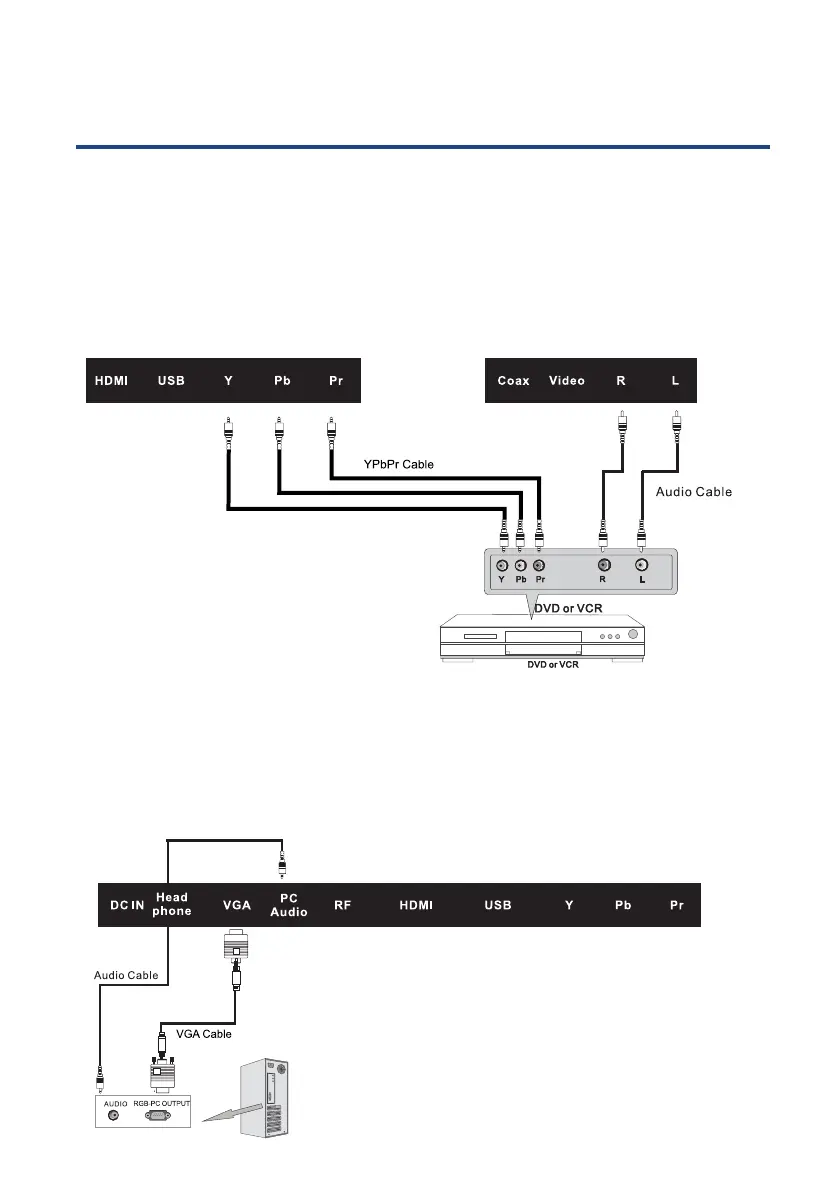
Component (YPbPr) Connection
VGA (PC) Connection
Connect the YPbPr output of the DVD or VCR to the YPbPr input on the set. The picture
quality is improved compared to connecting a regular VCR to the AV input. Connect the
Audio output of the DVD or VCR to the Audio input jacks on the set using the RCA cable.
Match the jack colours: Y is green, Pb is blue, Pr is red, Audio left is white and Audio right
is red, Select Component input source using the SOURCE button on the remote control.
Connect the VGA output of the PC to the VGA jack on the set. Connect the AUDIO
output of the PC to the PC AUDIO jack on the set. Select the PC input source using the
SOURCE button on the remote control.



 To Next Page