8
Connections and functions
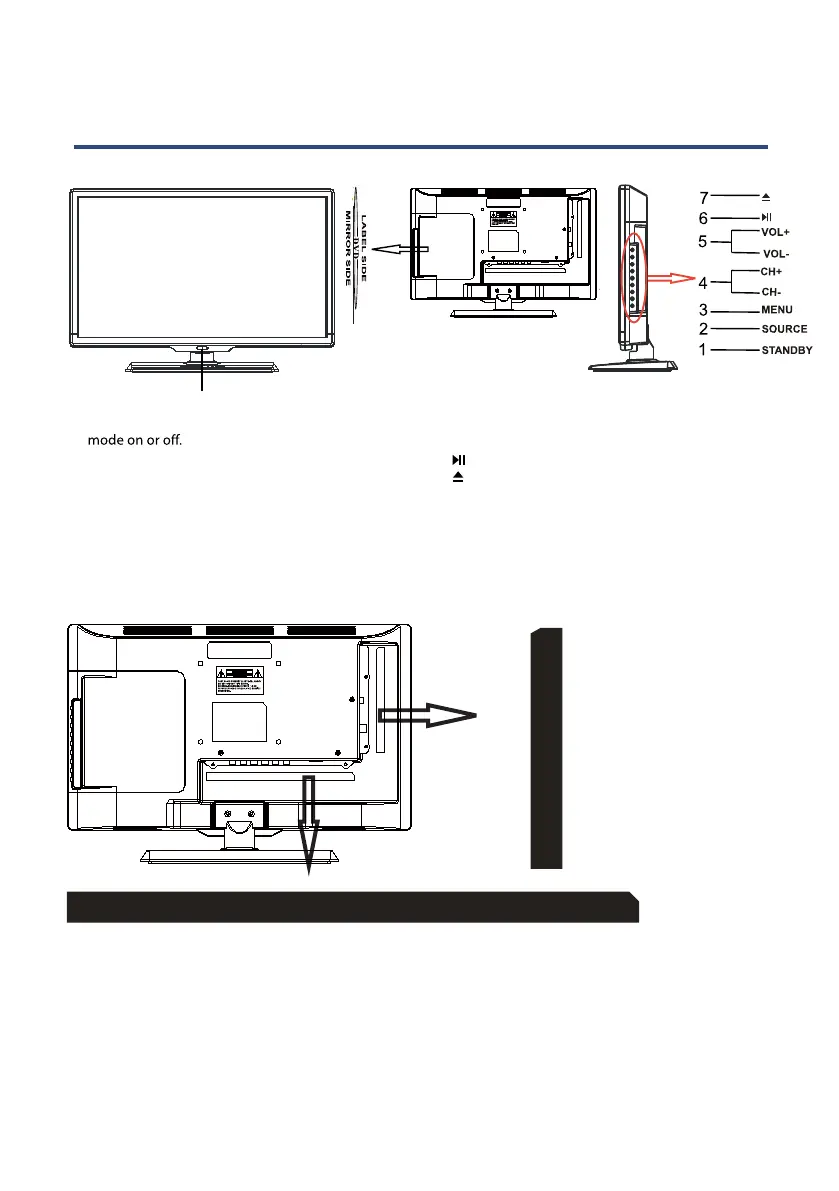
Front View
Back View & Control Connection
1. Press“STANDBY” button to turn standby
2. Press“SOURCE” to select the input source.
3. Press“MENU” to bring up the main menu
on the screen.
4. Press“CH+” or “CH-”to scan through channels.
5. Press‘‘ VOL+” or “VOL-”to increase or decrease
the volume.
8. POWER INDICATOR: Shows red in standby mode,
shows blue when your TV is switched on.
8
6. Press “ ” button to play/pause the program in DVD mode.
7. Press “ ” button to eject the program in DVD mode.
1. DC IN: power input
2. HEADPHONE: Connect the earphone
3. VGA: Connect the PC-RGB output jack of PC
4. PC AUDIO: Connect the Audio output jack of PC
5. RF: Connect the antenna
6. HDMI: Connect the HDMI output jack of DVD
9. Coax: Connect the SPDIF receiver
10. Video: Connect the VIDEO output jack of DVD
7. USB: Connect to portable USB device
8. YPbPr(Component) output jack of DVD
DC
Head
Phone
VGA
PC
Audio
RF HDMI USB Y
Pb
Pr
COAX
Video
RL
11. R/L: Connect the R/L audio output jack of DVD



 To Next Page