12
Remote Control
: Press to eject the disk
NUMBER BUTTONS: Press 0-9 to select a teletext page.
DISPLAY: Press to display the DVD information of DVD.
D. SETUP: Used for selecting programs. It may also be
used to execute commands.
/ / / /OK: Allows you to move, select and setup
the OSD options.
GOTO: Press to access the GOTO menu.
A-B: This button enables you to repeat a selected section
from the disc.
REPEAT: Press REPEAT to cycle through the repeat play
options.
SUBTITLE: Display subtitles.
TITLE: When DVD is playing, brings up the Title Menu.
ZOOM: In play state, press ZOOM, the player will zoom in
the picture once.
D.MENU: DVD disc menu. Access to menu
AUDIO: AUDIO selection buttons in DVD mode.
TIMESHIFT: Press to select timeshift function.
: PLAY/PAUSE in DVD mode.
: DVD Stop
/ : Fast backward and forward key
/ : Jump to previous and the next track/chapter.
DVD MODE
AUDIO
SUBTITLE
HOLD
SIZE
TEXT
REC
INDEX
SUBPAGE
TIMESHIFT
RAVEAL
MIX
EPG
TV/RADIO
DISPLAY
FAV
STANDBY
MUTE
PROGRAM
10
10+
GOTO
A-B
ANGLE
REPEAT
ZOOM
ASPECT
D.SETUP
D.MENU
TITLE EJECT
13
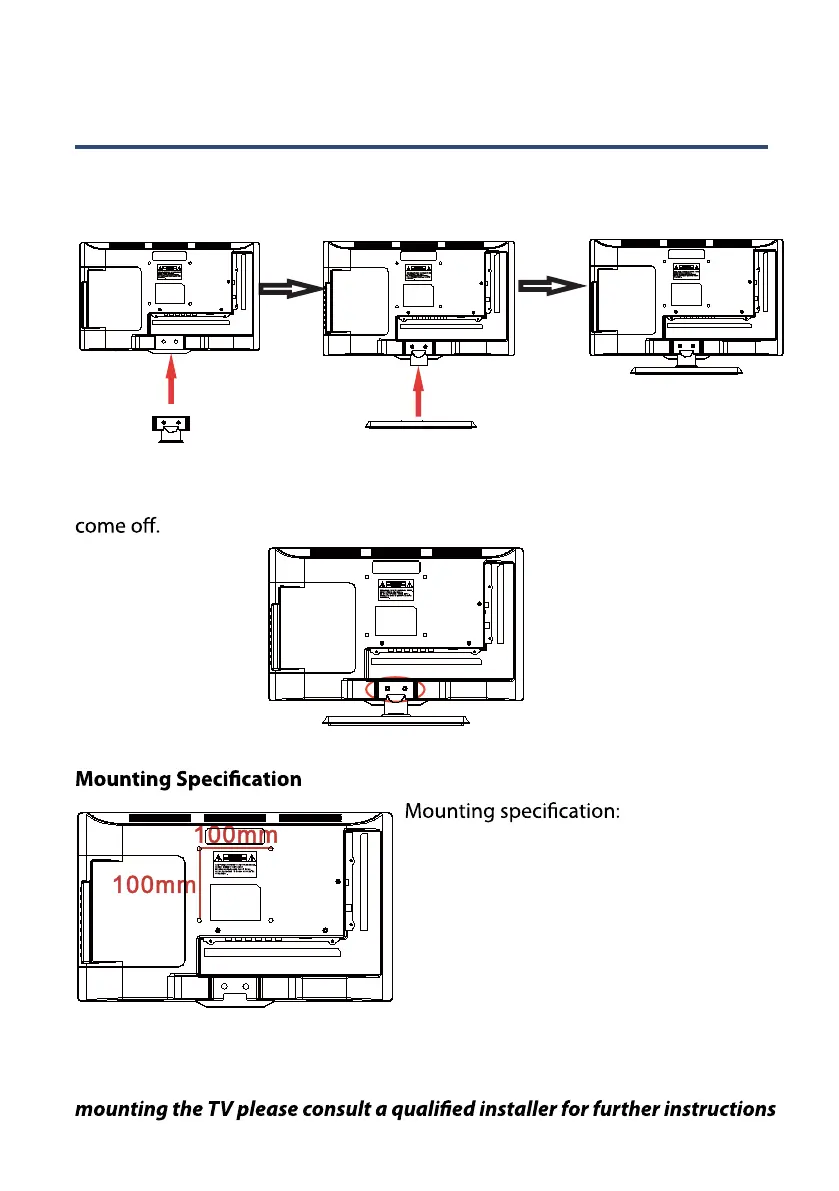
Wall Mounting Instructions(AX-1519)
Attach the stand
Remove the stand (For Mobile Installation)
To remove the stand, remove the screws in the circled area and the neck will
100mm x 100mm using screw size M4
(not supplied), length of screw should
not exceed 8 mm.
Please note: the 8 mm length of s c r ew
refers to how deep the screw can go
inside the mounting holes. When you
are buying screws, you should add the
original 8 mm to the thickness of your
mounting plate in order to get the total
screw length.
The screws in the package are for securing the TV stand only. If you are
on bracket support and wall support.
To attach the stand lay the TV down on a non-abrasive surface, then place the
TV stand on the neck of TV and insert the screws in the circled area.



 To Next Page