36
PVR Setting
Press / button to select PVR S
Or press the INDEX button on the remove control to enter the PVR Setting menu directly.
ETTING, then press OK button to enter submenu. It will
check the USB.
First Time Setup
Press / button to select First Time Setup, then press OK button to enter. (Default
Password is 0000).
Reset
Press / button to select Reset, then press OK button to enter.
Select “Yes” if you are sure to reset.
PVR and Timeshift Operation
DTV+ATV
37
USB Device Setup
Before use the Recording and Timeshift functions, you should insert an USB device and
format it, in the USB Host port at the connection panel of the TV set.
IMPORTANT: The setup will format the USB device, therefore all the data stored in the device
will be lost. We strongly recommend to save the content of your USB device to your PC
before starting c
ration.
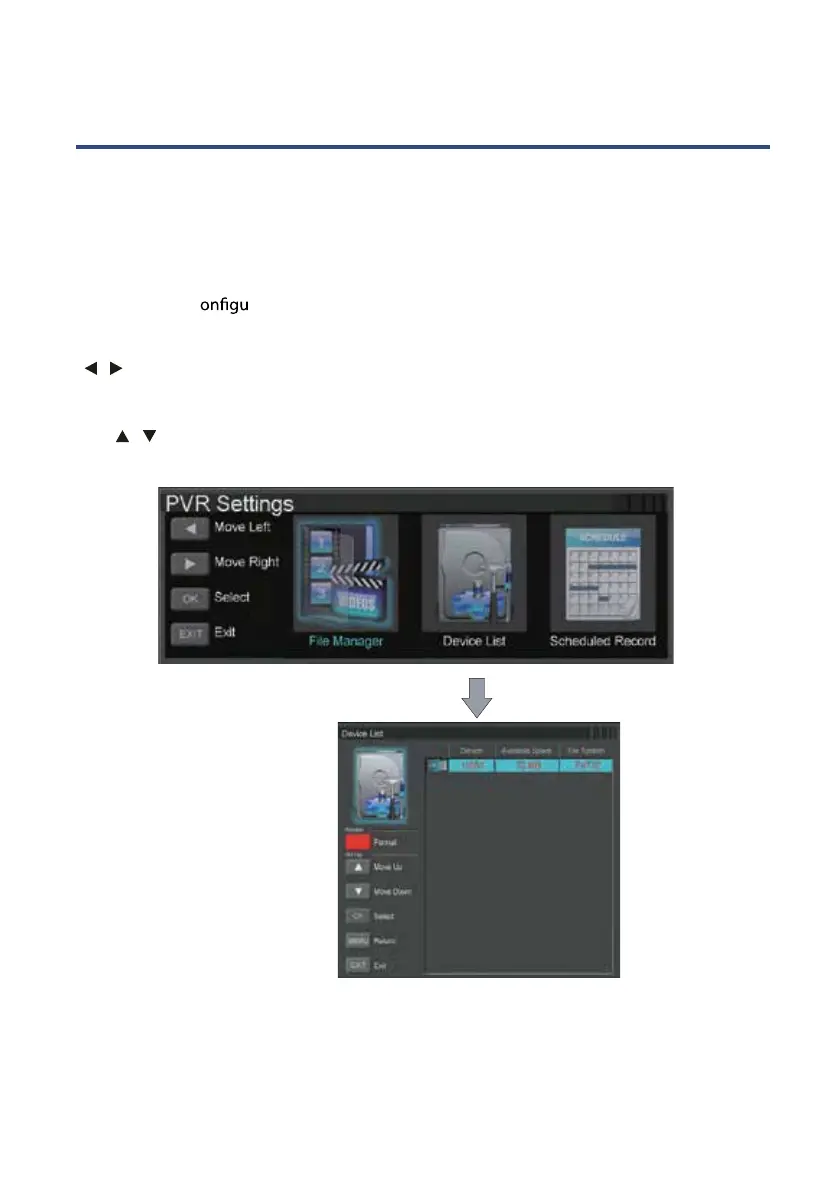
Press MENU button to access the PVR SETTINGS menu under the SETUP submenu. Use the
/ buttons and then press OK button to select and access the DEVICE LIST interface.
Follow the next steps to format the USB device:
Use
/ button to select the disk partition that you wish to use for Recording and
Timeshift functions, and then press the RED button to start formatting the selected partition.
Wait until the process ends and then press the EXIT button to exit the settings menu. The USB
device will be ready to start using the Recording and Timeshift functions.



 To Next Page