EasyManua.ls Logo

Axis W10 Series - User Manual

Axis W10 Series
15 pages
Print Icon
To Next Page IconTo Next Page
Loading...
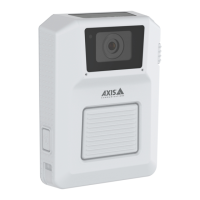
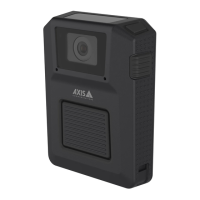
AXISW10xBodyWornCameras
AXISW100BodyWornCamera
AXISW101BodyWornCamera
Usermanual

Questions and Answers

  • C
    chelsea54Sep 1, 2025
    Why Axis Security Camera is not discovered by the system?
    • K
      Kurt TaylorSep 1, 2025
      If your Axis Security Camera is not discovered by the system and doesn’t appear in AXIS Body Worn Manager, it may be because the docking station is connected to the system controller through a router. To fix this, enable IPv6 on the network.
  • J
    James JenkinsSep 2, 2025
    Why is there no audio in my Axis Security Camera recordings?
    • C
      Cindy AlvarezSep 2, 2025
      If there's no audio in your Axis Security Camera recordings, the audio might be turned off in the camera profile. To fix this, ensure that audio is turned on in the camera profile within AXIS Body Worn Manager.
  • C
    Cody JordanSep 3, 2025
    Why does the image on my Axis W10 look foggy?
    • T
      Tina RoseSep 3, 2025
      If your Axis Security Camera image looks foggy, it might be because the lens is dirty. In this case, clean the lens. Alternatively, the protective film might still be on the lens window, so remove it.
  • L
    lynnsalazarSep 4, 2025
    What to do if my Axis Security Camera doesn't record?
    • L
      Laura BurkeSep 4, 2025
      If your Axis Security Camera is not recording, the camera storage might be full (indicated by a red storage status). To resolve this, dock the camera.
  • C
    christina61Sep 4, 2025
    Why don't my Axis W10 Security Camera recordings appear in content destination?
    • E
      erodriguezSep 5, 2025
      If your Axis Security Camera recordings don't appear in the content destination, the content destination might be unavailable. To check this, review the content destination status on the Dashboard in AXIS Body Worn Manager.
  • J
    james39Sep 5, 2025
    Why are my Axis W10 Security Camera recordings being deleted?
    • J
      John StewartSep 5, 2025
      If your Axis Security Camera recordings are being deleted, the retention time of the content destination might be too short. To resolve this, change the retention time on the content destination to a higher value.
  • T
    Tammy LunaSep 6, 2025
    Why is there no location data in the text overlay of my Axis Security Camera?
    • B
      Brandon KerrSep 6, 2025
      If there is no location data in the text overlay of your Axis Security Camera, location data might be turned off. Turn Location data on in the camera profile to resolve this.

Axis W10 Series Specifications

General IconGeneral
Frame RateUp to 30 fps
Lens TypeFixed
Night VisionYes
Weather ResistanceYes
ConnectivityWi-Fi
WirelessYes
Network ProtocolsHTTP, HTTPS, RTSP, RTP, TCP, UDP, DHCP, DNS

Related product manuals