EasyManua.ls Logo

Axis W100 - User Manual

Axis W100
68 pages
Print Icon
To Next Page IconTo Next Page
Loading...
10/19/21, 7:42 PM
AXIS W100 Body Worn Camera User manual
https://help.axis.com/axis-w100-body-worn-camera
1/68
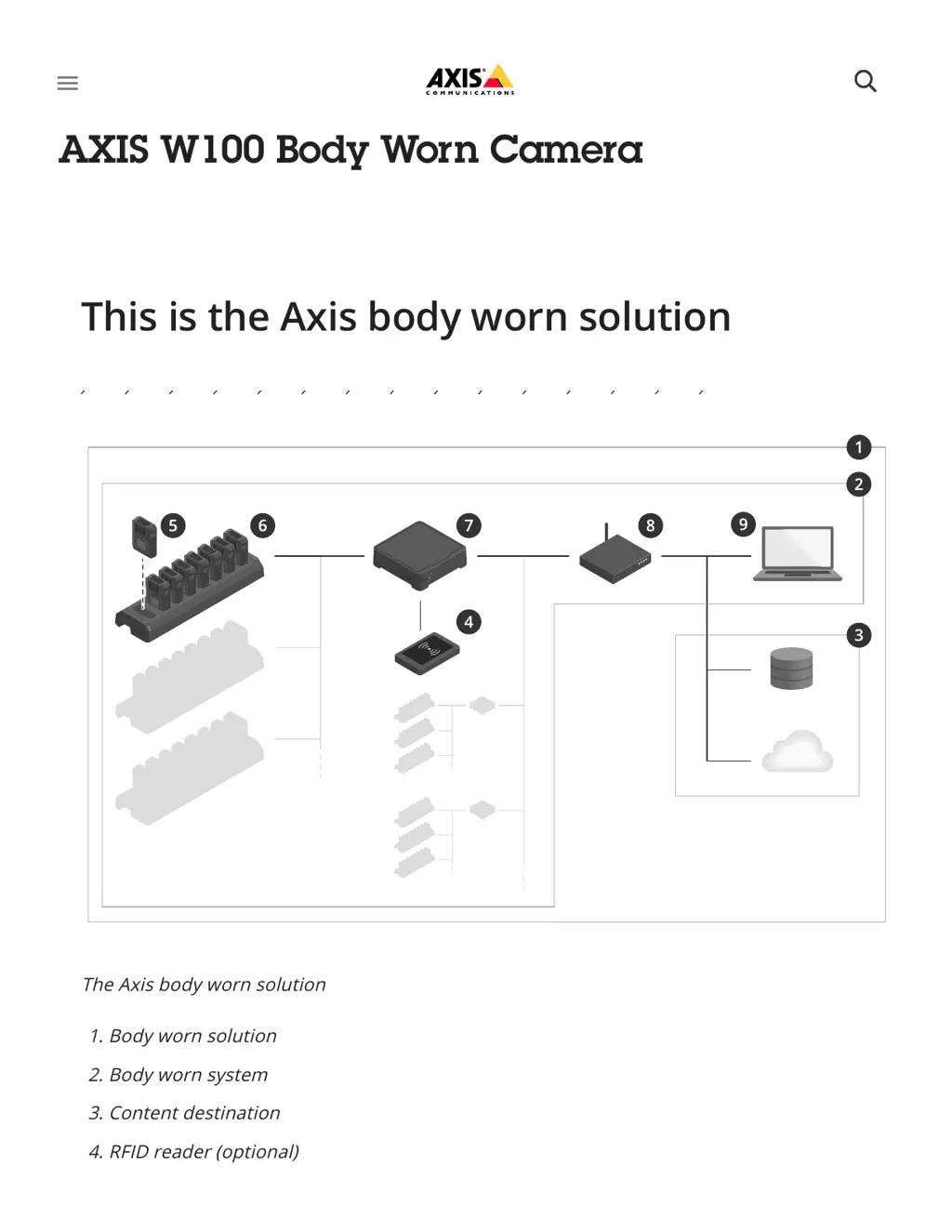
The Axis body worn solution
1. Body worn solution
2. Body worn system
3. Content destination
4. RFID reader (optional)
5 Body worn camera
This is the Axis body worn solution
AXIS W100 Body Worn Camera
󰍜

Other manuals for Axis W100

Questions and Answers

  • G
    George TylerSep 12, 2025
    Why is no Axis W100 Security Camera assigned when tapping the RFID tag?
    • M
      Michael ThomasSep 12, 2025
      If no camera is assigned to the user when the user taps the RFID tag on the reader (using self-assign), wait until a camera is ready for use. A camera is ready for use when it has enough storage and battery, and it has the same firmware version as the rest of the system.
  • S
    Samantha WalkerAug 25, 2025
    How to fix no audio in Axis Digital Camera recordings?
    • M
      Martha JordanAug 25, 2025
      If there is no audio in your Axis Digital Camera recordings, make sure audio is turned on in the camera profile within AXIS Body Worn Manager.
  • L
    laurenwardAug 25, 2025
    What to do if my Axis Digital Camera doesn't record?
    • L
      Laura AlvaradoAug 26, 2025
      Your Axis Digital Camera might not be recording because the camera storage is full (storage status is red). Try docking the camera to resolve this issue. Other possible causes are: pre-buffer video is not complete because pre-buffer time is shorter than configured in AXIS Body Worn Manager; recording started directly after the previous recording was ended; when using the maximum resolution 1080p in very complex scenes with a lot of movement, or in low light, the pre-buffer memory can get full.
  • D
    David MillerSep 23, 2025
    What to do if Axis Security Camera doesn't record?
    • J
      jeremy04Sep 23, 2025
      If your Axis Security Camera isn't recording, the most likely cause is that the camera storage is full. In this case, dock the camera.
  • H
    Holly WilliamsSep 13, 2025
    What to do if Axis Action Cameras operation status flashes green and battery is red?
    • M
      Michael LandrySep 13, 2025
      This behavior occurs when the camera profile setting Low battery warning is set to Periodic or Periodic reinforced. Charge the Axis Action Camera. If the camera is in the docking station, make sure it’s docked properly because the battery is about to run out.
  • J
    Jennifer CarrollSep 22, 2025
    Why are all LEDs off when Axis Action Cameras are docked?
    • M
      mmarksSep 22, 2025
      If you are using fixed camera assignment, no user is assigned to the camera, so assign a user to the camera. If you are using self-assign camera assignment, this means that the camera is ready to be self-assigned.
  • C
    Catherine CobbSep 6, 2025
    Why is there no location data in the text overlay of my Axis Security Camera?
    • A
      aparkerSep 6, 2025
      If there is no location data in the text overlay of your Axis Security Camera, location data might be turned off. Turn Location data on in the camera profile to resolve this.
  • J
    Jessica VasquezSep 7, 2025
    Why doesn't the LED display work on my Axis Security Camera?
    • J
      James PenaSep 7, 2025
      If the LED display on your Axis Security Camera isn't working, the camera might be in silent mode, which turns off the display. To resolve this, press the top button for 2 seconds.
  • J
    jwebbSep 23, 2025
    Why Axis Security Camera doesn't turn on?
    • P
      Patrick CollinsSep 23, 2025
      There are several reasons why your Axis Security Camera might not be turning on. It could be in shipping mode, in which case you should add the camera to the body worn system. Another possibility is that the camera battery is completely discharged; try charging the camera. If charging doesn’t resolve the issue, press and hold the power button for 4 seconds, then dock the camera until it’s charged. If you don’t have a docking station, press and hold the power button for 4 seconds and charge the camera using a USB charger.
  • B
    Benjamin MeyersAug 30, 2025
    Why are my Axis W100 Security Camera recordings offloading slowly?
    • K
      Katrina AllenAug 31, 2025
      If your Axis Security Camera recordings are slow to offload, it might be due to multiple simultaneous offloads affecting the transfer speed. To resolve this, check the camera status in AXIS Body Worn Manager and wait for the recordings to be transferred.

Axis W100 Specifications

General IconGeneral
BrandAxis
ModelW100
CategorySecurity Camera
LanguageEnglish

Related product manuals