EasyManua.ls Logo

Axis W100 - User Manual

Axis W100
68 pages
Print Icon
To Next Page IconTo Next Page
Loading...
10/19/21, 7:42 PM
AXIS W100 Body Worn Camera User manual
https://help.axis.com/axis-w100-body-worn-camera
1/68
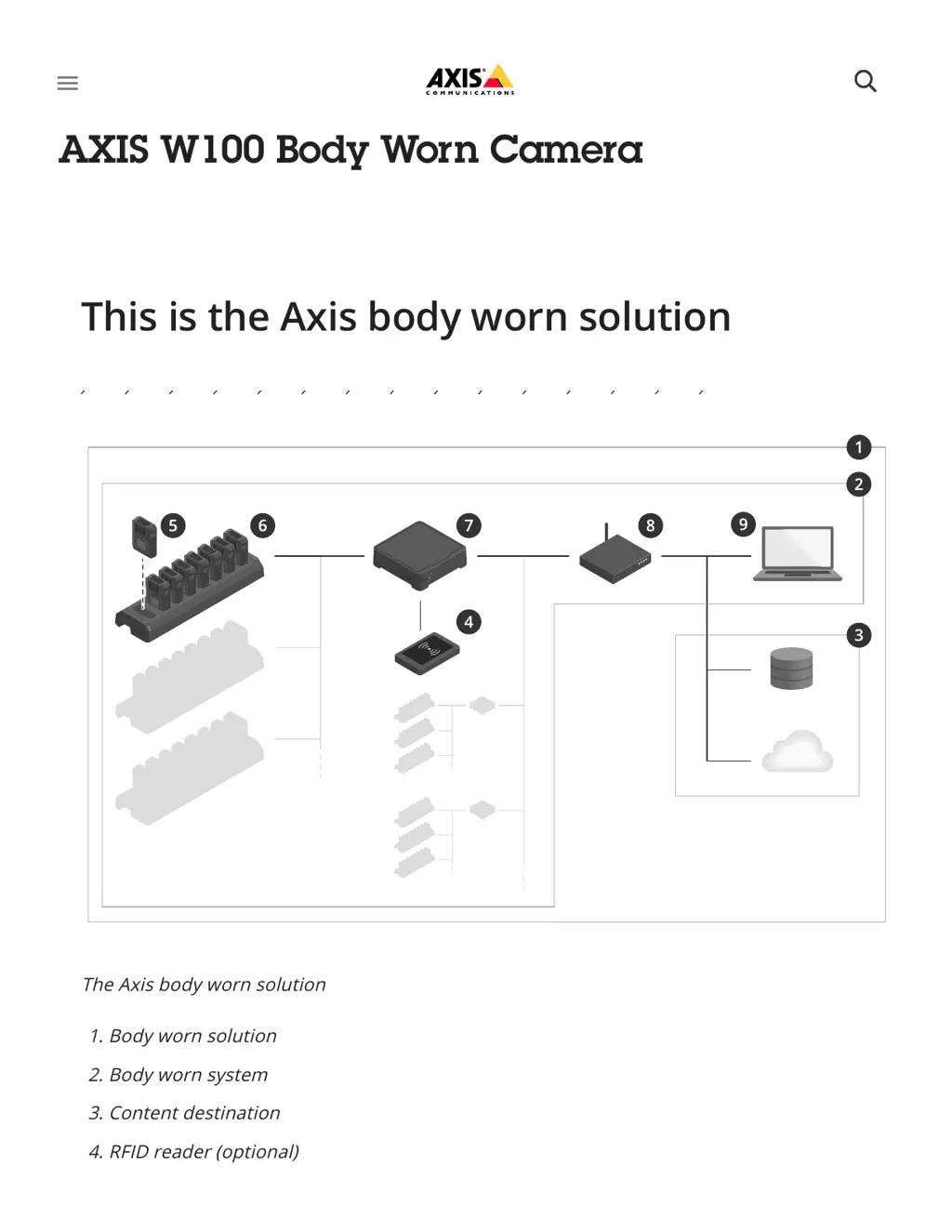
The Axis body worn solution
1. Body worn solution
2. Body worn system
3. Content destination
4. RFID reader (optional)
5 Body worn camera
This is the Axis body worn solution
AXIS W100 Body Worn Camera
󰍜

Other manuals for Axis W100

Questions and Answers

  • A
    Amanda Flynn DDSSep 1, 2025
    Why Axis Security Camera is not discovered by the system?
    • J
      Justin LewisSep 1, 2025
      If your Axis Security Camera is not discovered by the system and doesn’t appear in AXIS Body Worn Manager, it may be because the docking station is connected to the system controller through a router. To fix this, enable IPv6 on the network.
  • M
    Matthew DavisSep 2, 2025
    Why is there no audio in my Axis Security Camera recordings?
    • T
      tholtSep 2, 2025
      If there's no audio in your Axis Security Camera recordings, the audio might be turned off in the camera profile. To fix this, ensure that audio is turned on in the camera profile within AXIS Body Worn Manager.
  • E
    Elizabeth NicholsSep 3, 2025
    Why does the image on my Axis W100 Security Camera look foggy?
    • M
      Michael SchultzSep 3, 2025
      If your Axis Security Camera image looks foggy, it might be because the lens is dirty. In this case, clean the lens. Alternatively, the protective film might still be on the lens window, so remove it.
  • D
    Derek MorseSep 4, 2025
    What to do if my Axis W100 Security Camera doesn't record?
    • G
      George WilliamsSep 4, 2025
      If your Axis Security Camera is not recording, the camera storage might be full (indicated by a red storage status). To resolve this, dock the camera.
  • H
    hollowaytiffanySep 4, 2025
    Why don't my Axis W100 recordings appear in content destination?
    • C
      Cory HendersonSep 5, 2025
      If your Axis Security Camera recordings don't appear in the content destination, the content destination might be unavailable. To check this, review the content destination status on the Dashboard in AXIS Body Worn Manager.
  • N
    Nicole BarnettSep 5, 2025
    Why are my Axis Security Camera recordings being deleted?
    • F
      Fernando HowellSep 5, 2025
      If your Axis Security Camera recordings are being deleted, the retention time of the content destination might be too short. To resolve this, change the retention time on the content destination to a higher value.
  • C
    Catherine CobbSep 6, 2025
    Why is there no location data in the text overlay of my Axis Security Camera?
    • A
      aparkerSep 6, 2025
      If there is no location data in the text overlay of your Axis Security Camera, location data might be turned off. Turn Location data on in the camera profile to resolve this.

Axis W100 Specifications

General IconGeneral
BrandAxis
ModelW100
CategorySecurity Camera
LanguageEnglish

Related product manuals