5 Design and Construction
© b2 electronic GmbH DHV0017 b2 EN 19
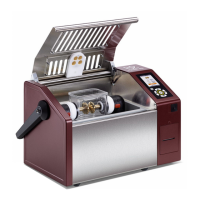
Liquid dielectric test cell including an electrode pair
with adjustable spacing.
Isolated housing with integrated electromagnetic
screening and built-in oil pan.
Hinged with safety interlocks
Ultra-Bright colour display to show menu options and
status information.
Facilitates instrument portability.
Connection point from the BA to ground cable.
(Applicable for testing with an external power source)
12 V DC power supply plug
(Only applicable for models with
integrated battery)
Connection point from the BA to an external DC
power source.
Connection point from the BA to an external AC
power source.
Printer
(Only applicable for models with
integrated printer)
Provides hardcopy record during BA test.
Report format and content depends on the test
standard selected and its corresponding required
parameters.
Connection point from the BA to a USB memory stick
• Pressing the Up / Down arrows allows the user
to select menu items.
• Pressing the Left / Right arrows allows the user
to change the function values and instrument
settings.
• Clicking “OK” in the centre of the navigation wheel
enters the menu selection or value entered.
• To turn on the instrument, press the button for
approx. 1 second.
• To turn off the instrument, press and hold the
button until display gets dark.


 To Next Page