7 Test Procedure
© b2 electronic GmbH DHV0017 b2 EN 33
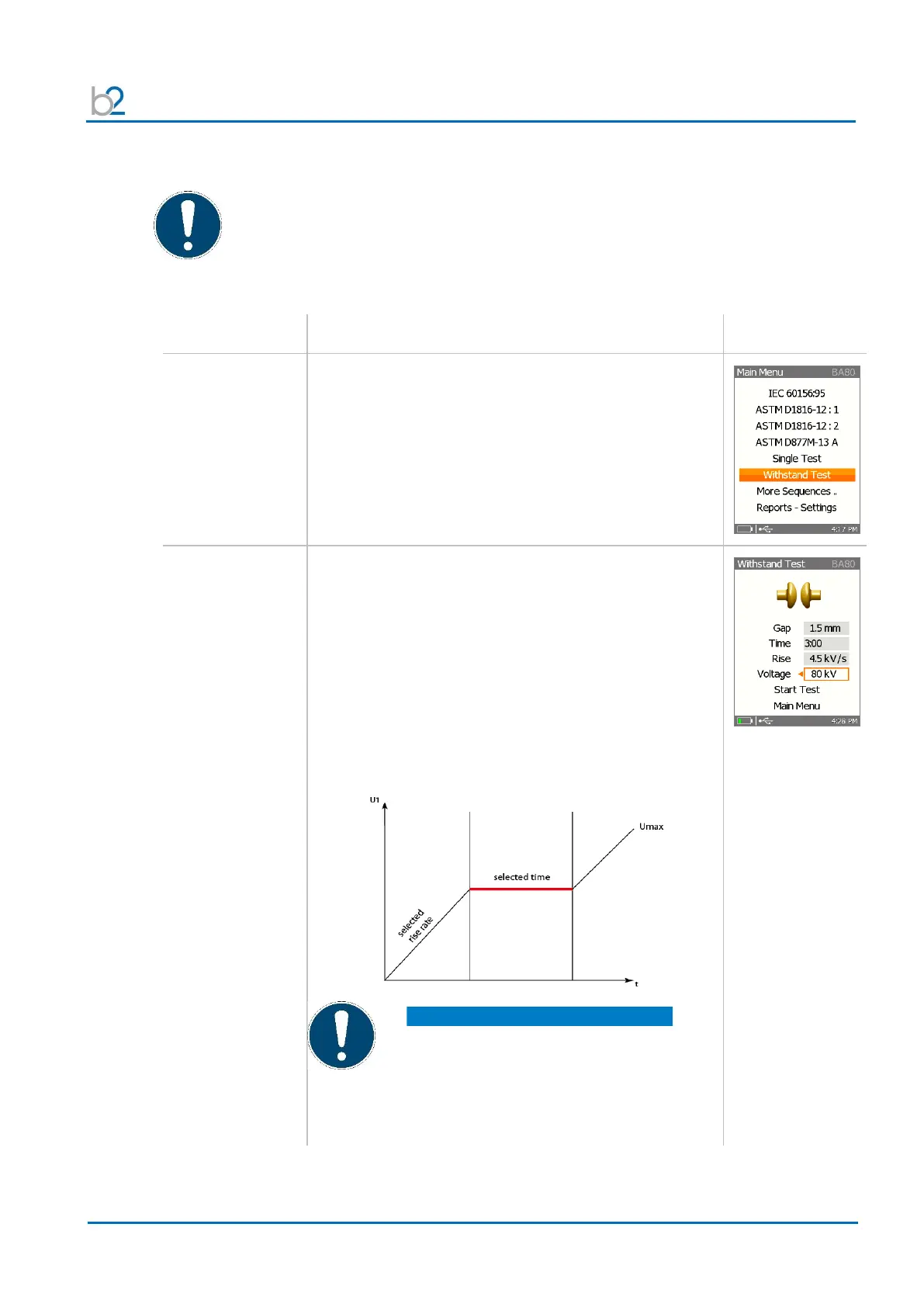
7.8 Withstand Test Execution
Procedure (Withstand Test)
Use the Up / Down arrows to place the cursor on
“Single Test”.
Click “OK”.
To set the different options, use “Up / Down” arrows to
place the cursor:
• Electrode Gap: between 0.5 - 10 mm
• Time: 10 seconds – 3 minutes
• Rise Rate: 0.5 – 10 kV/s
• max. Voltage: depends on the max. Voltage of
the BA unit
To toggle the value use Left / Right arrows.
To start test, set the cursor on option “Start Test”
NOTICE
At the end of selected time of withstand test,
instrument will rise up to maximum voltage!
Alternative settings – please check
operation manual of software
“BA ControlCenter”
Before executing an user defined test, the test vessel must be correctly
installed in the test chamber.
The electrode gap spacing and the voltage rate of rise are not assessed
automatically by the BA instrument. It is the BA operator’s responsibility to
verify that these variables are properly adjusted.


 To Next Page