5 Design and Construction
20 DHV0017 b2 EN © b2 electronic GmbH
5.2 Instrument Set-up
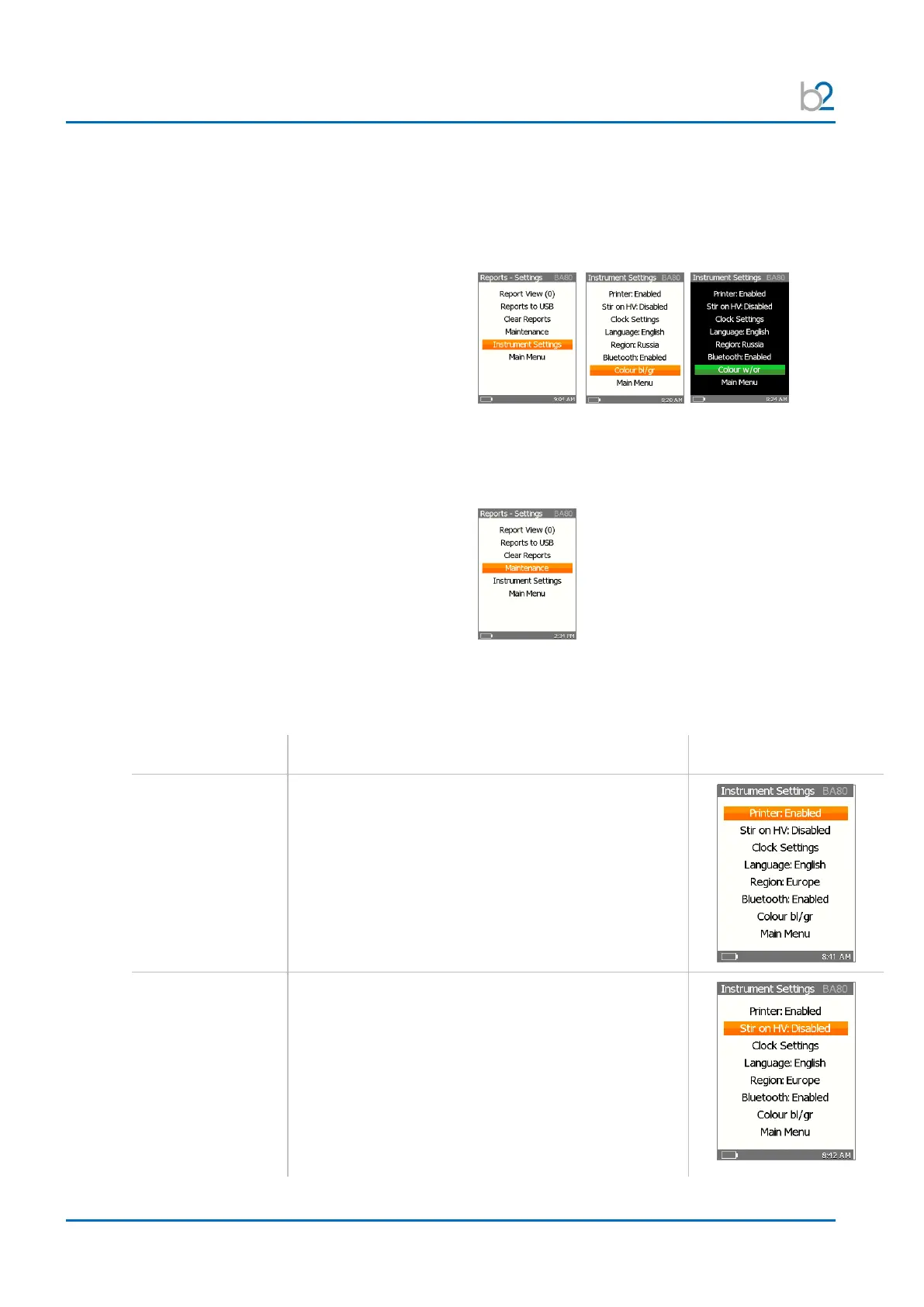
Prior to first utilization, the BA instrument settings should be established. These
settings can be modified at anytime thereafter. Under “Reports – Settings” in the
“Instrument Settings” menu the following functions can be adjusted:
• Printer en-/disabled
• Stirrer en-/disabled
• Clock Settings
• Language
• Region
• Bluetooth
• Colour
Change between weak and high contrast
Under “Report Settings” in the “Maintenance” Menu you can handle the
following points:
• Paper Feed
• Printer Test
• Voltage Check
• Clean Electrodes
• System Info
Use the Up / Down arrows of the navigation arrows to select one of the
menu functions. To return to the main menu use the Up / Down arrows to place
the cursor on the “Main Menu” option and click “OK”.
To enable or disable the printer, with the cursor on
the “Printer” option.
Use “OK” to toggle one of the following options:
• Enabled
• Disabled
To activate or deactivate the liquid stirring function,
with the cursor on the “Stir on HV” option.
Use “OK” to toggle one of the following options:
• Enabled
• Disabled
Depending on the standard selected, this
option selects whether the stirrer is on/off
during High-Voltage.


 To Next Page