Page 20 of 28 BACTcontrol – Software Manual – V0.1.15 microLAN b.v.
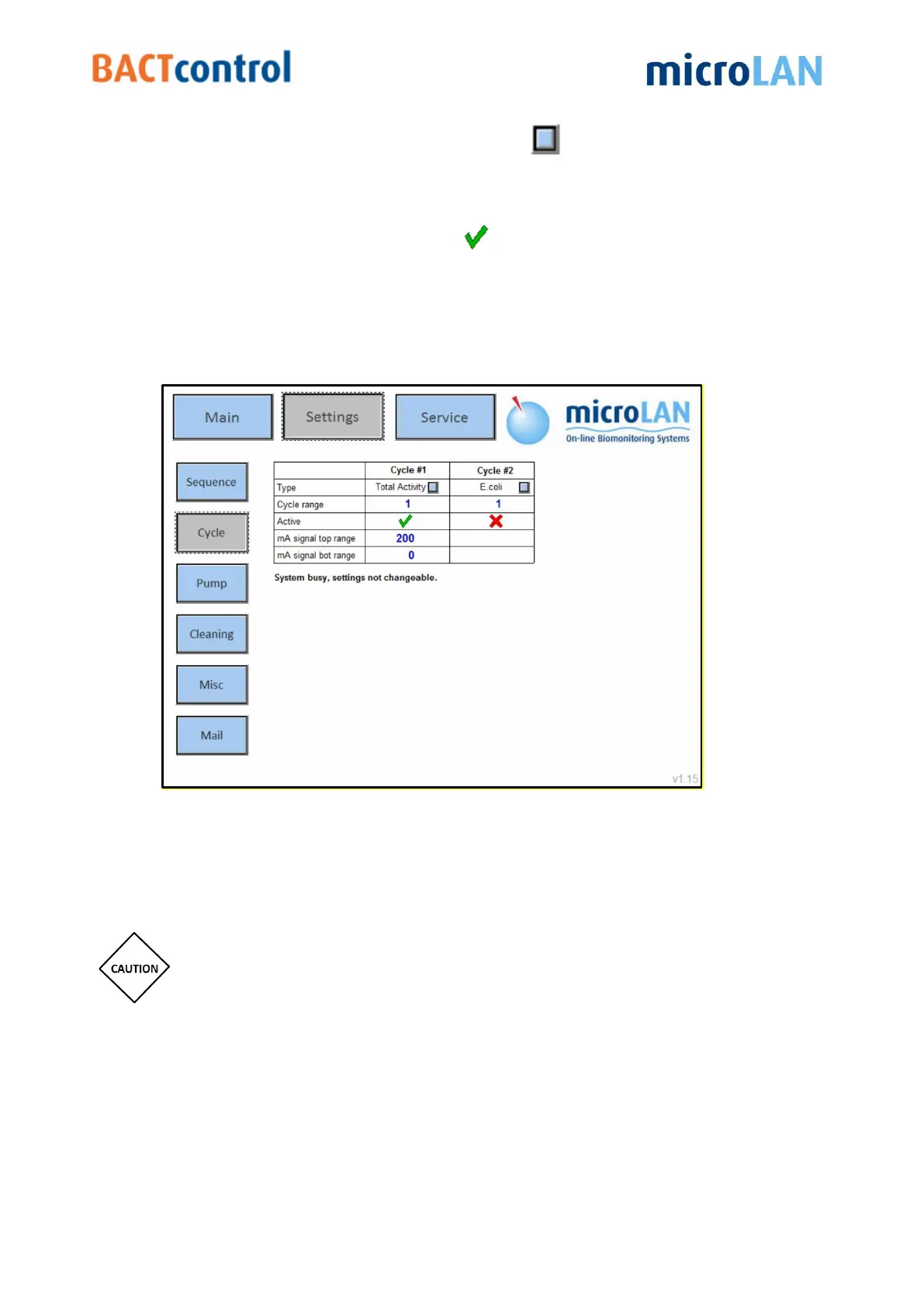
TYPE: By clicking a blue selection button
a measurement type can be
assigned to a Cycle.
Blank Frequency: Shows the number of measurements relative to a Blank
measurement.
Active: Selecting a check mark
will activate the Cycle
mA Signal Top Range: Indicates the maximum value for analogue output
(20 mA)
mA Signal Bot Range: Indicates the minimum value for analogue output
(4 mA)
Figure 15 Cycle screen
8.3 PUMP
In the Pump submenu the pump settings can be changed.
Always contact microLAN for required settings, incorrect settings may
damage the filter or the reaction chamber!
Normal Pumping Speed: This is the maximum speed for the pump. The pump
speed is variable, depending on pressure.
Deaeration Pumping Speed: This is the pump setting for deaerating the
reactor.
Filtration Starting Speed: Setting for the pump speed by a new filtration start.


 To Next Page