microLAN b.v. BACTcontrol – Software Manual – V1.15 Page 21 of 28
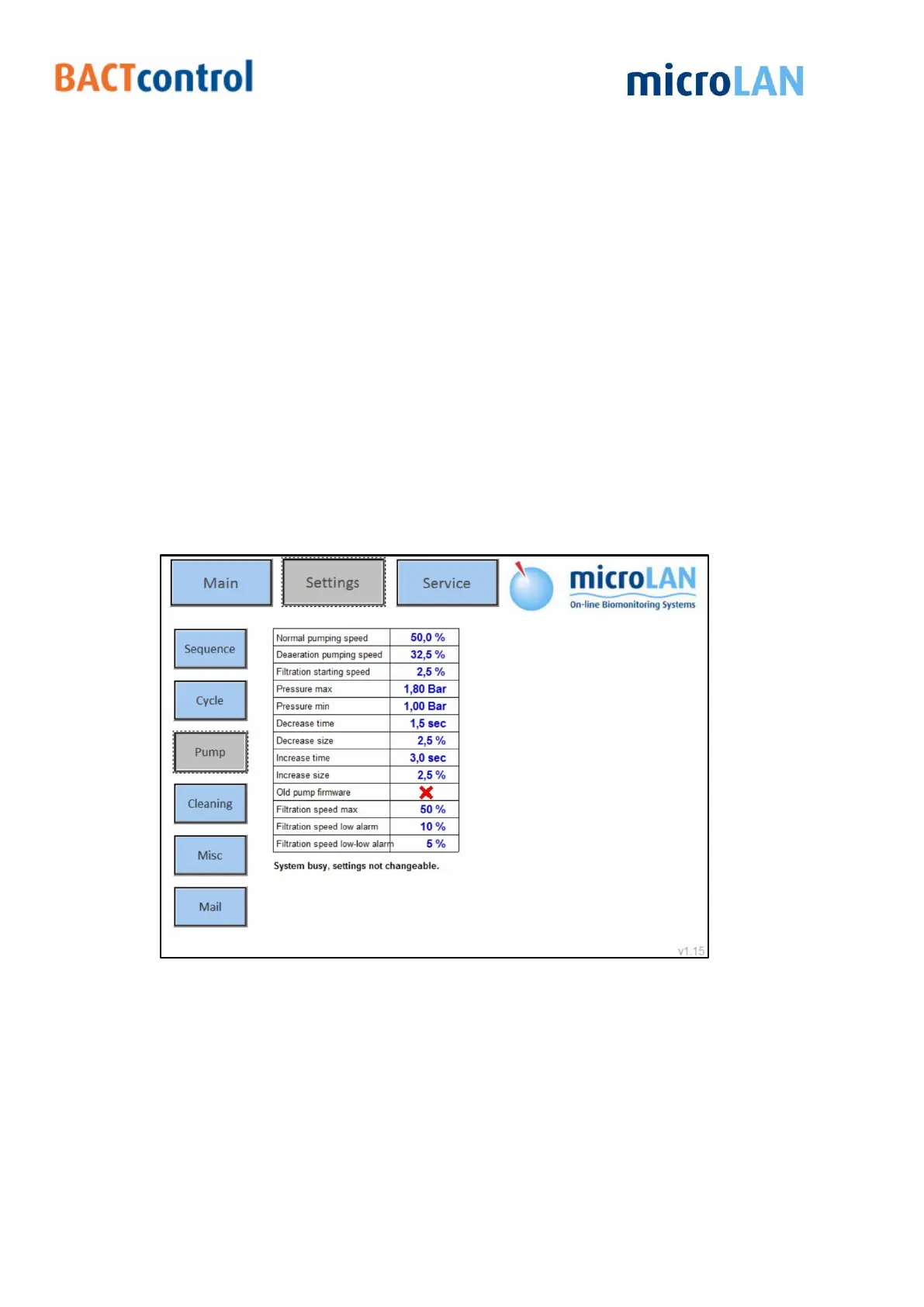
Pressure Max: This setting adjusts the pump speed. When pressure max is
reached, the pump speed decreases (Settings: Decrease Size & Time).
Pressure Min: This setting adjusts the pump speed. When pressure min is
reached, the pump speed increases (Settings: Increase Size & Time).
Decrease Time: Time setting for decrease pump speed.
Decrease Size: Size for steps to decrease pump speed.
Increase Time: Time setting for increase pump speed.
Increase Size: Size for steps to increase pump speed.
Old pump firmware: Only necessary for testing other versions Print board.
Filtration speed max: This is the maximum speed for the pump during
filtration.
Filtration speed low alarm: When filtration speed is lower than this value a
low- Alarm will occur
Filtration speed low-low alarm: When filtration speed is lower than this value
a low-low Alarm will occur and the measurement is abort.
Figure 16 Pump screen
8.4 CLEANING
In the Cleaning submenu the individual settings for the cleaning procedure of each
measurement type can be changed.


 To Next Page