EasyManua.ls Logo

Baelz Automatic BA 375-E42 - User Manual

Baelz Automatic BA 375-E42
32 pages
Print Icon
To Next Page IconTo Next Page
Loading...
1 | 32W. Baelz & Sohn GmbH & Co. · Koepffstrasse 5 · 74076 Heilbronn · Germany · www.baelz.de Seite | Page
BA_375-E42_01_DEF_MJ_4419
Operating Instructions BA 375-E42
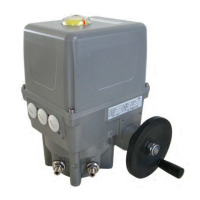
Motorized Rotary Actuator baelz 375-E42
Technical specications subject to change without notice Copyright according to ISO 16016

Table of Contents

Question and Answer IconNeed help?

Do you have a question about the Baelz Automatic BA 375-E42 and is the answer not in the manual?

Summary

1. SAFETY

1.1 Intended use

Details the specific purpose of the Baelz 375-E42 motorized rotary actuators and defines improper use.

1.2 Instructions for the operator

Emphasizes keeping operating instructions available and observing safety regulations during use.

2. PRODUCT DESCRIPTION

2.2 Technical Specifications

Provides a detailed table of technical specifications for the baelz 375-E42 actuator, including torque, speed, and voltage.

4. ASSEMBLY

4.4 Electrical connection

Offers critical safety instructions and guidelines for the electrical connection of the actuator.

4.5 Carrying out the electrical connection

Provides step-by-step instructions for performing the electrical connection, emphasizing safety and proper wiring.

5. COMMISSIONING

7. DIGITAL POSITIONER 7020 A

7.3 Wiring diagrams and allocation of connection terminals

Provides essential wiring diagrams and terminal allocation for correctly connecting the digital positioner.

7.3.1 Wiring diagram

Presents the detailed wiring diagram for the digital positioner baelz 7020A and the basic actuator.

7.3.2 Allocation of connection terminals

A table mapping terminals to their functions and providing important notes for connection and configuration.

7.4 Configuration of the DIP switches

Details the configuration options for all DIP switches on the 7020A positioner, including factory settings.

7.5 Commissioning

Outlines the commissioning process for the digital positioner.

7.5.2 Initialization run

Detailed steps for the initialization run, including LED status, synchronization, and error handling.

7.5.3 Meaning of LED signals

Explains the meaning of different LED signal combinations (green/red) indicating unit status and errors.

7.6 Errors

Provides information on error handling for the digital positioner.

7.6.1 Errors after an initialization run

Details error codes and corrective actions for issues encountered during the initialization phase.

7.6.2 Errors during normal positioner operation

Explains error codes and corrective actions for malfunctions occurring during normal positioner operation.

7.7 Technical Specifications

Lists the detailed technical specifications for the baelz 7020A digital positioner.

10. TROUBLESHOOTING

Troubleshooting Steps

General steps to follow when the actuator is not working properly, including checks and contacting service.

10.1 Checklist for operational malfunctions

A diagnostic checklist detailing malfunctions, their causes, and required corrective actions for the actuator.

Summary

1. SAFETY

1.1 Intended use

Details the specific purpose of the Baelz 375-E42 motorized rotary actuators and defines improper use.

1.2 Instructions for the operator

Emphasizes keeping operating instructions available and observing safety regulations during use.

2. PRODUCT DESCRIPTION

2.2 Technical Specifications

Provides a detailed table of technical specifications for the baelz 375-E42 actuator, including torque, speed, and voltage.

4. ASSEMBLY

4.4 Electrical connection

Offers critical safety instructions and guidelines for the electrical connection of the actuator.

4.5 Carrying out the electrical connection

Provides step-by-step instructions for performing the electrical connection, emphasizing safety and proper wiring.

5. COMMISSIONING

7. DIGITAL POSITIONER 7020 A

7.3 Wiring diagrams and allocation of connection terminals

Provides essential wiring diagrams and terminal allocation for correctly connecting the digital positioner.

7.3.1 Wiring diagram

Presents the detailed wiring diagram for the digital positioner baelz 7020A and the basic actuator.

7.3.2 Allocation of connection terminals

A table mapping terminals to their functions and providing important notes for connection and configuration.

7.4 Configuration of the DIP switches

Details the configuration options for all DIP switches on the 7020A positioner, including factory settings.

7.5 Commissioning

Outlines the commissioning process for the digital positioner.

7.5.2 Initialization run

Detailed steps for the initialization run, including LED status, synchronization, and error handling.

7.5.3 Meaning of LED signals

Explains the meaning of different LED signal combinations (green/red) indicating unit status and errors.

7.6 Errors

Provides information on error handling for the digital positioner.

7.6.1 Errors after an initialization run

Details error codes and corrective actions for issues encountered during the initialization phase.

7.6.2 Errors during normal positioner operation

Explains error codes and corrective actions for malfunctions occurring during normal positioner operation.

7.7 Technical Specifications

Lists the detailed technical specifications for the baelz 7020A digital positioner.

10. TROUBLESHOOTING

Troubleshooting Steps

General steps to follow when the actuator is not working properly, including checks and contacting service.

10.1 Checklist for operational malfunctions

A diagnostic checklist detailing malfunctions, their causes, and required corrective actions for the actuator.

Baelz Automatic BA 375-E42 Specifications

General IconGeneral
BrandBaelz Automatic
ModelBA 375-E42
CategoryController
LanguageEnglish

Related product manuals