USER MANUAL – M625/M325 DRIVE SYSTEM
18
• Walk assistance.
• Energy consumption indicator CALORIES
(Note: If the display has this function).
• Display for the remaining distance.
(Depends on your riding style)
• Setting password.
• Bluetooth function. (the display can connect
to the mobile through Bafang Go APP)
• USB charge port (5V 500mA)
• Parameter setting (The default support level,
speed limit, wheel size)
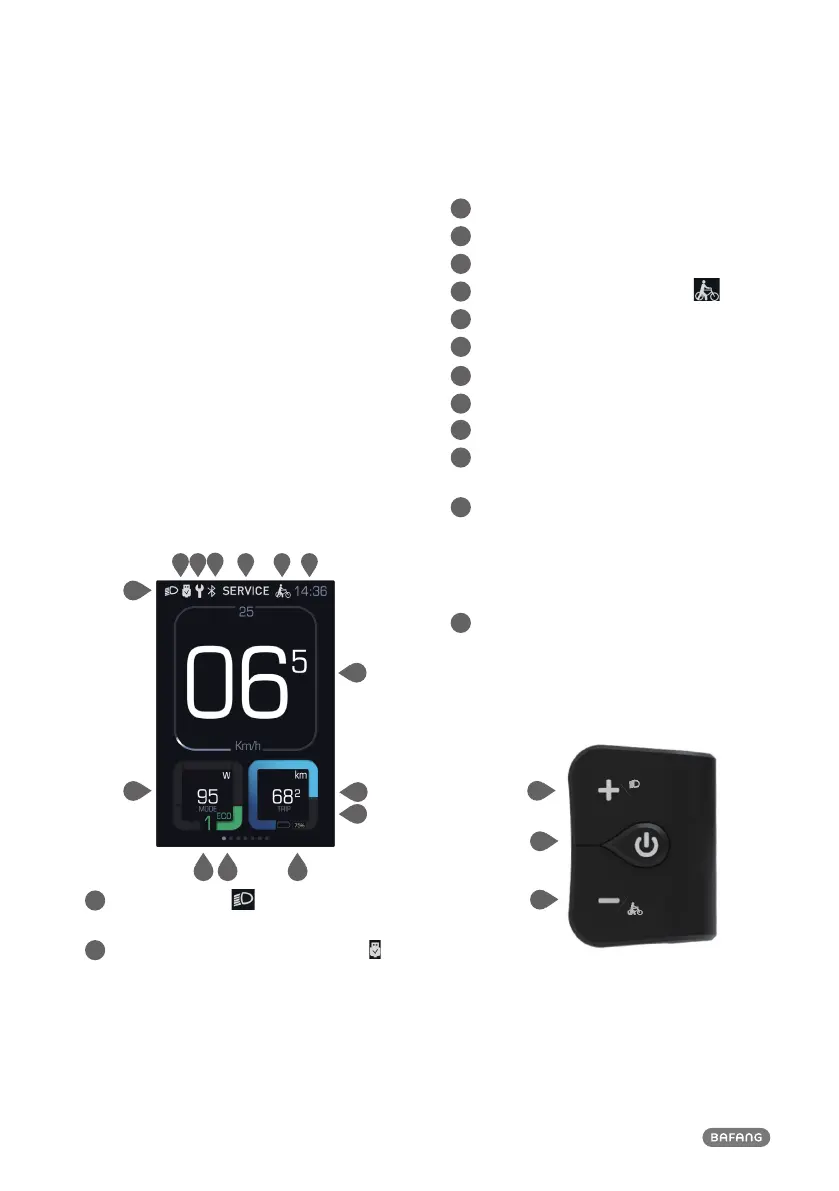
8.4 Display Information
1
8
9
10 14
2 3
4
5 6 7
1
The display shows this symbol, if the
light is on.
2
USB charging indicator displays the icon , if
an external USB device is connected to the
display.
3
Maintenance indicator.
4
Bluetooth indicator.
5
Service: Please see the service section.
6
Support level/ Walking assistance .
7
Time
8
Power indicator in watts / amperes.
9
Support level indicator.
10
Default Mode: ECO/SPORT
11
Speed Graphics.
12
Data: Display data, which corresponds to the
current mode.
13
Trip: Daily kilometers (TRIP) - Total kilometers
(ODO) - Top speed (MAX) - Average speed
(AVG) - Range (RANGE) - Energy Consump-
tion (CALORIES(only with torque sensor
fitted)) - Travel time (TIME).
14
Display of battery capacity in real time.
8.5 Key Definition
System On/Off
Up
Down



 To Next Page