USER MANUAL – M625/M325 DRIVE SYSTEM
25
DISPLAY
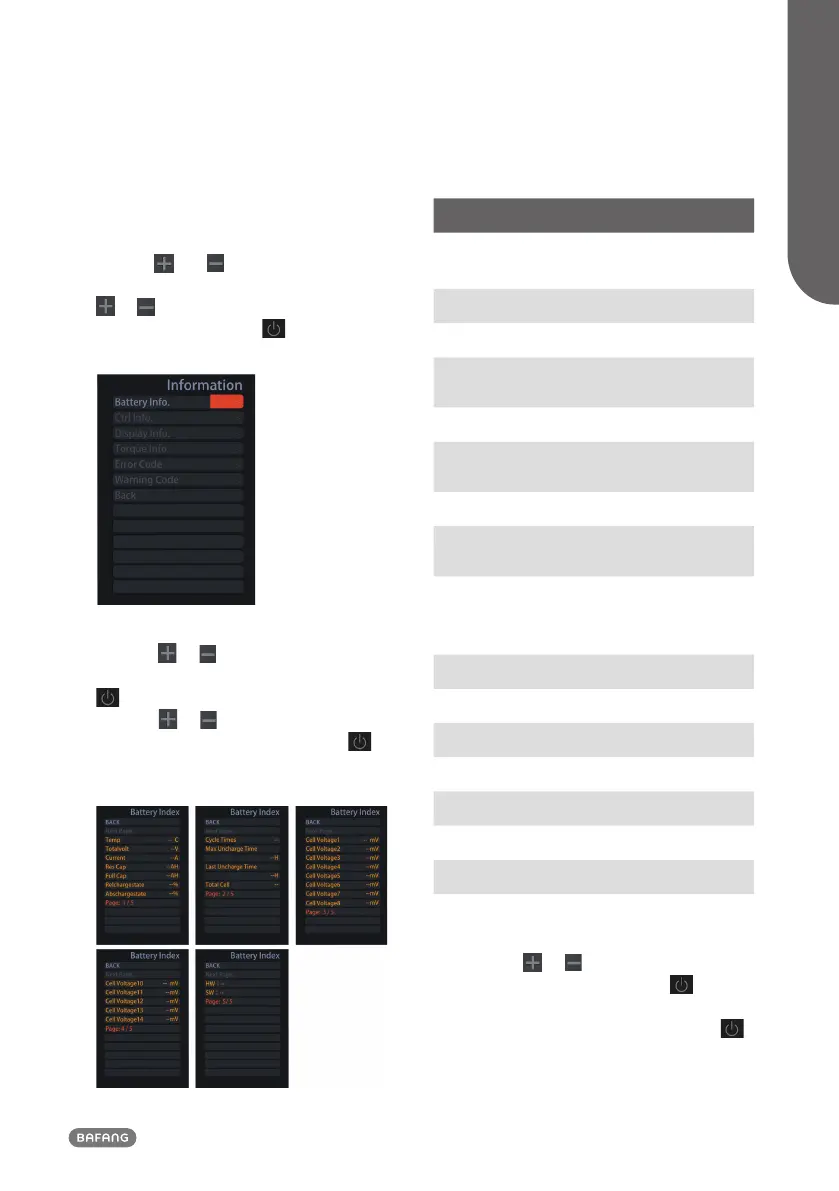
8.7.2 “Information”
Once the system is turned on, press and
hold the and (>1S) button to access
the "SETTING" menu. Now by pressing the
or (<0.5S) button, Highlight the "In-
formation" and press the (<0.5S) button
confirm your selection.
8.7.2.1 Battery Information
Press the
or (<0.5S) button to access
the "Battery Info" menu, and then press the
(<0.5S) button to select confirm. Now
press the or (<0.5S) button and select
"Back” or “Next Page". Then press the
(<0.5S) button to confirm, now you can read
the battery information.
Content Explanation
Temp
Current temperature in
degrees (°C)
Totalvolt Voltage (V)
Current Discharge (A)
Res Cap
Remaining Capacity
(A/h)
Full Cap Total Capacity (A/h)
RelChargeState
Default Loader Status
(%)
AbsChargeState Instant charge (%)
Cycle Times
Charging cycles
(number)
Max Uncharge Time
Maximum time in
which no charge was
made (Hr)
Last Uncharge Time
Total Cell Number (individual)
Cell Voltage 1 Cell Voltage 1 (m/V)
Cell Voltage 2 Cell Voltage 2 (m/V)
Cell Voltage n Cell Voltage n (m/V)
HW Hardware Version
SW Software Version
NOTE: If no data is detected, "--" is displayed.
8.7.2.2 Controller Information
Press the
or (<0.5S) button and select
"CTRL Info", and then press the (<0.5S)
button to confirm. Now you can read the
controller information. To Exit press the
(<0.5S) button, or select “Back” to return to
the “Information” interface.


 To Next Page