USER MANUAL – M625/M325 DRIVE SYSTEM
24
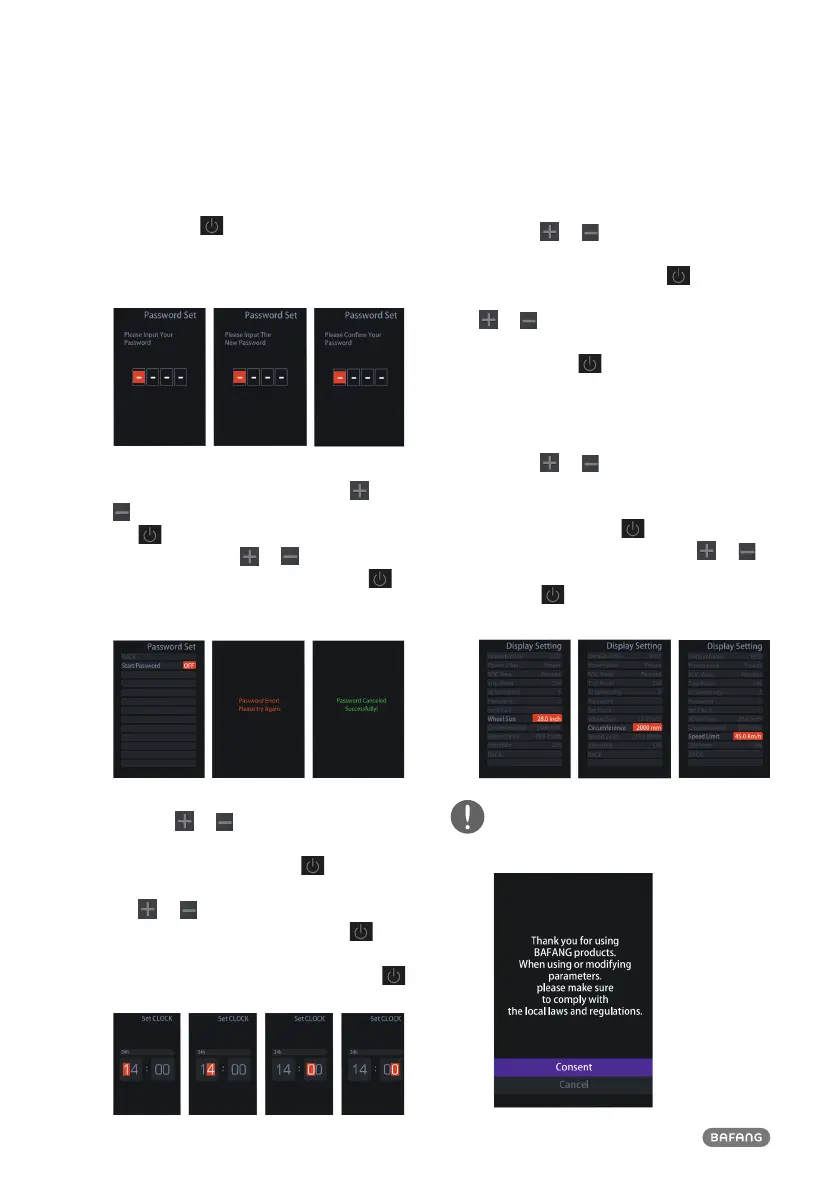
(<0.5S) button highlight “Reset Password"
and with the (<0.5S) button to confirm.
By entering your old password once, fol-
lowed by inputting the new password twice,
then your password will be changed.
Deactivating the password:
To deactivate the password, use the
or
buttons to select “Password” and press
the (<0.5S) button to highlight your
selection. Press the or (<0.5S) button
until is shows “OFF”. Then press briefly
(<0.5S) to select.
Now enter your password, to deactivate it.
8.7.1.11 “Set Clock”
Press the
or (<0.5S) Button to
highlight “Set Clock” in the display settings
menu. Then briefly press the (<0.5S)
button to confirm selection. Now press
the or (<0.5S) button and input the
correct number (time) and press the
(<0.5S) button to move to the next number.
After entering the correct time, press the
(<0.5S) button to confirm and save.
8.7.1.12 “Vibration”
Press the
or (<0.5S) Button to
highlight “Vibration” in the display settings
menu. Then briefly press the (<0.5S)
button to confirm selection. Then press the
or (<0.5S) button to choose between
“ON” and “OFF”. After entering the correct
time, press the (<0.5S) button to confirm
and save.
8.7.1.13 “Wheel size”/ “Circumference” /
“Speed limit”
Press the
or (<0.5S) Button to
highlight “Wheel size”/ “Circumference” /
“Speed limit” in the display settings menu.
Then briefly press the (<0.5S) button to
confirm selection. Then press the or
(<0.5S) button to change the settings. Then
press the (<0.5S) button to confirm and
save.
Please accept the disclaimer and
comply with local regulations before
changing any parameters.


 To Next Page