EasyManua.ls Logo

Baldor Flex+DriveII - Setup; Initial Setup, Controls, and Indicators Guide

Baldor Flex+DriveII
42 pages
Print Icon
To Next Page IconTo Next Page
To Previous Page IconTo Previous Page
Loading...
Setup 3-1MN1917
3.1 Introduction
The Flex+Drive
II
demonstration unit is supplied with all necessary wiring already connected (except for upgrade
kits). The user must only connect the AC power supply and serial cable. A PC will be necessary to run the
WorkBench v5 software.
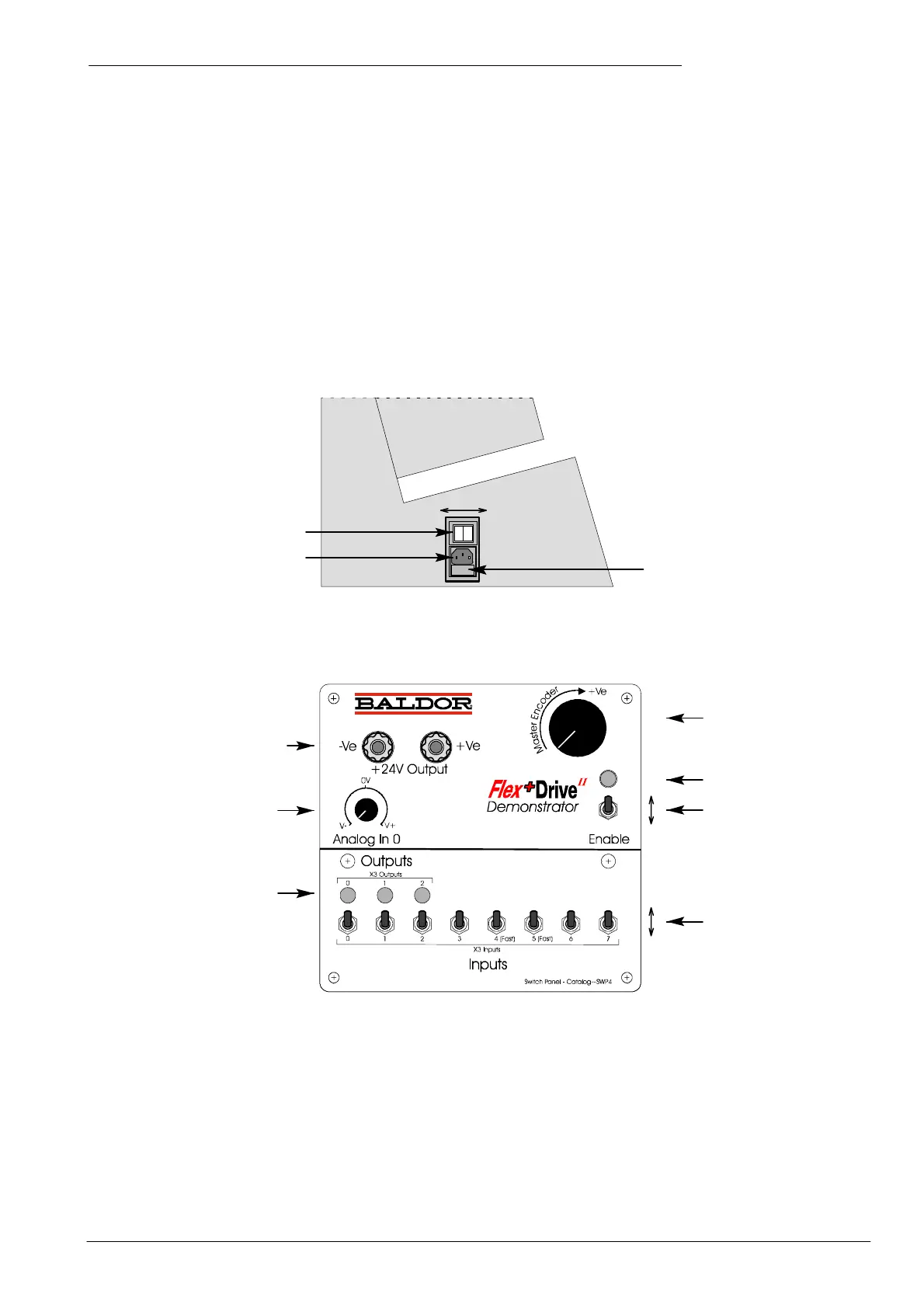
3.1.1 Controls and indicato rs
Fuse Compartment
250V, T5AL
Power on/off switch
AC power socket
On
Off
On
Off
Output
LEDs
Input switches
Drive enable switch
Analog input
control
24V output
(not used)
Master encoder
(handwheel) input
Enable
Disable
Drive enable LED
Figure 1 - Control panel layout and AC power location
3 Setup
3

Other manuals for Baldor Flex+DriveII

Related product manuals