Care2
Installation Instructions
32 Care2 issue 7
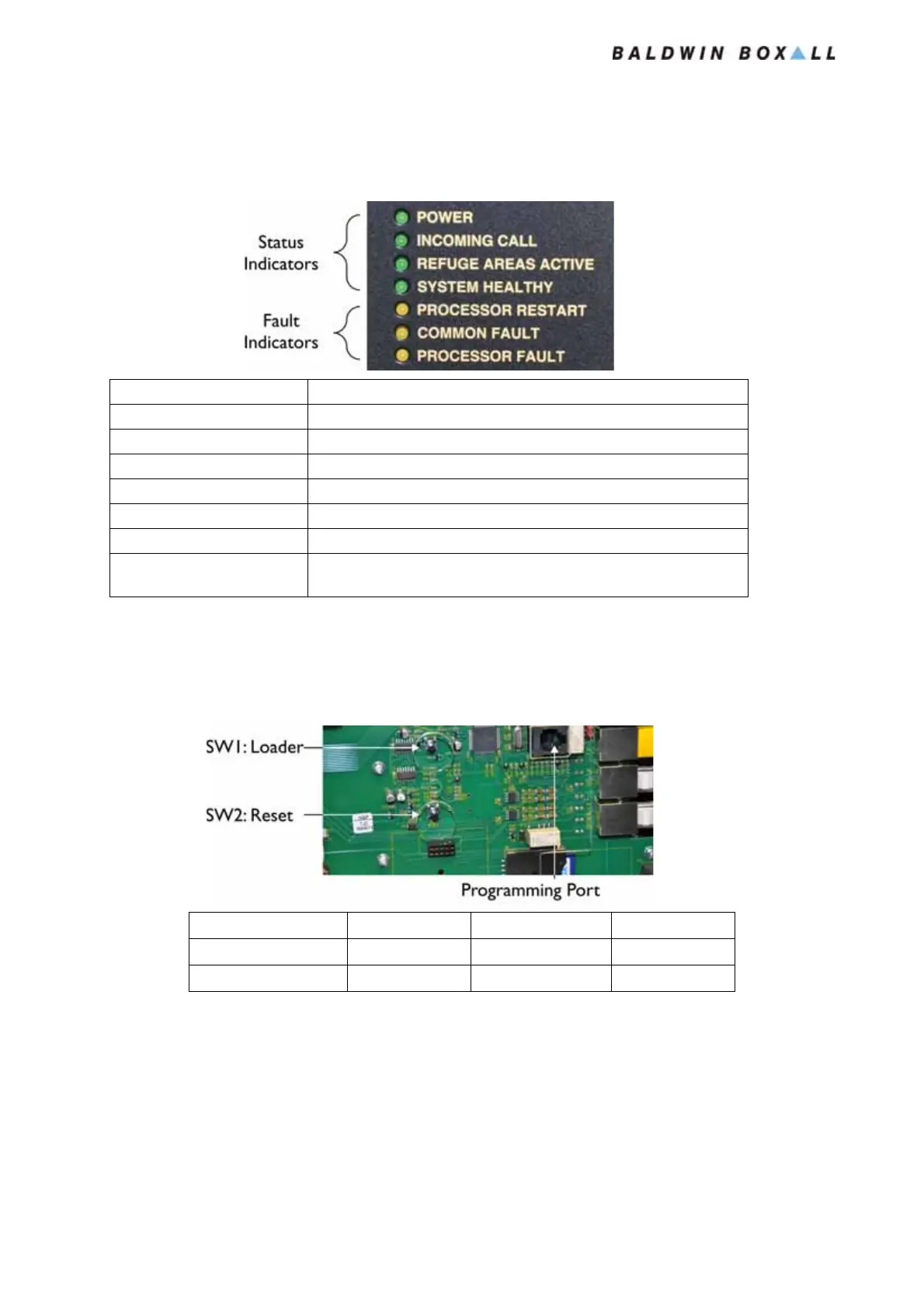
3.2 FRONT PANEL LED INDICATORS
Figure 3.2 — Console LED Indicators
3.3 INTERNAL RESET BUTTONS
Figure 3.3 — Console Internal Reset Buttons
3.4 BATTERY CONNECT (IF MAINS POWER
U
NAVAILABLE)
If Mains power is not available press SW1 (Battery Connect) on
the internal PSU to power the Console from batteries.
Legend Description
Power Illuminates when Panel has either 24V Battery or Mains Supply
Incoming Call Flashes to indicate Incoming Call
Refuge Areas Active Illuminates when DRS Refuge Remotes are active
System Healthy Illuminates when no Faults are present
Processor Restart (Fault) Illuminates after the Processor has restarted
Common Fault Illuminates if any fault is detected
Processor Fault Illuminates if the system detects a Processor fault
(Note: the system may not operate correctly)
Press & Hold Press & Release Release
Device Detection SW1 SW2 SW1
System Reset SW2 SW1 SW2
www.acornfiresecurity.com
www.acornfiresecurity.com


 To Next Page