Care2
Installation Instructions
76 Care2 issue 7
6.6 MAKE A CALL
6.6.1 Call a Single Outstation
Open the Handset Door and pick up the Handset.
The LCD Display will show the “Directory” Menu with all the
available Outstations.
Scroll down until the required Outstation is highlighted.
Press the Encoder to call the required Outstation.
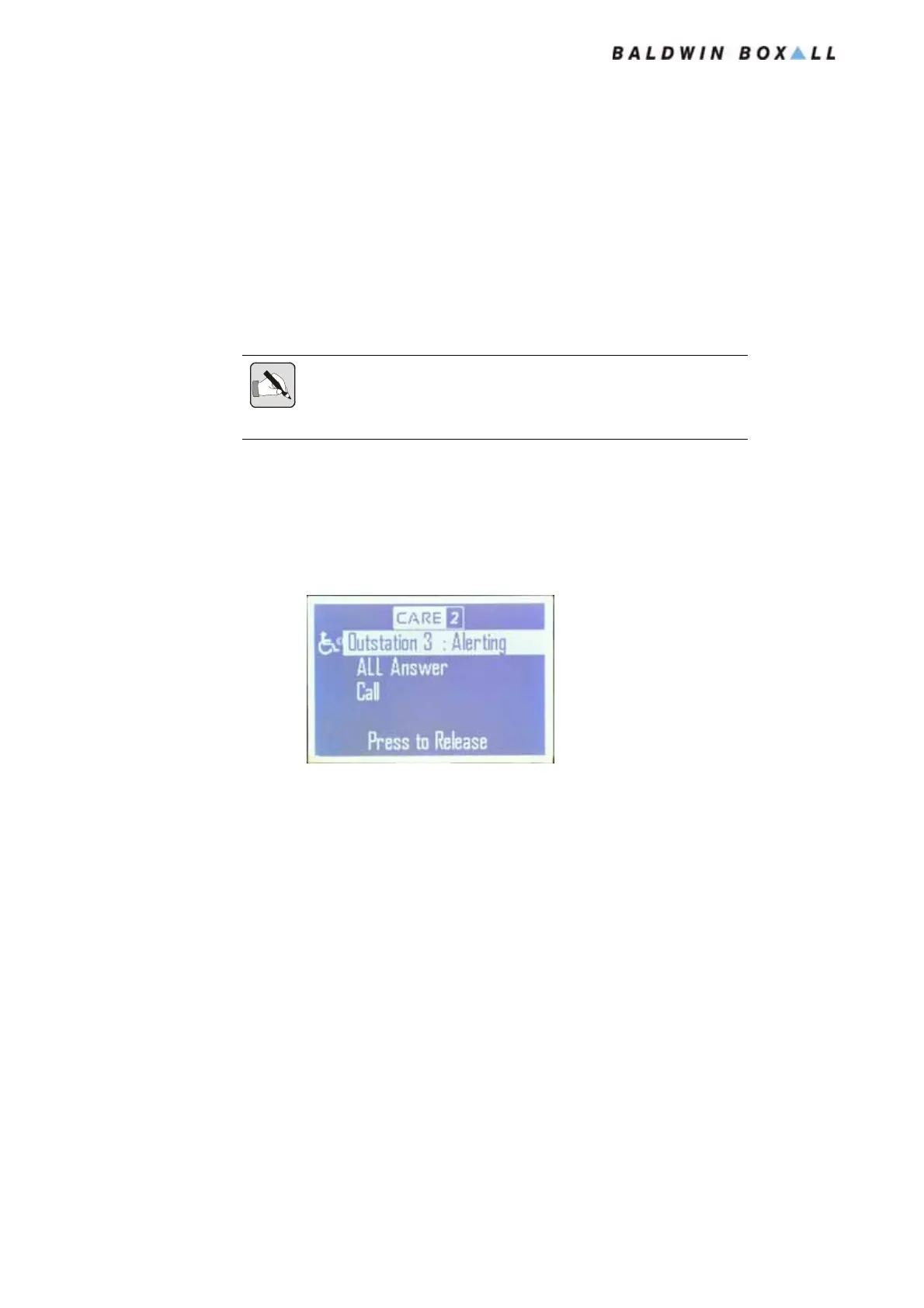
The LCD Display will indicate the Outstation is being Alerted.
Figure 6.11 — LCD Display showing Outstation 3 being Alerted
When the Outstation is answered the LCD display will indicate
“Busy” (as shown in
Figure 6.2) and the operator can speak to the
Outstation.
To end the call refer to Section 6.4.
6.6.2 Call All Outstations
It is possible to Call All Outstations that are capable of receiving
calls.
Open the Handset Door and pick up the Handset.
Scroll up until “All Call” is highlighted and press the encoder.
The LCD Display will show when each Outstation answers.
NOTE: Outstations that cannot accept calls will be shown in the Directory
but will have "N/A" to indicate they cannot be called.
Outstations that are currently "On Hold" will not be displayed.
www.acornfiresecurity.com
www.acornfiresecurity.com


 To Next Page