Care2
Installation Instructions
Care2 issue 7 63
5.3 IP CONFIGURATOR
5.3.1 Setting Alternate IP Configuration on PC
Before the IP Configurator software can communicate with a
Console using TCP/IP it is necessary to set up an Alternate IP
Configuration for the relevant Network Adaptor on the PC.
The Alternate IP Configuration allows the PC to connect to the
Care2 Consoles using a specific configuration, without making
any changes to the existing TCP/IP Configuration.
The following sections give basic instructions on setting this
alternate Configuration using Windows XP and Windows 7.
5.3.2 Setting Alternate TCP/IP Configuration -
Windows XP
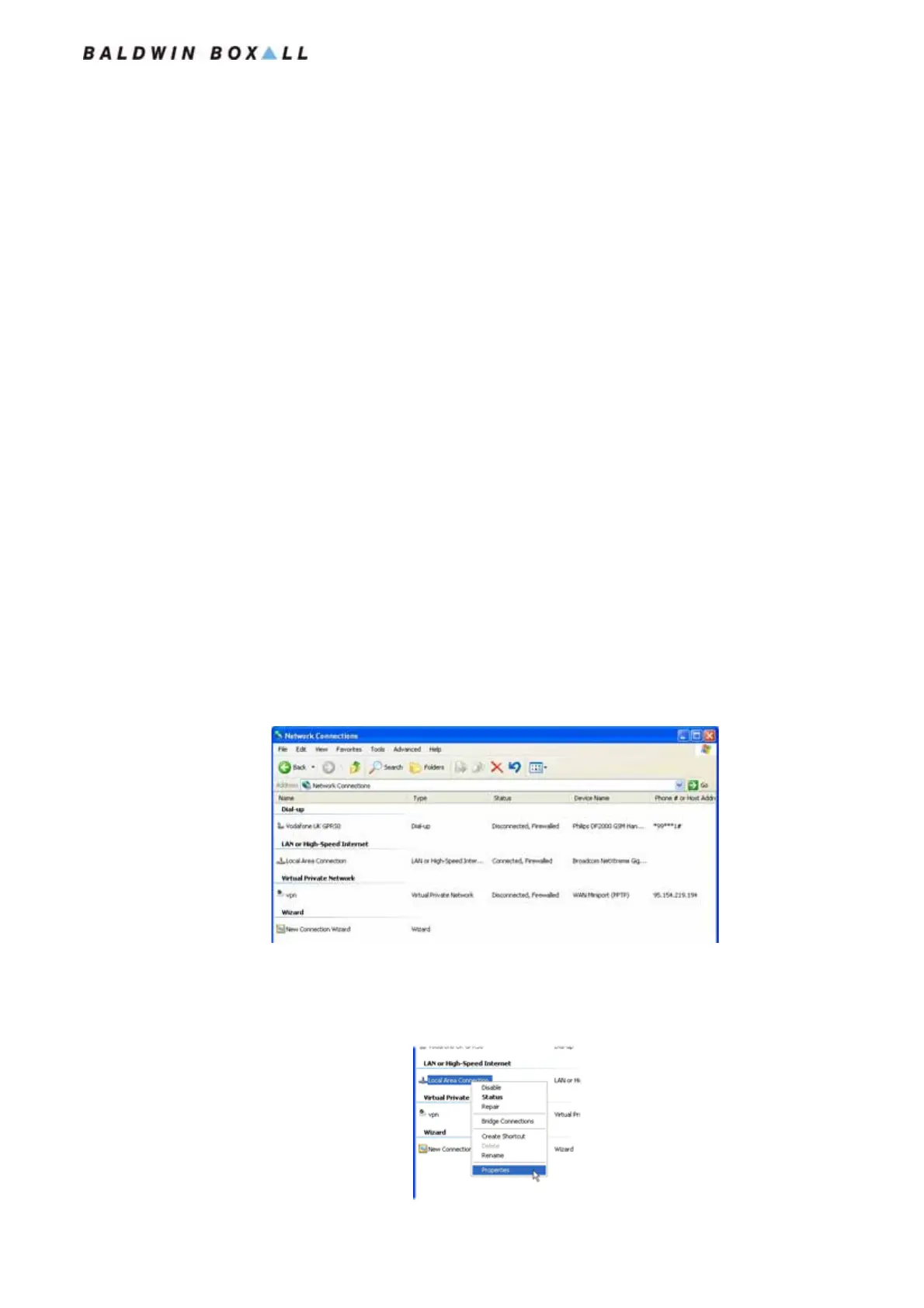
1. Open the Windows XP Control Panel and open the Network
Connections tab:
Figure 5.11 — Typical Windows XP Network Connections
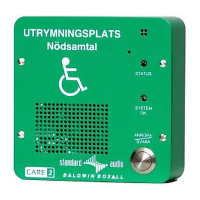
2. Under the LAN or High-Speed Internet entries, Right click
on the Local Area Connection and select properties:
Figure 5.12 — Selecting Properties of the Local Area Network Connection
www.acornfiresecurity.com
www.acornfiresecurity.com


 To Next Page