254
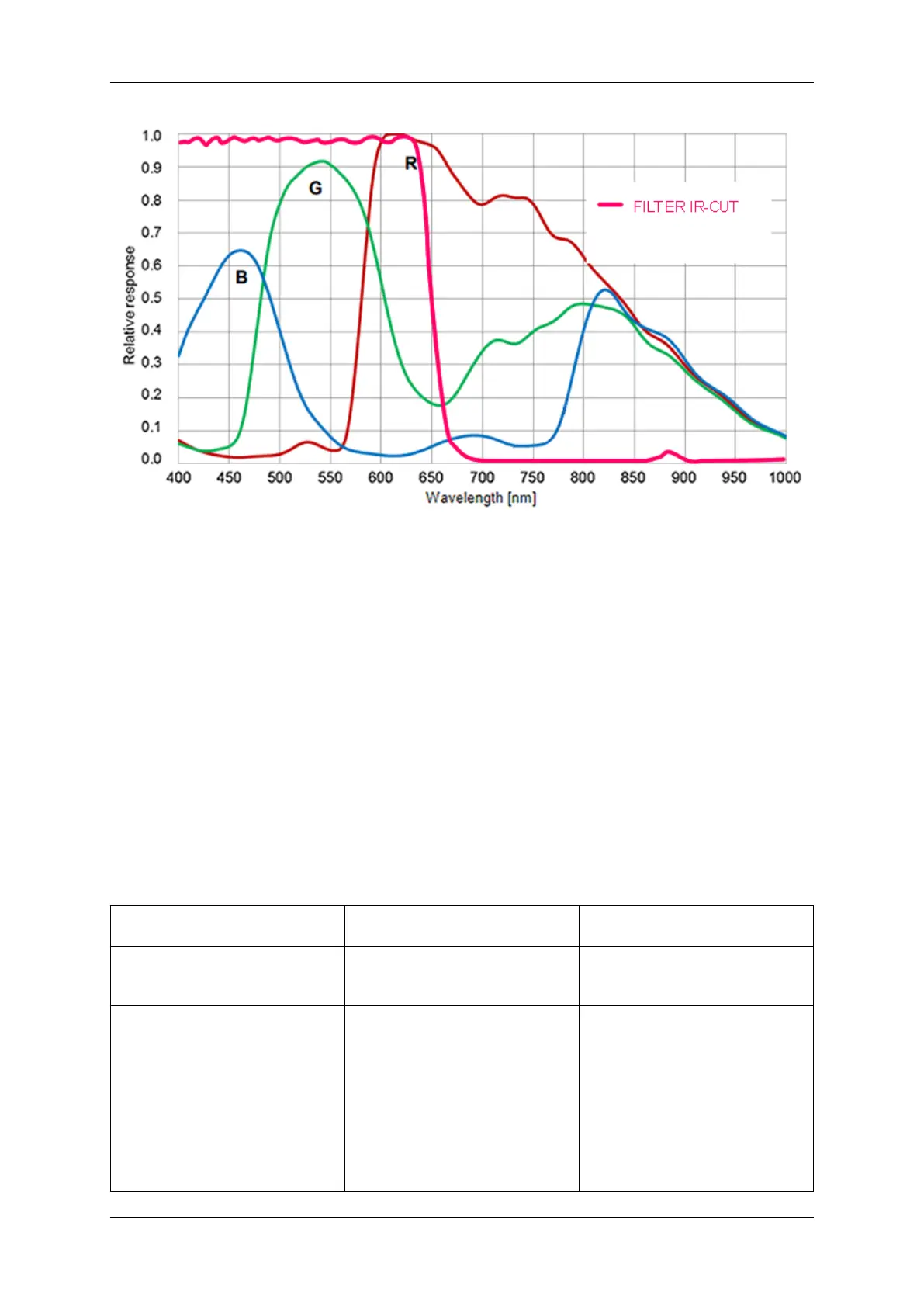
Figure 1: Spectral sensitivity BVS CA-BN2-0124ZC
1.19.2.1.5.3 Timings For calculating the frame rates, please use the frame rate calculator of the online manual:
See also
https://www.matrix-vision.com/manuals/mvBlueNAOS/mvBlue_models_BVS←-
_CA-BN2-0124ZC_.html#mvBC_subsubsection_sensors_CMOS_models_BVS_CA-←-
BN2-0124ZC_Calc
The following trigger modes are available:
Setting (GenICam) Mode / Setting (obsolete "Device
Specific")
Description
"TriggerSelector =
FrameStart"
"TriggerMode = Off"
Continuous Free running, no external trigger
signal needed.
"TriggerSelector =
FrameStart"
"TriggerMode = On"
"TriggerSource =
Software"
"ExposureMode = Timed"
To trigger one frame execute
the TriggerSoftware@i command
then.
OnDemand Image acquisition triggered by
command (software trigger).
MATRIX VISION GmbH


 To Next Page