88
Note
Please be sure to register the MV device for DirectShow with a matching version of mvDeviceConfigure.
I.e. if you have installed the 32-bit version of the VLC Media Player, Virtual Dub, etc., you have to
register devices with the 32-bit version of mvDeviceConfigure ("C:\Program Files\MATRIX VISION\mv←-
IMPACT Acquire\bin", the 64-bit version resides in "C:\Program Files\MATRIX VISION\mvIMPACT Ac-
quire\bin\x64")!
1.15.3.1 Registering devices
To register all devices currently recognized by the mvIMPACT Acquire driver stack for access with DirectShow the
following registration procedure is needed:
1. >mvDeviceConfigure needs to be started(with elevated rights).
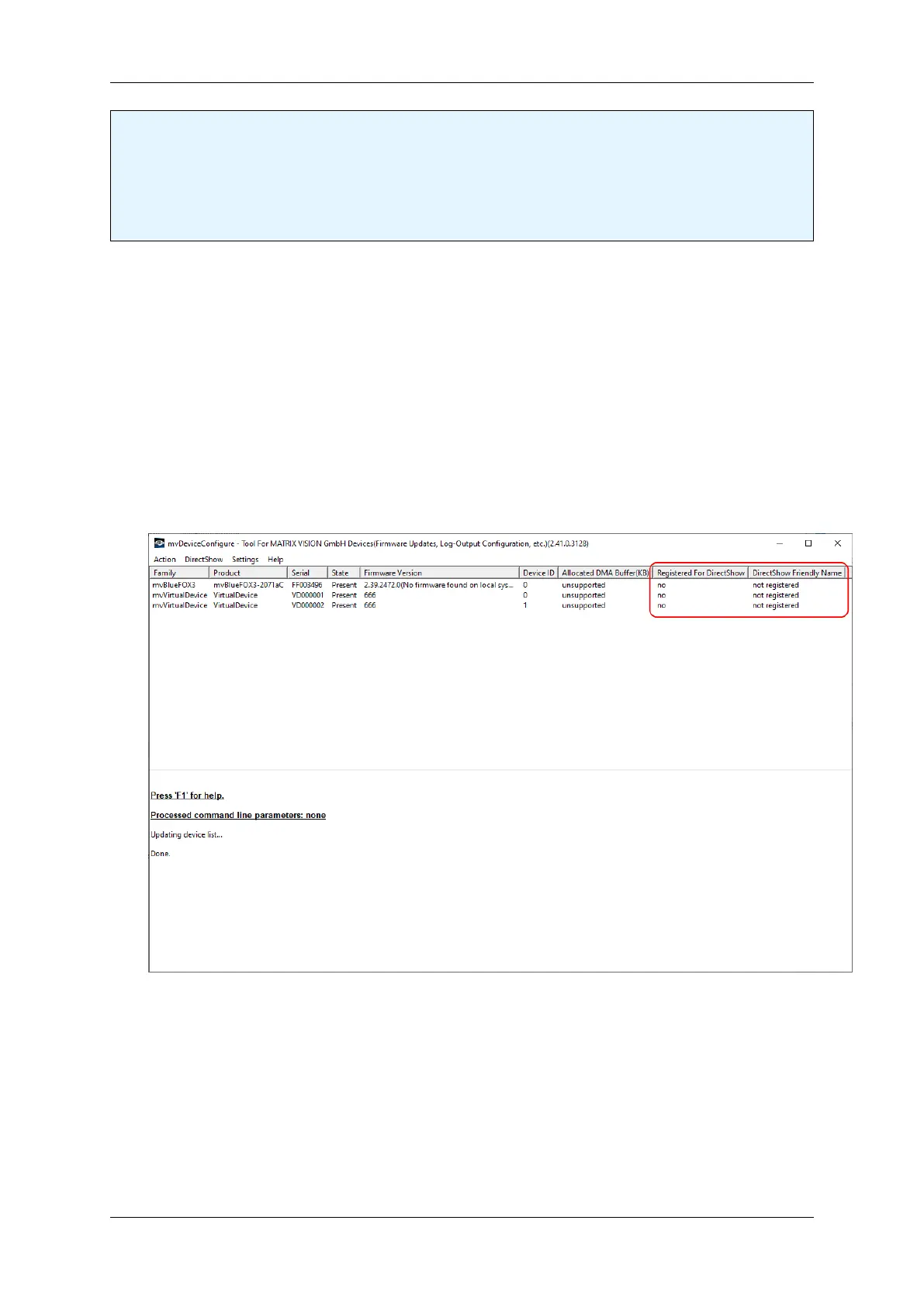
If no device has been registered the application will more or less (depending on the installed devices) look
like this.
mvDeviceConfigure - After Start
2. To register every installed device for DirectShow access click on the menu item "DirectShow" → "Register
All Devices".
MATRIX VISION GmbH


 To Next Page