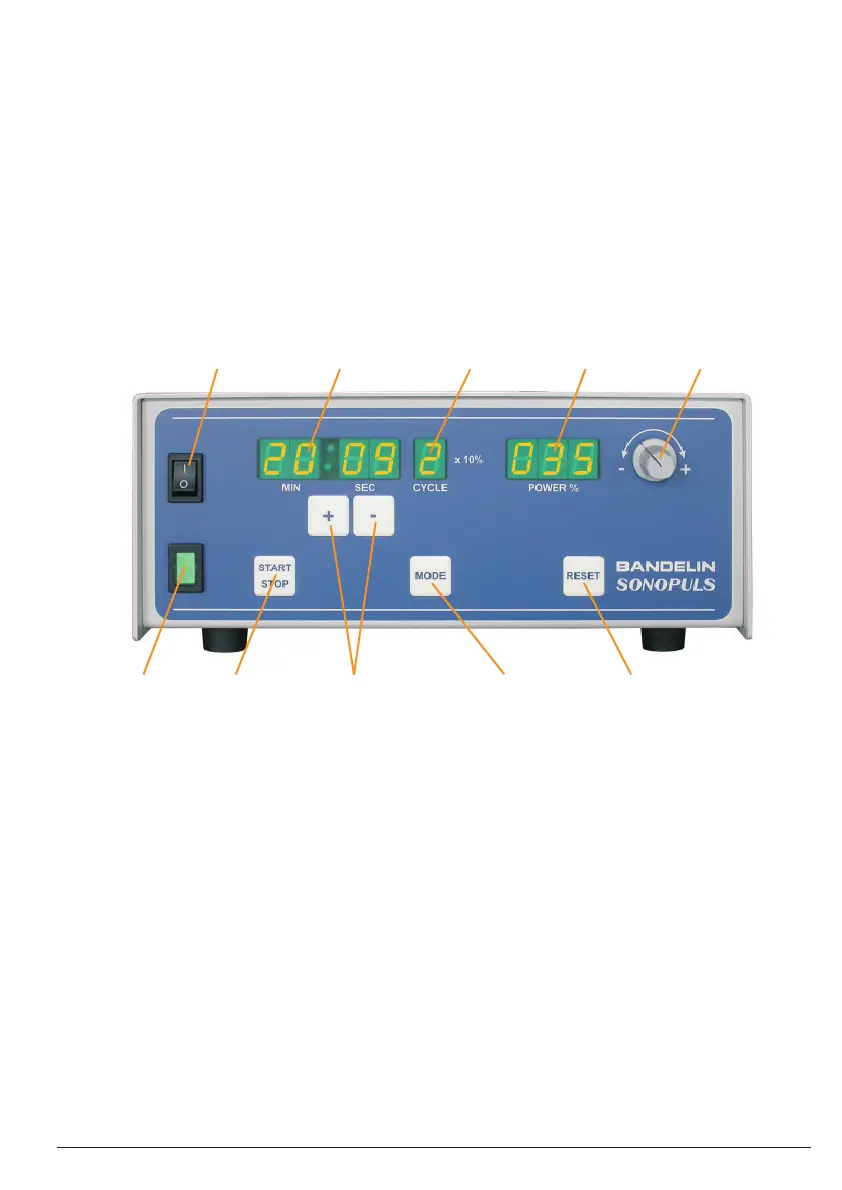
1 Mains switch Turning generator on or off
2 Digital timer Display
3 Pulsation level Display
4 Power display Display
5 Power control dial Used for infi nitely variable setting of the amplitude (10 - 100 %) during operation
6 Control light Lit green during operation
7 "Start/Stop" key Starts or stops the entered program.
Optional with button on the ultrasonic transducer or the foot switch.
8 Type "+" / "-": the blinking value increases or decreases by one unit.
Press and hold (> 2 sec):
the blinking value increases or decreases through a fast scroll.
9 "Mode" key Used for step-by-step modifi cation of the time entries - minutes, seconds and pulsation
level - and at the end for saving in countdown or continuous operation.
10 "Reset" key Interrupts the current program
Switches from countdown operation to continuous operation and vice versa.
12 345
109876
2.3 Start-up
Check the positioning of the ultrasonic transducer in the holder.
Check the fi rm positioning of the probe and, if needed, clean thoroughly before fi rst use.
Connect the HF generator to the mains ( grounded socket) and switch on.
Conduct a function test pursuant to chapter 6.2.
3 Operation
3.1 Operating elements
Operation is conducted from the operating and display panel on the front side of the HF generator:
15 / 4451436a GB/2017-10
1 electronic GmbH & Co. KG • Heinrichstraße 3-4 • 12207 Berlin • Deutschland • info@bandelin.com


 To Next Page