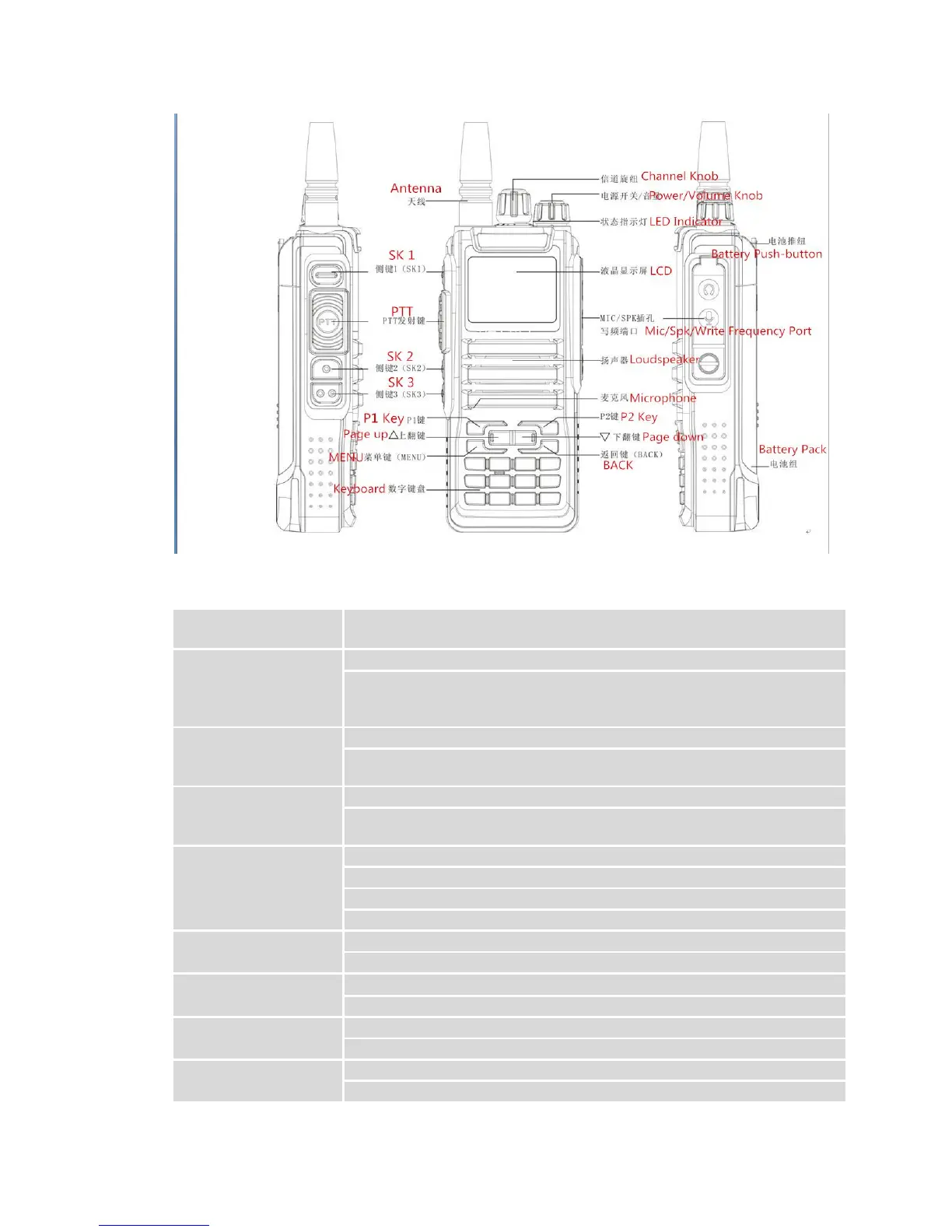
Switch between transmission and reception; when transmitting, press this button and speak to the
microphone; release the button to receive.
* Defaults to Up and down screen
switch
Short press this button to quickly switch the upper and lower screen.
Press and hold it to enter the alarm mode, press and hold it again or press briefly to exit the alarm mode. If
the current channel is digital and no alarm system is configured, the alarm function can’t be started.
* The default is to select the
channel up
Short press shortcut select channel up.
Press and hold it to turn on the monitor function (only support analog channels).
* The default is to select the
channel down
Short press shortcut select channel down.
Long press for the power switch, select the high and low power.
[0~9] code words in DTMF function
Select punctuation marks or letters in Pinyin input method.
If numeric shortcut function is set, you can press and hold this button to jump to the corresponding contact.
Press it to activate the menu mode, enter the menu and press this button to select menu items.
Press and hold it to enter the radio settings.
Move up; change the scanning direction in scanning state.
Move left in SMS editing interface.
Move down; change the scanning direction in scanning state.
Move right in SMS editing interface.
Clear the entered information in input state.
Press and hold this button to switch channel mode or frequency mode.



 To Next Page