101R5905752 /16 DP2K C
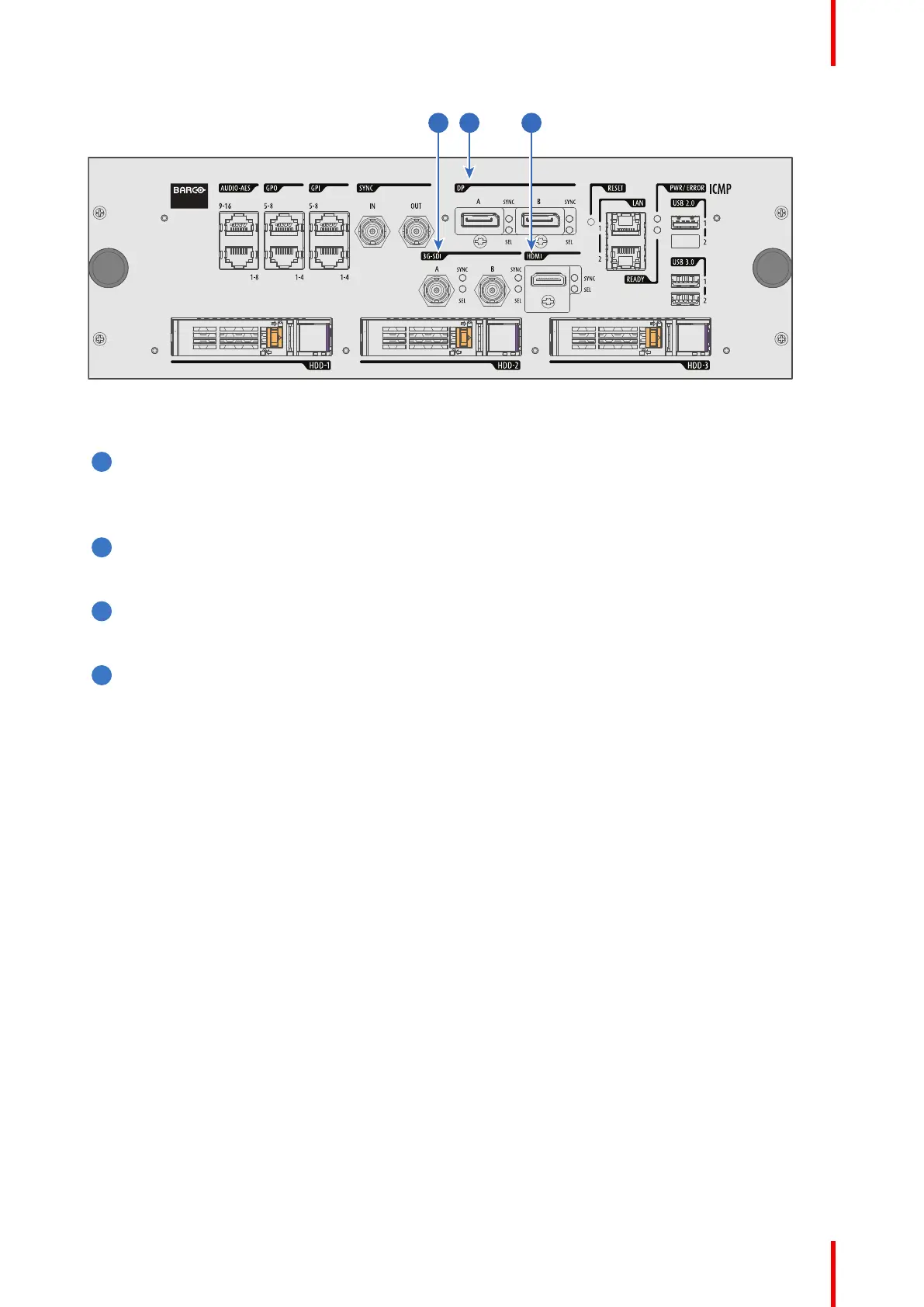
Image 7–21 ICMP (with DisplayPort and HDMI 1.4).
Functionality
HDMI A (B)
HDMI 2.0 connector to connect a video source.
NOTE: It is recommended to use the HDMI 2.0 ports for faster transfer of video and audio data.
3G-SDI A (B)
SDI connector to connect a video source.
HDMI
HDMI 1.4 connector to connect a video source.
DisplayPort A (B)
DisplayPort connector to connect a video source.
7.13 ICMP-X network streaming (Live IP)
specifications
About network streaming
When equipped with a mezzanine, the ICMP-X can receive and play streaming content (multicast live
streaming or http live streaming). Streaming content (audio/video/text files) is delivered in real time via one of
LAN (local area network) connected to one of Ethernet ports of the ICMP (LAN1/LAN2) or Cinema Controller.
For more details concerning playout of Live IP streaming content please refer to the Web Commander user
guide: in the chapter dedicated to the show editor a section explains how to manage alternative input clips (the
clips dedicated to the alternative media inputs or Live IP streaming content).
Minimum requirements
To use Live IP function of ICMP-X, the followings are needed:
• ICMP-X must be equipped with a video mezzanine board.
• a license need to be installed with (Web) Communicator to enable the functionality.
• a macro named LIVE_IP (used to set Live IP as the input of the video mezzanine board) need to be
present on the projector. To do this both the following methods are available:
- a new clone package that contain Icmp_Live_IP.INPUT file (and LIVE_IP macro) could be apply with
(Web) Communicator.
ICMP-X


 To Next Page
 Loading...