4.1 On-Screen Display Menus
4. USER CONTROLS
The projector has On-Screen Display (OSD) menus that allow you to make image adjustments and
change a variety of settings.
4.1.1 Using the OSD Lite Menus
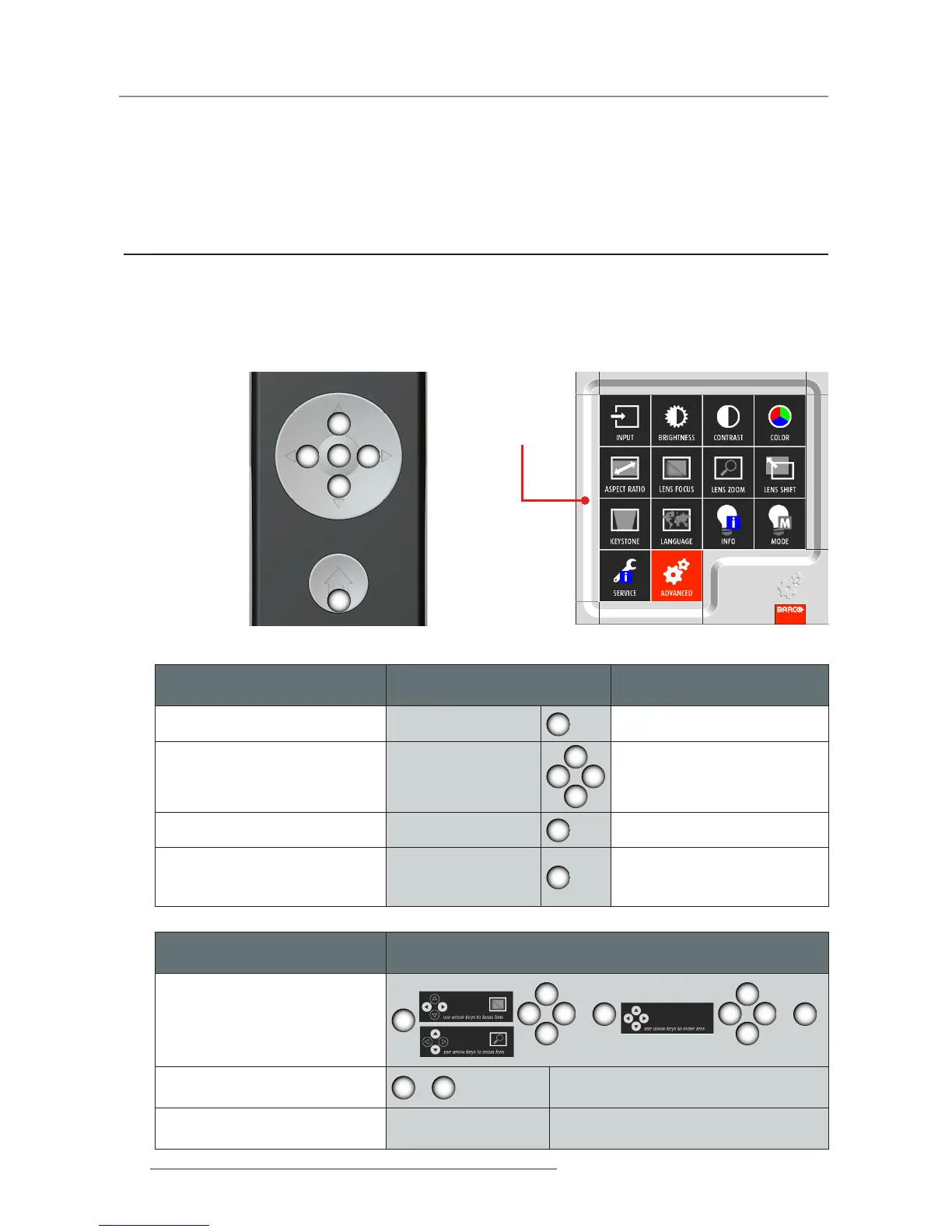
Main Menu & Buttons
Main Menu
Basic OSD Lite navigation
(Result)
Remote Lite
(Action)
OSD Lite
(On Screen)
Show main menu of OSD Lite on
screen
Press “Home”
2
main menu appears in bottom
right corner
To move through the OSD Lite Press “Arrow keys”
6 4
5
7
button will turn red when the
function is available
Go to desired function Press “OK”
3
the menu of the desired func-
tion will appear
Leave the menu or clear the
screen
Press “Home”
2
the main menu will be displayed
or when you are in the main
menu the screen will be cleared
6 4
5
7
3
2
Hotkey / Short Cut
Remote Command (Result)
Remote Lite -> OSD Lite
(Action -> On Screen)
To quick adjust a blurry screen
3
6 4
5
7
>
3
6 4
5
7
>
3
To mute picture on the projector
5
>
5
Unmute picture on the projector Press any key
Overview
On-Screen Display Menus y
Functionality


 To Next Page
 Loading...