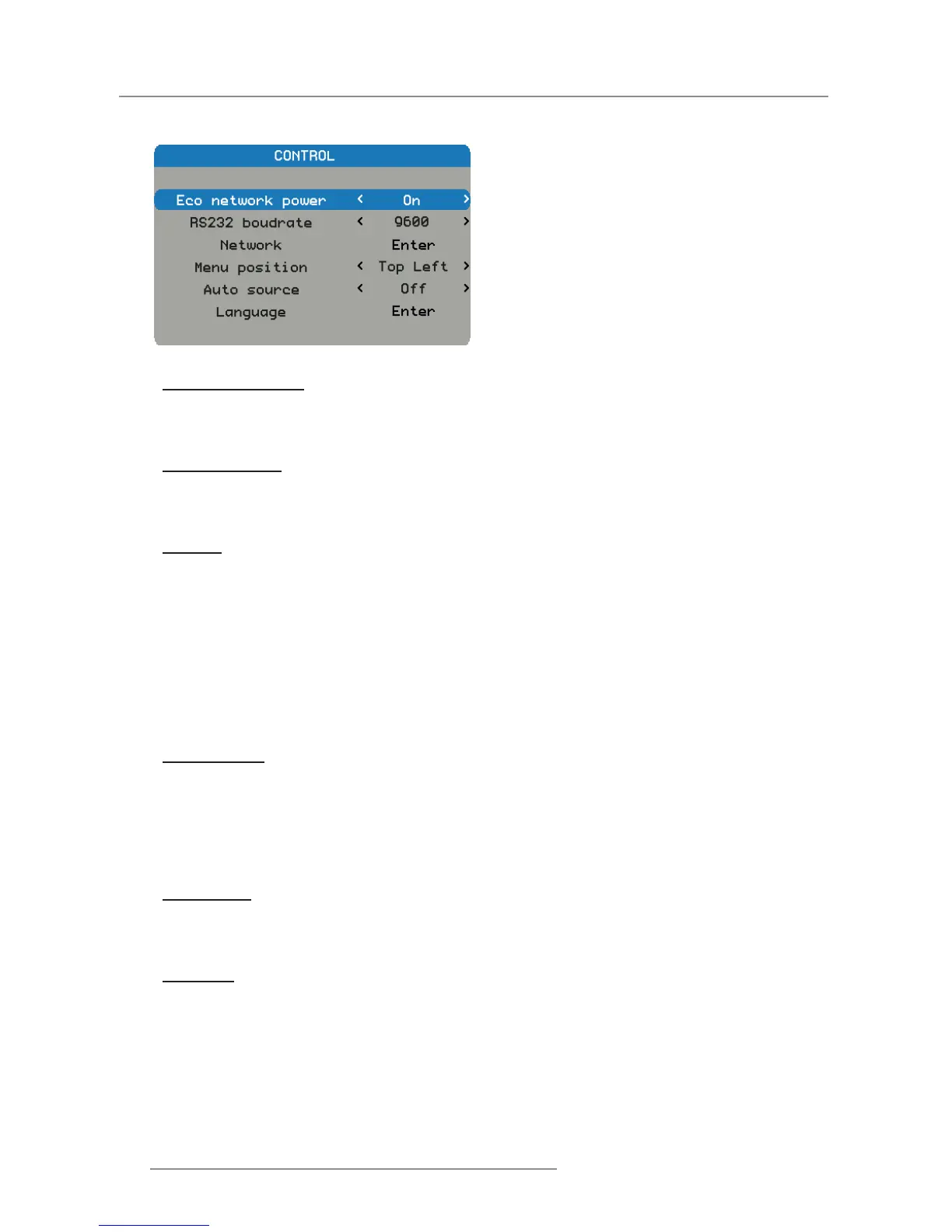
4.1.2.6 Control Menu
Eco Network Power
Switch on/off the network power to save power.
Off: Default value. Network is enable in standby. y
On: Network is not available in standby. y
RS232 Baudrate
Select RS232 baudrate.
115200: Default value for this function. y
9600/19200: Other options. y
Network
View the relevant network information.
IP Address: Default value is 192.168.0.100. y
Subnet Mask: Default value is 255.255.255.0. y
Gateway y
DHCP: Default value is Off, key in the IP address manually and press APPLY. y
Apply: y
The DHCP function must be set to “On” and press “Apply” to get the IP address from DHCP server automati- -
cally.
It takes several seconds to get the IP. -
In case of fail to get the IP address, please re-apply again. -
Menu Position
Shift the menu box to a position.
Center: Default value for this function. y
Top left y
Top right y
Bottom Left y
Bottom right y
Auto Source
Automatic source searching.
On: Default value. Automatic source searching is enabled. y
Off: Automatic source searching is disabled. y
Language
Select the language to display the OSD Menu.
English y
German y
French y
Spanish y
Simplied Chinese y
Japanese y


 To Next Page
 Loading...