64
DIPSWITCH SETTINGS
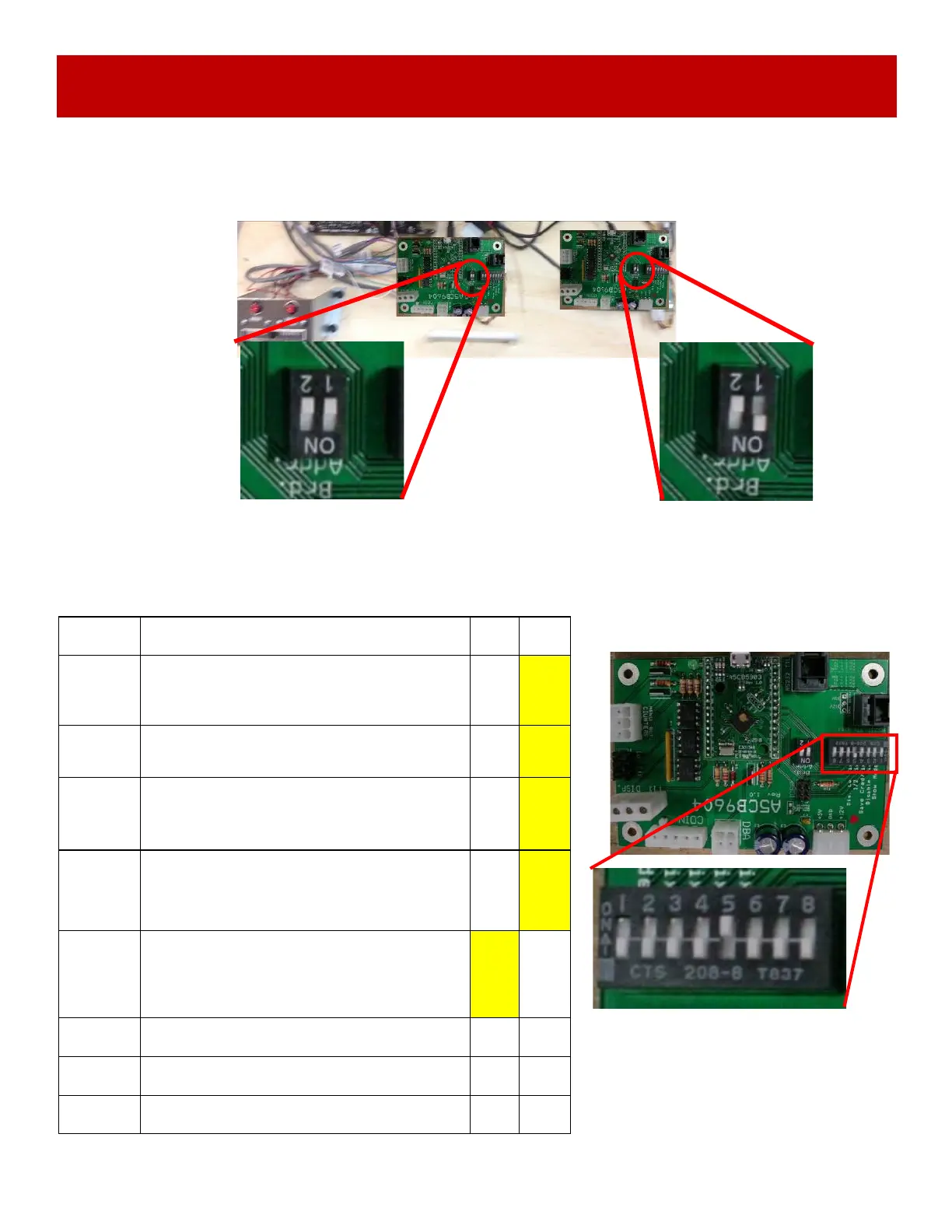
Left Side (Blue Player)
Both switches 1 and 2 should be set to OFF
Right Side (Yellow Player)
Set switch 1 to ON , Set switch 2 to OFF
Dipswitches must be set correctly on the I/O Aux Boards or game will not know which is
left or right player.
Turn off game by flipping the power switch on the power strip.
Set dipswitches as shown:
There are also a 8 dip bank of dipswitches on the I/O Aux Boards.
SWITCH DESCRIPTION ON OFF
1
SHOW GAME
Does not dispense tickets and clears all
accumulated credits if ON
X
2
AMUSEMENT ONLY
Does not dispense tickets if ON
X
3
NJ LOCKOUT
Saves tickets owed and unused credits
after a power loss if ON
X
4
1/2 TICKET PAYOUT
Dispenses 1/2 the amount of tickets as
shown on screen. It will round up odd
amounts of tickets if ON
X
5
DISABLES LOW TICKET INPUT
Disables the low ticket message on screen
if ON. This option should be enabled when
using a card swipe system
X
6 NOT USED
7 NOT USED
8 NOT USED





 To Next Page