8
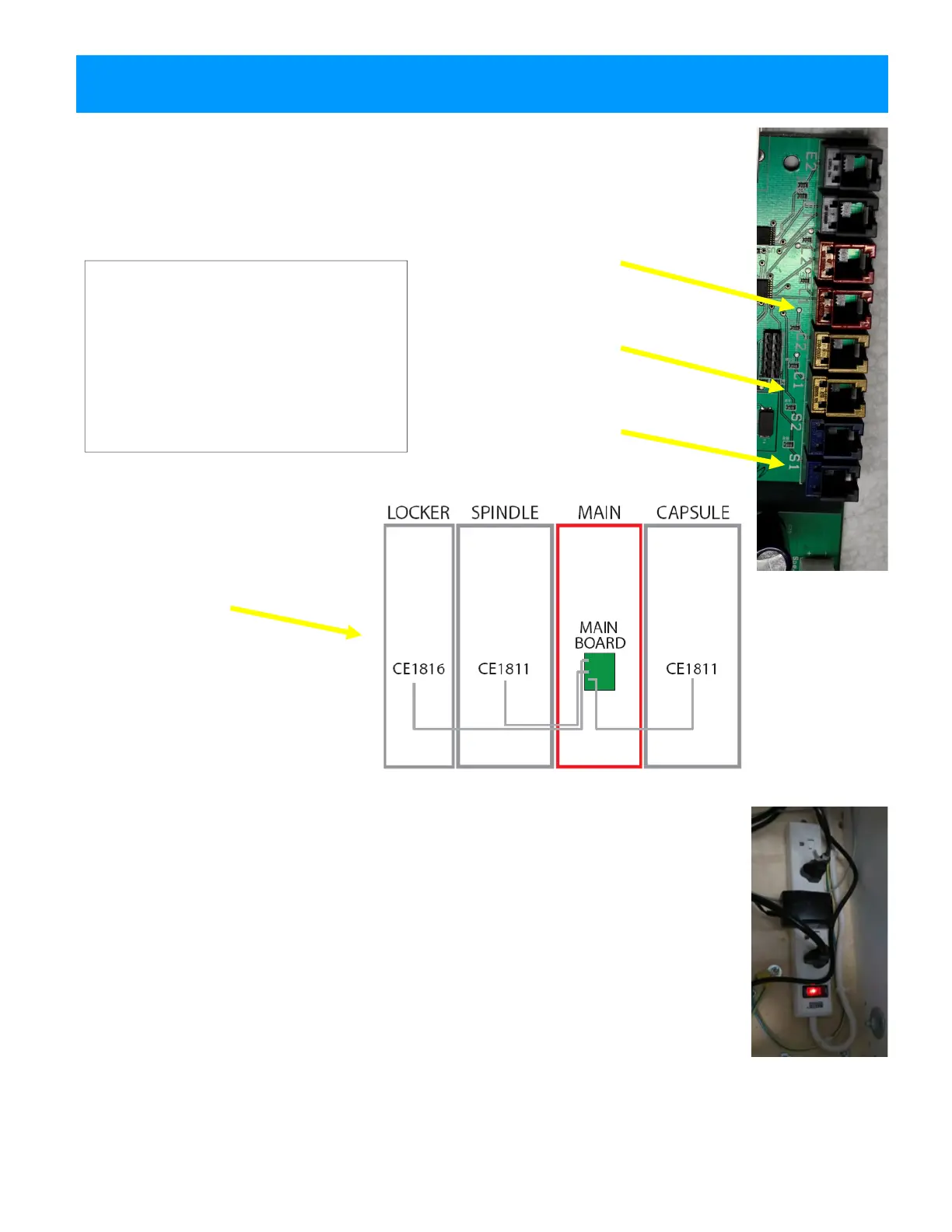
Plug the phone cable ends into the
appropriate ports on the main board
inside the Main hub.
For consistency, use port 1 for single
hubs.
Only use port 2 if you have two of the
same hub and one is marked “B”.
QUICK SET UP GUIDE
Feed the loose connector ends of the thin grey phone cable in each hub through
the holes in all adjoining cabinets and into the Main hub.
Ensure the cables are not pinched and move freely between cabinets.
The phone cables are numbered as follows:
Locker Hub: CE1811
Red Cable to L1
Capsule Hub: CE1811
Gold Cable to C1
Spindle Hub: CE1816
Blue Cable to S1
Communication cable diagram is
viewed from the back of game.
Replace the back doors of the cabinets.
Plug the power cord from the Main hub into a standard 110v electrical outlet.
Switch the power strip inside the main hub door to ON.
Continue on to explore the Operator Menus...



 To Next Page
 Loading...