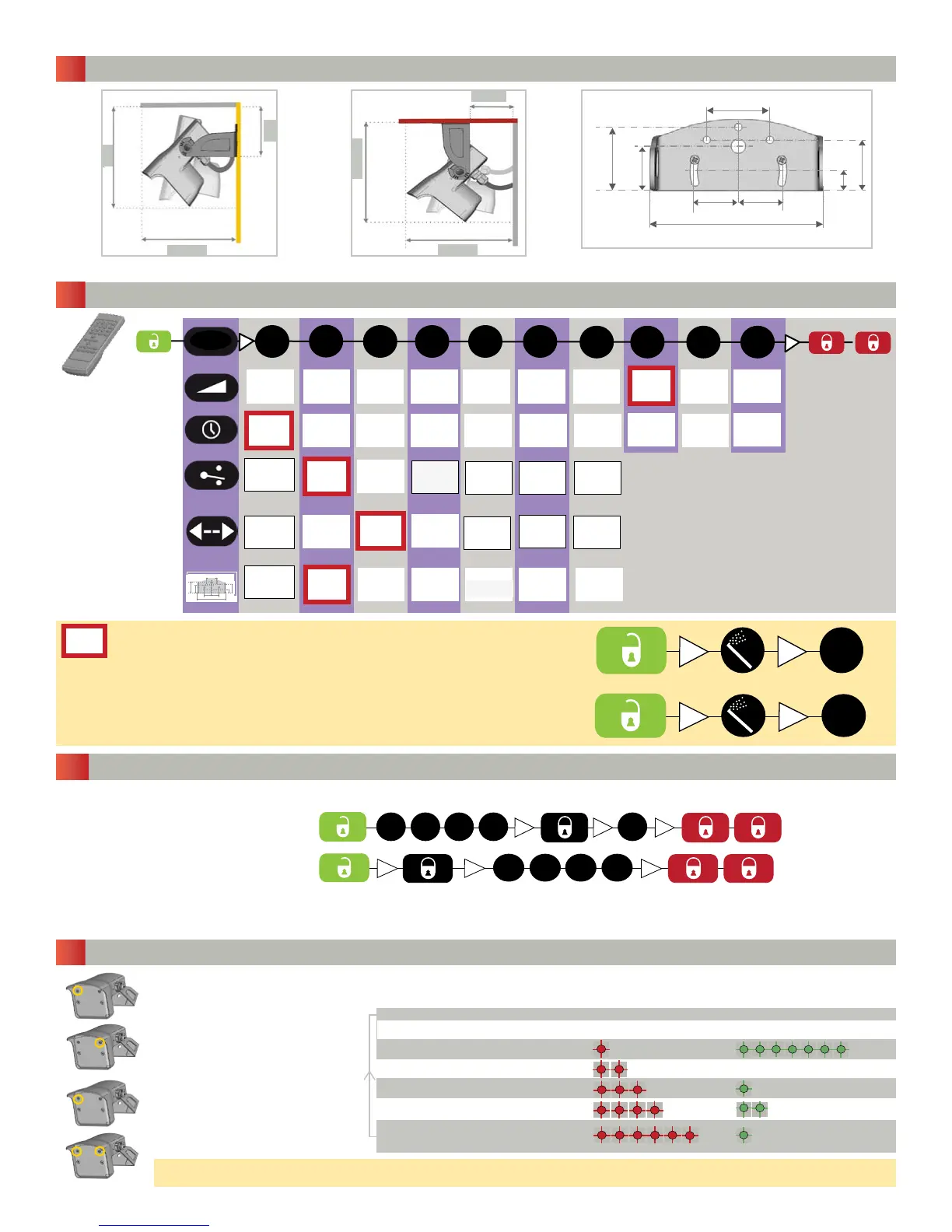
1 9/16
1 1/16
1 1/16 1 1/16
4 1/8
1/2
1 1/4
1 1/2
XXS XS S > > > > L XL XXL
0.5 s 1 s 2 s 3 s 4 s 5 s 6 s 7 s 8 s 9 s
3 4
5 6
1
2
P
A
bi uni
6.25
6.25
6
6
2.5
1 9/16
1 1/16
1 1/16 1 1/16
4 1/8
1/2
1 1/4
1 1/2
5
3
2
4
1
2 3 4 5
6 7 8 9
0
n/a
n/a
n/a n/a n/a
n/a
n/a
n/an/a
n/a
1
0
0-90-90-9 0-9
3
Page 2 of 5 75.5678.04 20111104
(7)
(1)
(2)
(0)
(1)
n/a
FIELD SIZE
SENSITIVITY
OUTPUT
CONFIGURATION
DETECTION
MODE
uni
departing
= deFAuLt vALues
ResettING tO deFAuLt vALues:
DETECTION
FILTER/
REJECTION MODE
HOLD-OPEN TIME
Ceiling mounting
Bracket dimensions
TO START OR END AN ADJUSTMENT SESSION, press and hold either push button until
the LED ashes or stops ashing.
1 FIELD SIZE/SENSITIVITY
Parameter
number (Red LED)
2 HOLD-OPEN TIME
4 DETECTION
MODE
5 DETECTION FILTER
REJECTION MODE
Value Default
(Green LED) values
Wall mounting
POSSIBLE SETTINGS BY REMOTE CONTROL
DIMENSIONS (INCHES)
POSSIBLE SETTINGS BY PUSH BUTTONS
3 OUTPUT CONFIGURATION
ResettING tO deFAuLt vALues
WHeRe tHe seRIAL NuMBeR
LABeL Is MARKed WItH “RL” OR “sL”:
SAVING AN ACCESS CODE:
DELETING AN ACCESS CODE:
The access code (1 to 4 digits) is recommended to set sensors installed close to each other.
Once you have saved an access code, you always need to enter this code to unlock the sensor.
If you do not know the access code, cut and restore the power supply. Within 1 minute, you can access the sensor
without introducing any access code.
ACCESS CODE VIA REMOTE CONTROL
bi = two-way detection
uni = one-way detection towards sensor
uni departing = one-way detection away from
sensor
A = active output (relay active with detection)
P - passive output (relay active with no detection)
1 - 2 = pedestrian detection
3 - 6 = Vehicle detection with pedestrian and
cross trafc rejection
TO SCROLL THROUGH THE
PARAMETERS, press the right
push button.
TO CHANGE THE VALUE OF THE
CHOSEN PARAMETER, press the
left push button.
To restore the factory settings, hold down both butttons until both LEDs blink


 To Next Page