Page 4 of 9 75.5695.07 IS40 IS40XL 20170313
1
1
2
1
12-24 V
AC-DC
3
2
2
1-4
4
8
12
f
16
20
f
6
3 0
3
6
8 ft
11.5 ft
16 ft
15° 30° 45°
15° 30° 45°
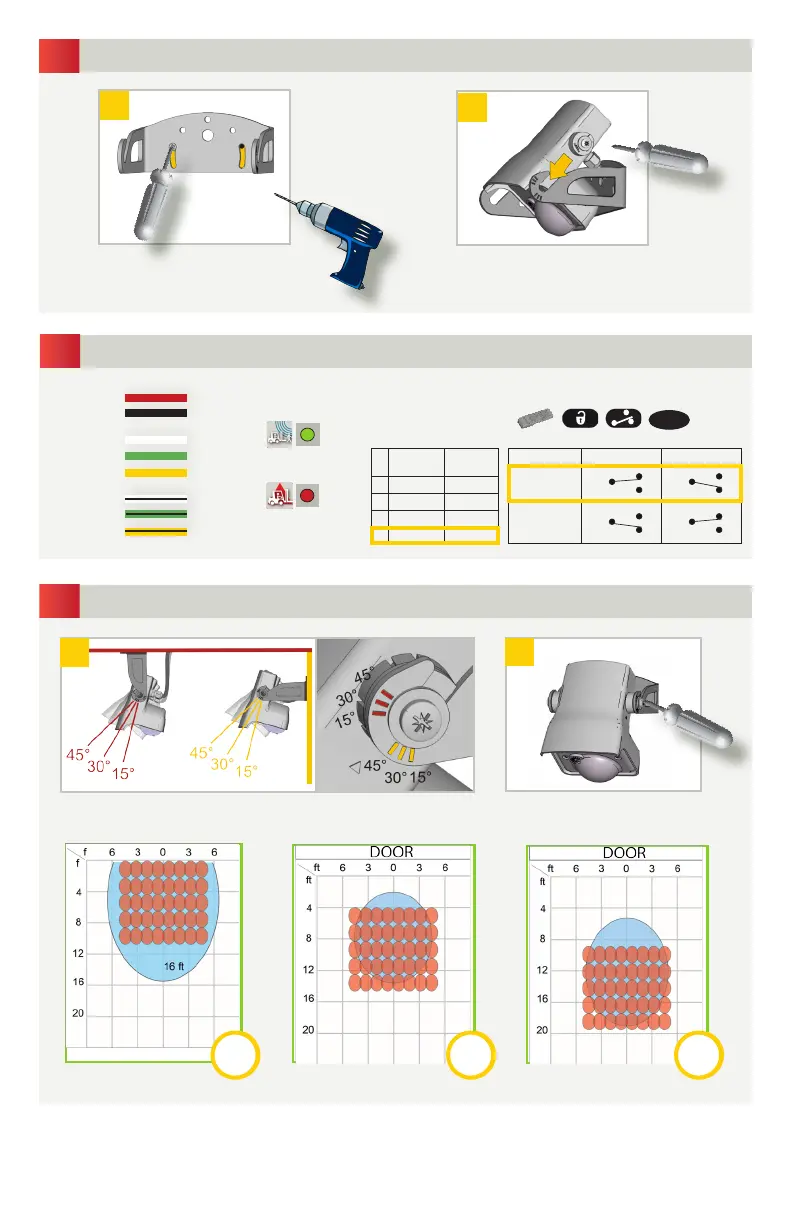
Position the sensor on the bracket and
tighten the screws
Remove the bracket from the sensor.
Drill 2 holes accordingly.
Attach the bracket to a solid surface.
WIRING
MOUNTING
Adjust the angle of the sensor to position the detection fields.
SENSOR ANGLE
Tighten the screws firmly.
RECOMMENDED
RADAR OUTPUT
Motion signal
AIR OUTPUT
Presence signal
POWER SUPPLY
CEILING
WALL
RED
BLACK
WHITE
GREEN
YELLOW
WHITE/BLACK
GREEN/BLACK
YELLOW/BLACK
Motion
Relay
Presence
Relay
1 Active Passive
2 Passive Active
3 Passive Passive
4 Active Active
Description Detection No Detection
Active
Relay
COM COM
Passive
Relay
COM COM
NO
NC
NO
NC
NO
NC
NO
NC
RELAY CONFIGURATION
COM
NO
NC
COM
NO
NC
RECOMMENDED
• The graphics above are not to scale and for illustration purposes and represent approximate detection fields when mounted at 16
ft./4.9m. AIR-Infrared field = emitting spots detectable by using the Spotfinder. The actual detection field is slightly smaller and
influenced by external factors.
• It’s important to adjust the sensor angle to position the deteciton fields correctly for your application. Utilizing a mounting bracket,
sensor location and reveal will dictate the sensor angle for your application.



 To Next Page