EasyManua.ls Logo

BEC MX-200 - Access Management

BEC MX-200
132 pages
Print Icon
To Next Page IconTo Next Page
To Previous Page IconTo Previous Page
Loading...
Device Configuration
VPN L2TP (Example on LAN-to-LAN)
99
BEC MX-200 User Manual
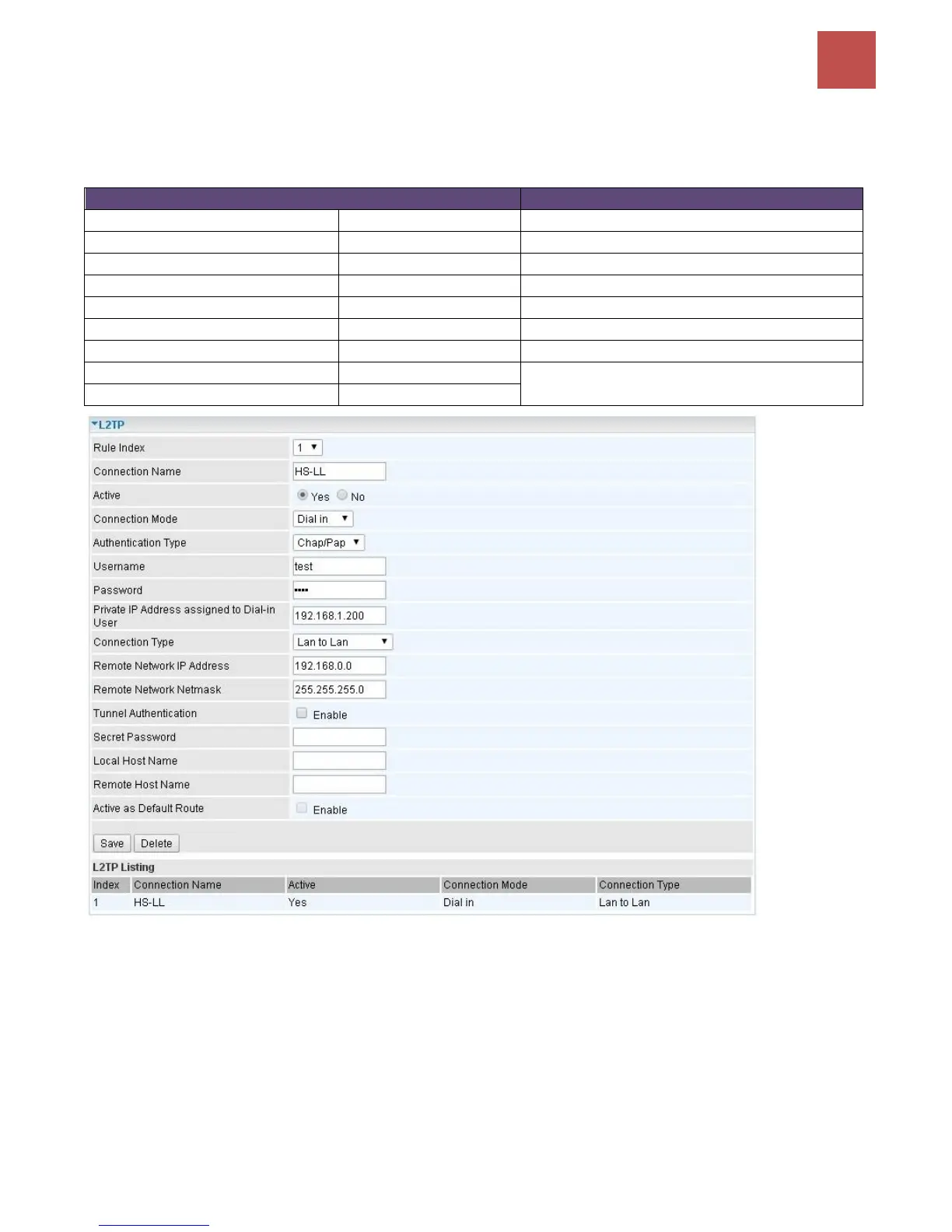
Configuring L2TP VPN Dial-in in the Head office
The IP address 192.168.1.200 will be assigned to the router located in the branch office. Please make
sure this IP is not used in the head office LAN.
Item
Description
Connection Name
HS-LL
Give a name of L2TP connection
Connection Mode
Dial in
Operate as L2TP server
Authentication Type
Chap/Pap
Authentication type
Username
Test
Dial in authenticate user name
Password
Test
Dial in authenticate user password
Assigned IP
192.168.1.200
An IP assigned to the dial in client
Connection Type
LAN to LAN
LAN to LAN for dial in
Remote Network IP
129.168.0.0
Remote access network
Remote Network Netmask
255.255.255.0

Table of Contents

Other manuals for BEC MX-200

Related product manuals