BEC MX-200 User Manual
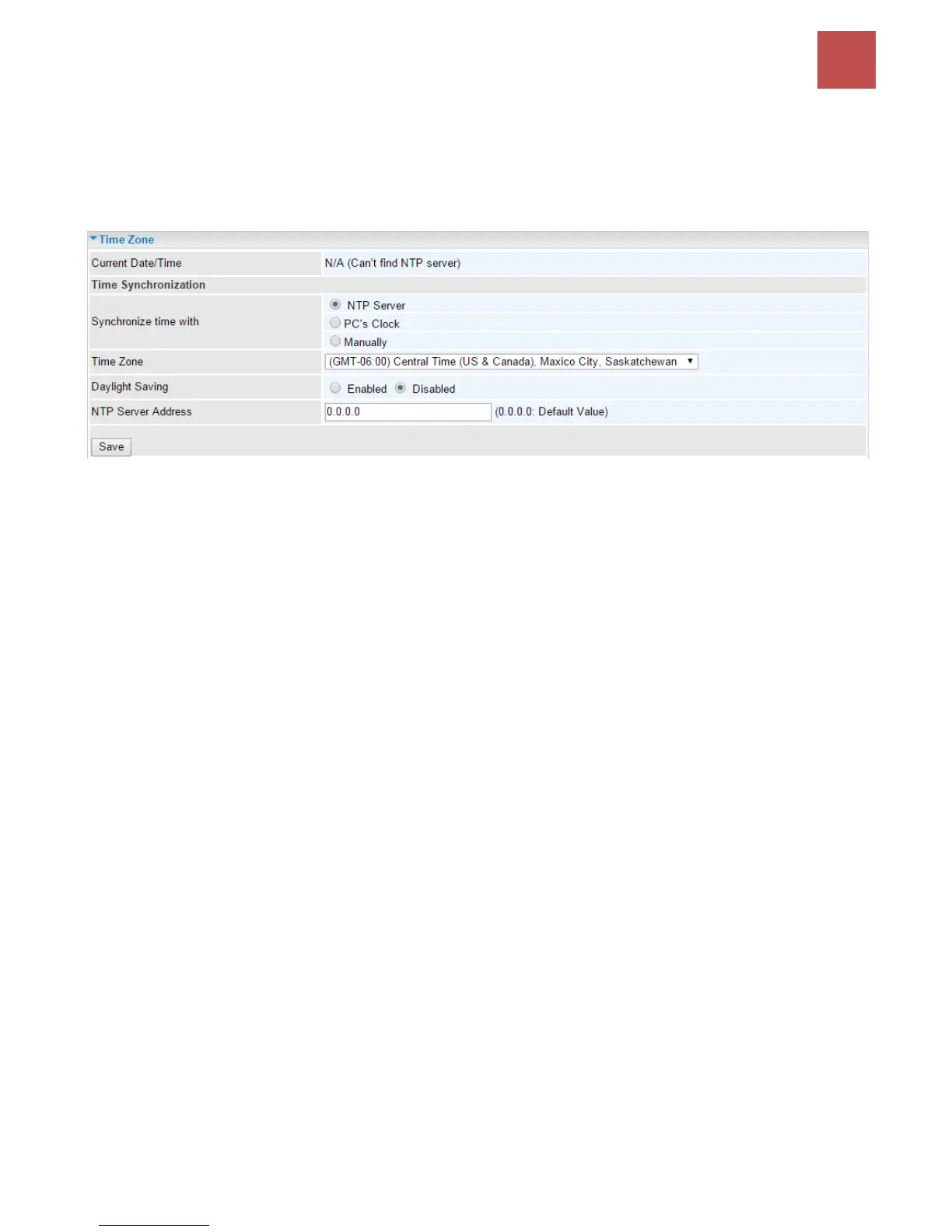
Time Zone
With default, MX-200 does not contain the correct local time and date.
There are several options to setup, maintain, and configure current local time/date on the MX-200. If
you plan to use Time Schedule feature, it is extremely important you set up the Time Zone correctly.
Synchronize time with: Select the methods to synchronize the time.
NTP Server automatically: To synchronize time with the SNTP servers to get the current time
from an SNTP server outside your network then choose your local time zone. After a successful
connection to the Internet, MX-200 will retrieve the correct local time from the SNTP server this
is specified.
PC’s Clock: To synchronize time with the PC’s clock.
Manually: Select this to enter the SNMP server IP address manually.
Time Zone: Choose the time zone of your location. This will set the time difference between your time
zone and Greenwich Mean Time (GMT).
Daylight Saving: Select this option if you use daylight savings time.
NTP Server Address: Enter the IP address of your time server. Check with your ISP/network
administrator if you are unsure of this information.



 To Next Page