BEC MX-200 User Manual
Routing
This is static route feature. You are equipped with the capability to control the routing of all the traffic
across your network. With each routing rule created, user can specifically assign the destination where
the traffic will be routed to.
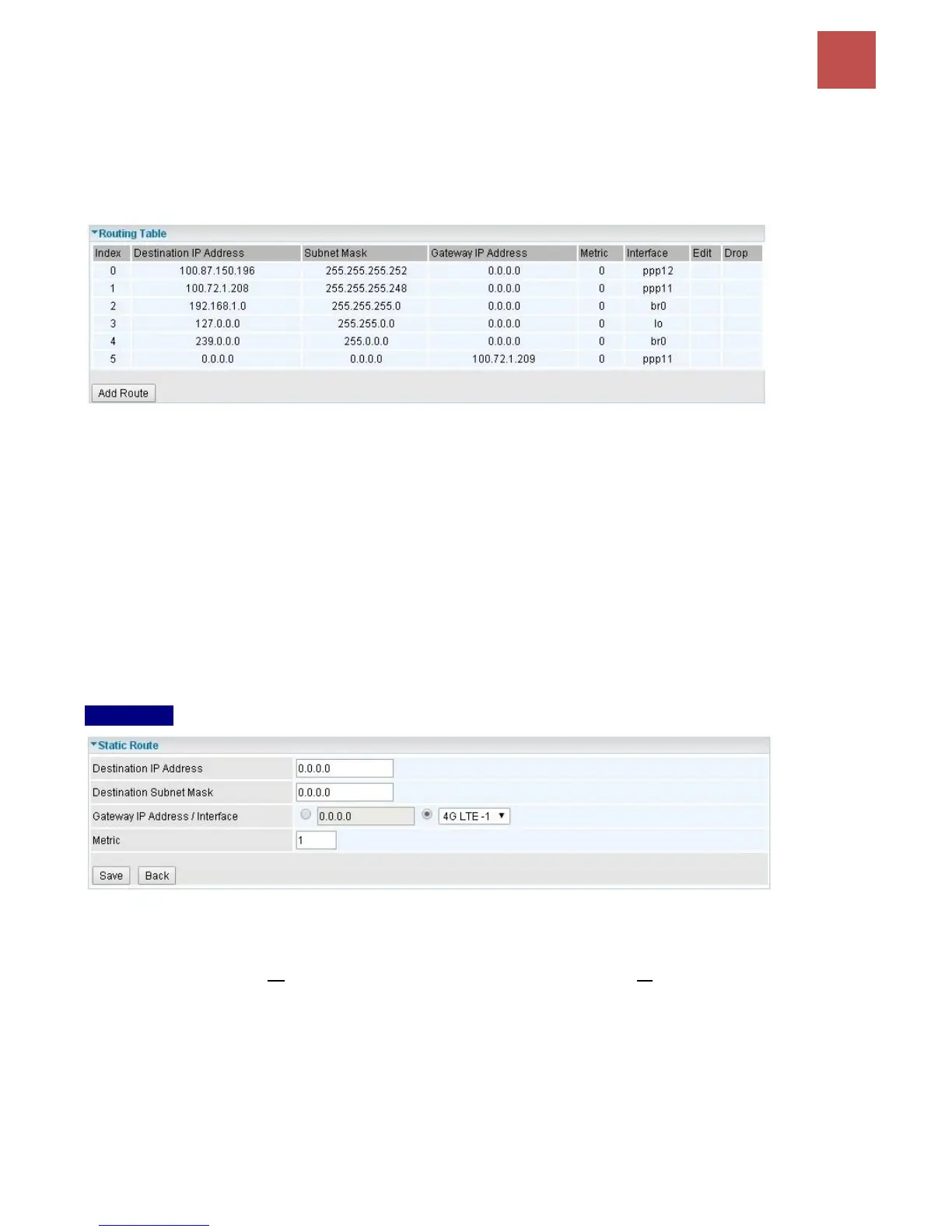
Index #: The numeric route indicator.
Destination IP Address: IP address of the destination network
Subnet Mask: The subnet mask of destination network.
Gateway IP Address: IP address of the gateway or existing interface that this route uses.
Metric: It represents the cost of transmission for routing purposes. The number need not be precise,
but it must be between 1 and 15.
Interface: Media/channel selected to append the route.
Edit: Edit the route; this icon is not shown for system default route.
Drop: Drop the route; this icon is not shown for system default route.
Add Route
Destination IP Address: This is the destination subnet IP address.
Destination Subnet Mask: The subnet mask of destination network.
Gateway IP Address or Interface: This is the gateway IP address or existing interface to which
packets are to be forwarded.
Metric: It represents the cost of transmission for routing purposes. The number need not be precise,
but it must be between 1 and 15.
Click Save to add this route



 To Next Page