BEC MX-200 User Manual
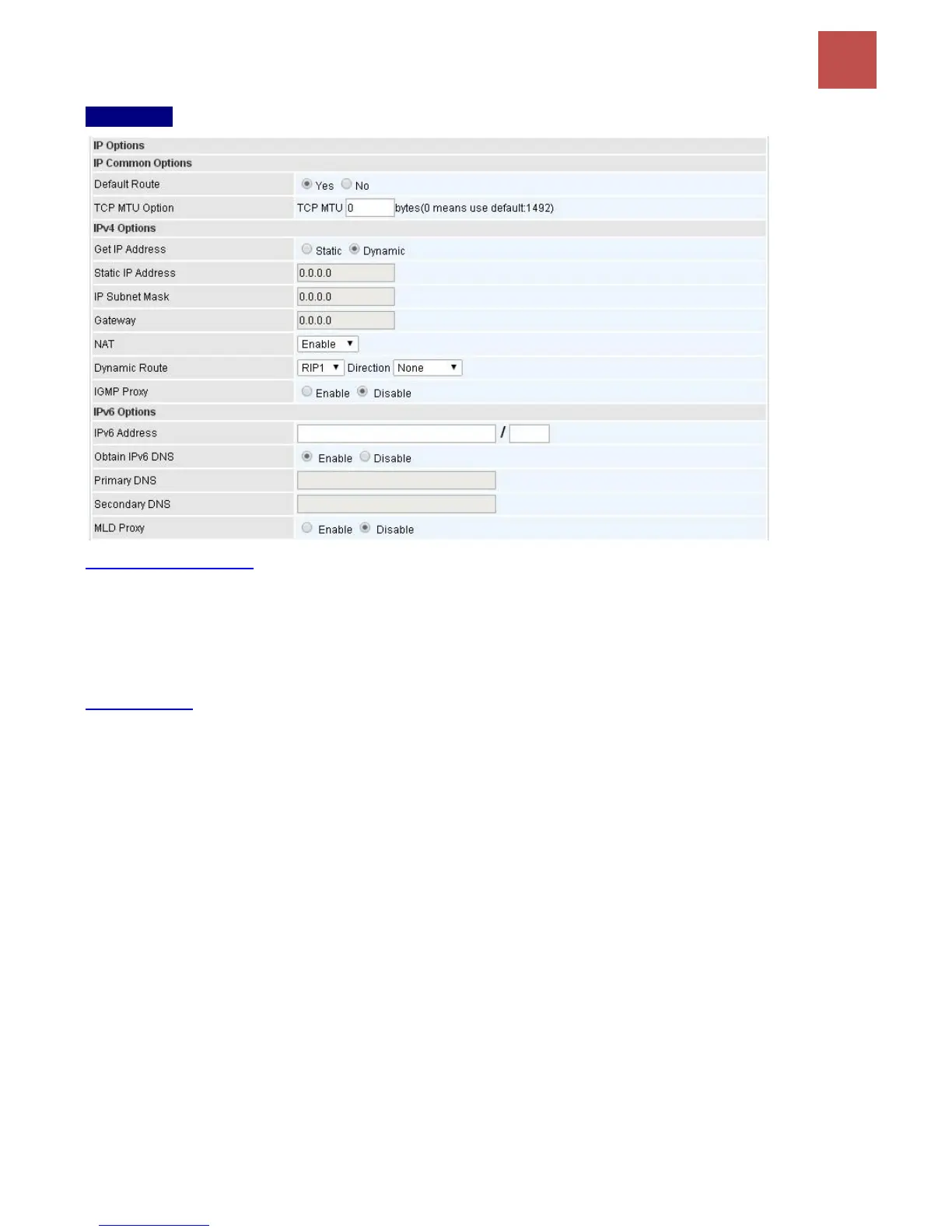
IP Options
IP Common Options
Default Route: Select Yes to use this interface as default route interface.
TCP MTU Option: Enter the maximum packet that can be transmitted. Default MTU 0 means it is set
to 1492 bytes.
IPv4 Options
Get IP Address: Choose Static or Dynamic
Static IP Address: If Static is selected in the above field, please enter the specific IP address you get
from ISP and the following IP subnet mask and gateway address.
IP Subnet Mask: The default is 0.0.0.0. User can change it to other such as 255.255.255.0.Type the
subnet mask assigned to you by your ISP (if given).
Gateway: Enter the specific gateway IP address you get from ISP.
NAT: Enable to allow MX-1000 to assign private network IPs to all devices in the network for get
Internet access.
Dynamic Route:
RIP Version: (Routing Information protocol) Select this option to specify the RIP version,
including RIP-1, RIP-2.
RIP Direction: Select this option to specify the RIP direction.
- None is for disabling the RIP function.
- Both means the router will periodically send routing information and accept routing
information then incorporate into routing table.
- IN only means the router will only accept but will not send RIP packet.



 To Next Page