17 PROTON User Manual
3. Oscillators
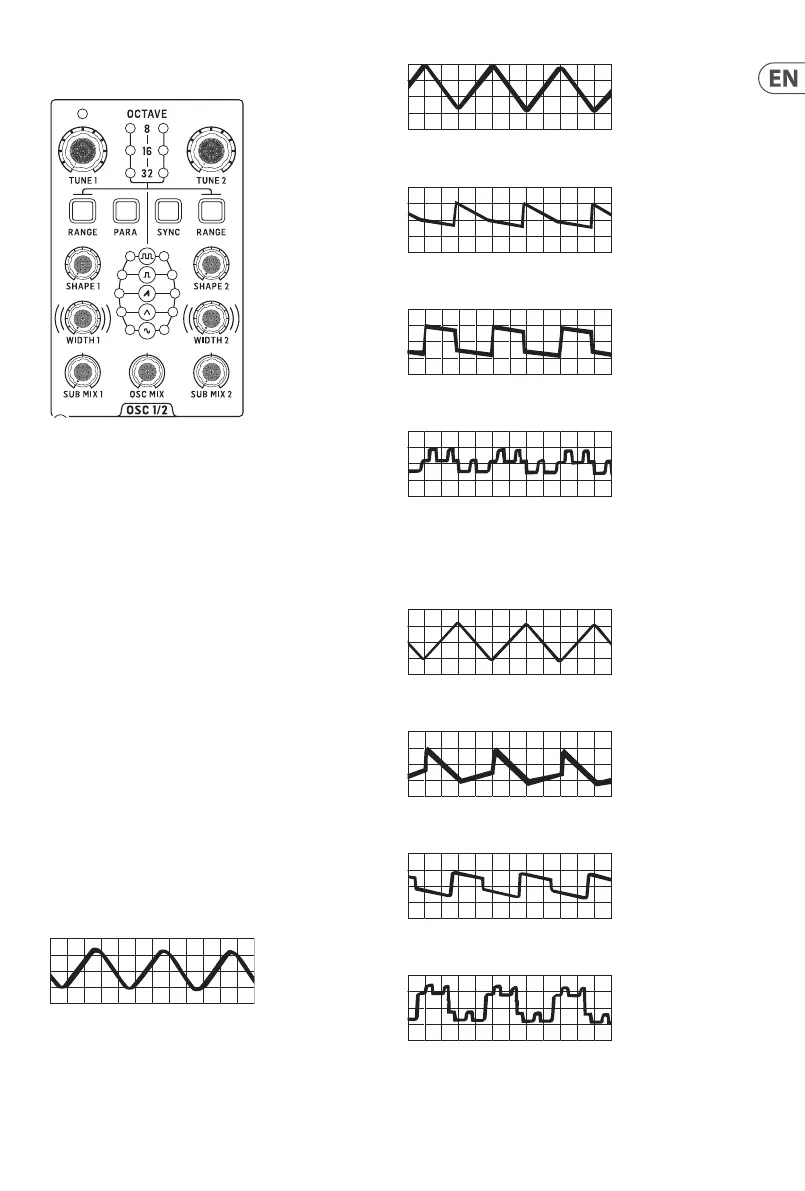
Your Proton has two analog VCOs, whose pitch can be controlled
by MIDI (5-pin DIN or USB) or from a suitable CV source in the
range -5 V to +5 V. The VCOs are capable of producing frequencies
between 0.7 Hz to 50 kHz. Each VCO has its own controls for
tuning, range, shape, pulse width and sub mix. In addition there is
an Oscillator mix control and buttons to select Oscillator sync and
paraphonic mode.
3.1 Tuning
The two VCOs can be individually tuned by 13 semitones up or
down.
3.2 Range
The two VCOs can have their range set to either 32’, 16’ or 8’, which
is indicated by the LEDs on the front panel. The ranges can be
stepped through using the range buttons, from 8’ down to 32’.
When all three LEDs are let on either VCO it is in ten octave mode
and will respond to the full note range.
Shape
The Proton VCOs have ve waveshapes, which can either be
switched or blended using the SynthTribe app or according to the
second panel settings. Press Range (Osc 1 or 2) for two seconds
and, once it is ashing, use the para button to toggle between
switched and blended for the selected oscillator. Press Range
again for two seconds to exit second panel.
The basic shapes are:
Sine
Triangle
Sawtooth
Square/Pulse
Tone Mod
When the blending option is selected then adjacent waves blend
into one another, with the more dominate wave’s LED showing
brighter. Thesewaveforms are:
Sine/Triangle
Triangle/Sawtooth
Sawtooth/Square
Square/Tone Mod











 To Next Page