23 PROTON User Manual
9. Low Frequency Oscillators
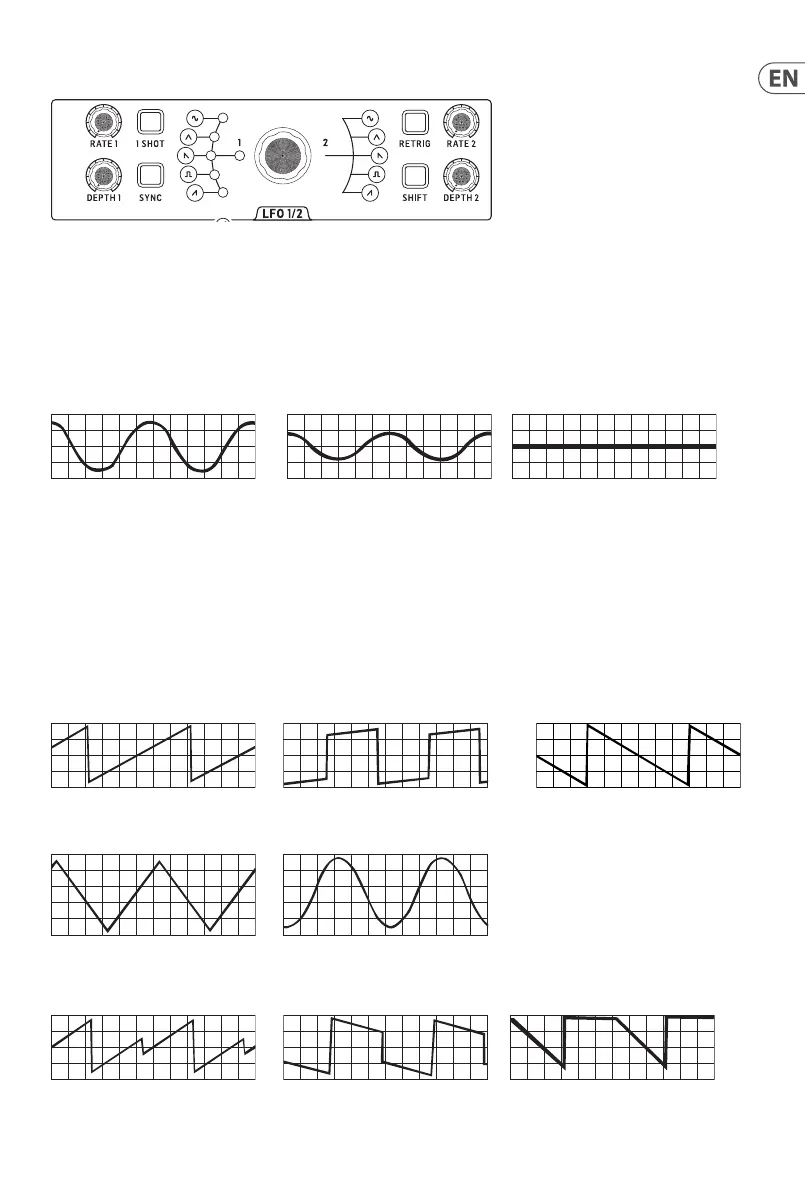
The Proton has two independent LFOs. Owing to space considerations some controls are shared between the two, which is achieved by
use of the shiftbutton.
9.1 Rate
Each LFO has its own rate control, with a range from 0.01 Hz at full CCW to 200 Hz at full CW.
9.2 Depth
Each LFO has its own depth control, which allows full amplitude when turned CW, with the amplitude reducing to zero as it is turned CCW.
100% depth 50% depth 0% depth
9.3 Shift
The shift button is used to select which LFO is aected by shared controls. When it is lit in red then LFO 1 is aected, white for LFO 2.
Theshift control is also used to select which ASR envelope is aected by their shared buttons.
9.4 Waveform
Each LFO can have its own waveform selected from ramp, square, sawtooth, triangle and sine. These waveforms can also be set to blend
rather than being switched, either by using the SynthTribe app, or by the second panel function. Press 1-shot for two seconds and, once it
is ashing, use the para button to toggle between switched and blend for LFO 1. Press 1-shot again for two seconds to exit second panel.
For LFO 2 press the LFO retrig button for two seconds, then para. Press retrig again to exit second panel.
Ramp Square Sawtooth
Triangle Sine
The waveform blending is a continuous process, so there are many possible blends of adjacent waveforms
Ramp / Square Square / Sawtooth Sawtooth / Triangle











 To Next Page