30 PROTON User Manual
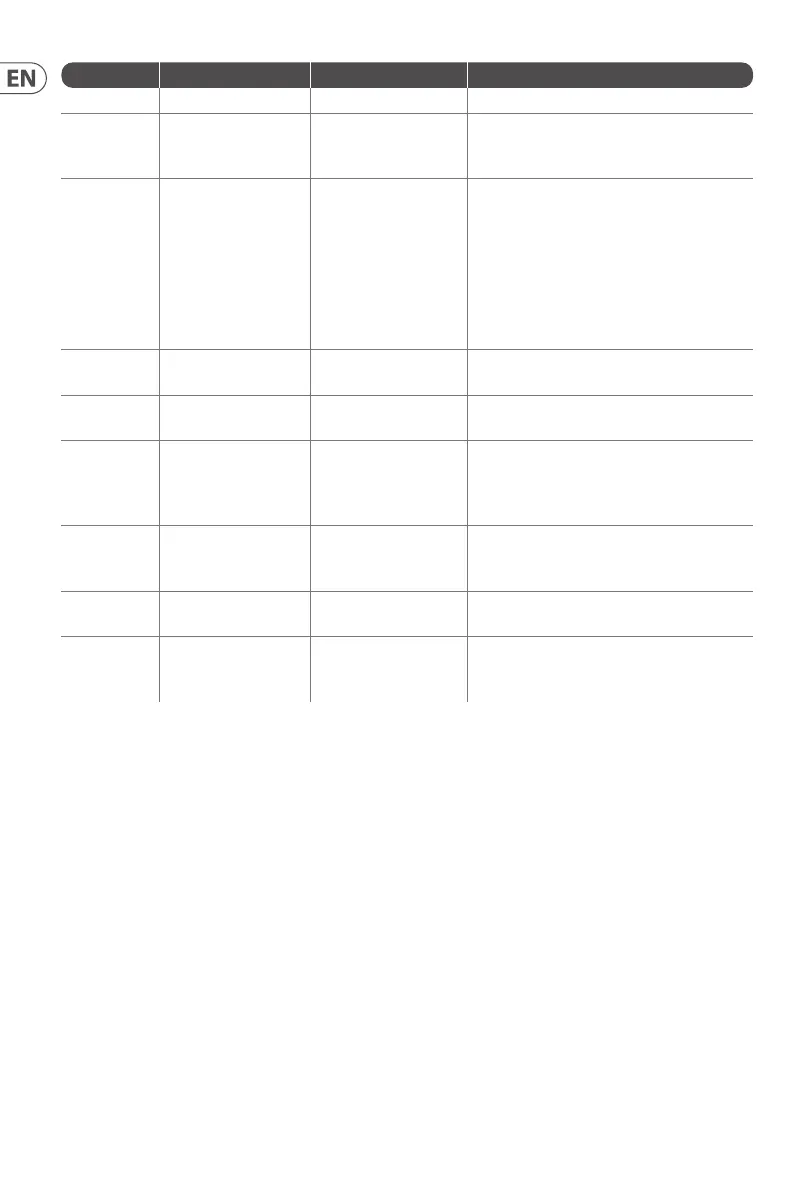
First Second Third Action
LFO Shift LFO Encoder Sets the VCF 2 modulation depth.
Osc Sync VCF 1 Mode
Sets the note priority for both oscillators
when in mono mode: HPF – highest, BPF –
last, LPF – lowest.
VCF 2 Mode
Set the note priority for paraphonic mode.
Osc 1 will play the rst priority note, Osc 2
the second. Reaction to a third note will be
governed by the setting: HPF – highest, BPF
– last, LPF – lowest.
LFO Encoder
Selects the source for Assign Out on the
patchbay, from: Osc 1 CV, Osc 2 CV, velocity,
Mod Wheel, Aftertouch.
Para
Switches Polychaining on or o: 0 = o,
1 = on.
LFO Sync
Switches MIDI clock forwarding on or o 0
= o, 1 = on
Env Retrig
Selects the mode for ASR retriggering, from:
Neutron (default) – new notes will retrigger
the ASRs or Proton – notes will not retrigger
the ASRs while at least one note is held.
Wave
Mode
LFO Encoder
Selects the destination for Assign In, from:
None (default), Osc 1, Osc 2, Osc 1&2, VCF 1,
VCF 2, VCF 1&2.
LFO Shift LFO Encoder
Adjusts the depth of the Assign In, from 0%
to 100%.
Osc Para ASR Retrig
Pressing Osc Para and ASR Retrig for more
than two seconds will recalibrate the
Proton.
16. Factory Restore
If it becomes necessary to restore the Proton to its factory settings press and hold the Osc Para and Osc Sync buttons while powering up.
17. Polychaining
If you have multiple Proton units, you can connect them in a ‘Poly Chain’ to produce polyphonic sounds. The Proton works by sending
unhandled notes to the next in the chain. When the chain runs out, subsequent notes are not played. The rst Proton plays the rst played
note, the second plays the second, thethird plays the third etc. Note that a Proton in Paraphonic mode will handle 2 notes. Each Proton
must have the same MIDI channel number set using the rear panel switches or SynthTribe app. The Poly Chain connections are shown in
the diagram. Set the Poly Chain ON for all Protons. The last Proton in the chain can either be set to Poly Chain on or o depending on how
you would like the MIDI information to be handled. If Poly Chain is on, the last Proton will act as if it is sending the next played note over
the maximum number of notes played to the next device in the chain, and the note will not be heard or dropped. If Poly chain is o for the
last Proton, the next played note over the maximum number of notes will steal the last played note from the last Proton. To toggle Poly
Chain mode, press and hold the OSC SYNC button for 2 seconds. The LED will repeatedly ash (once when in mono mode - twice when in
duo mode). Ashort press on the PARA button will still toggle the PARA/MONO mode. Hold PARA to exit. If you are only using one Proton,
make sure the PolyChain is OFF.











 To Next Page