29 PROTON User Manual
15. Extra Panel Functions
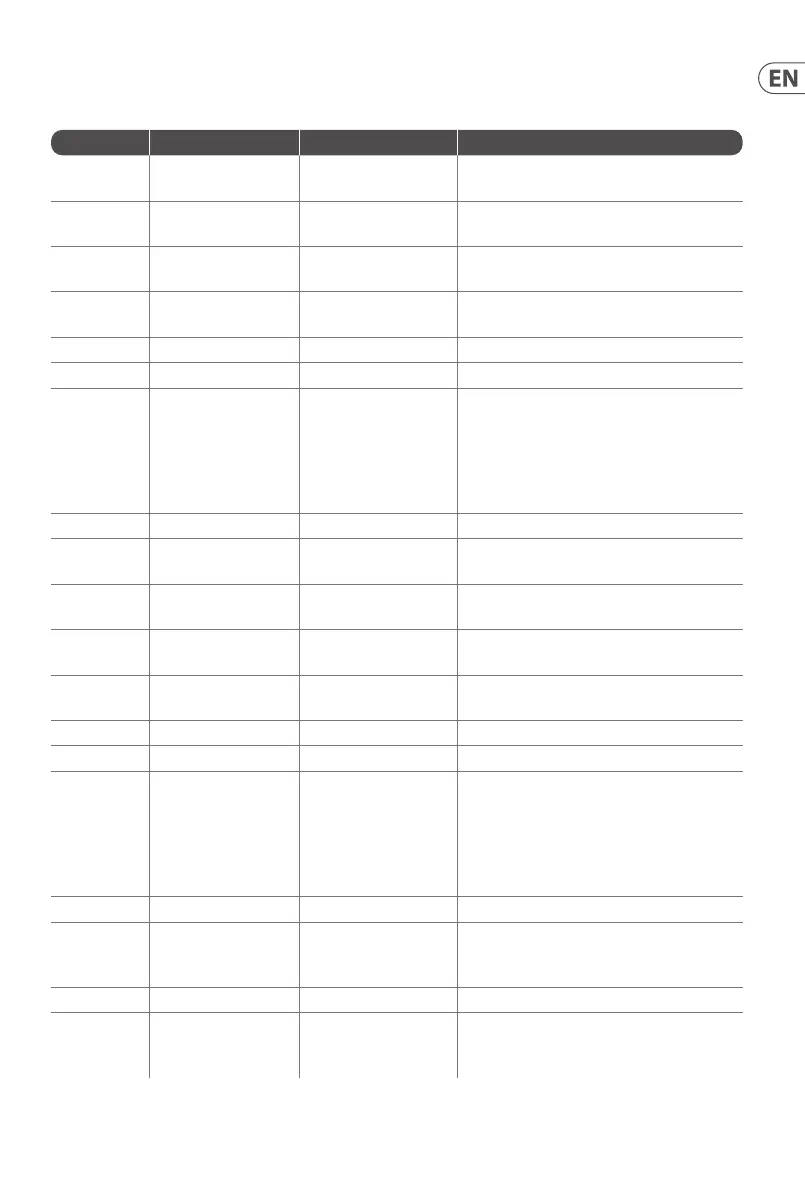
Below is a summary of the control combinations required to access and adjust the extra panel functions. The extra panel functions can be
switched on or o using SynthTribe, which makes these functions only adjustable using the app.
First Second Third Action
Osc 1 Range LFO Encoder
Selects the waveform for Osc 1 sub oscillator,
from the LFO options.
Para
Selects whether the Osc 1 waveform is
switched (default) or blended.
Osc Sync
Selects whether the Osc 1 tuning control is
enabled (default) or disabled.
Wave Mode
Switches Osc 1 frequency input from
exponential to linear
F/S Switches Osc 1 frequency input to exponential
Env Retrig Disables MIDI control of Osc 1.
MIDI Note VCF 1 Mode
Sets the key split point, for paraphonic
behavior in Last Note Priority mode: when
a split point is set then Osc 1 will sound the
note below the split point, and Osc 2 the one
above. Otherwise the last note will be played
by both Oscs.
MIDI Note LFO 1 Shot Sets the base note for LFO 1 key tracking
Osc 2 Range LFO Encoder
Selects the waveform for Osc 2 sub oscillator,
from the LFO options.
Para
Selects whether the Osc 2 waveform is
switched (default) or blended.
Osc Sync
Selects whether the Osc 2 tuning control is
enabled (default) or disabled.
Wave Mode
Switches Osc 2 frequency input from
exponential to linear
F/S Switches Osc 2 frequency input to exponential
Env Retrig Disables MIDI control of Osc 2.
MIDI Note VCF 2 Mode
Sets the key split point, for paraphonic
behavior in Last Note Priority mode: when
a split point is set then Osc 1 will sound the
note below the split point, and Osc 2 the one
above. Otherwise the last note will be played
by both Oscs.
MIDI Note LFO 1 Shot Sets the base note for LFO 2 key tracking.
VCF 1 Mode LFO Encoder
Selects the modulation source for VCF 1 from:
none, MIDI velocity, Mod Wheel (MIDI CC #1),
Aftertouch.
LFO Shift LFO Encoder Sets the VCF 1 modulation depth.
VCF 2 Mode LFO Encoder
Selects the modulation source for VCF 2 from:
none, MIDI velocity, Mod Wheel (MIDI CC #1),
Aftertouch.











 To Next Page