28 PROTON User Manual
13.7 CV Mix
Output of the CV mix fed from the In patchbay and mixed with the
CV mix utility. If there are no inputs to the CV mix then the mix
will be of LFO 1 and 2 (bipolar).
13.8 Sum
Output of the two CVs fed into the sum inputs on the In patchbay.
If there are no inputs then the output will be a mix of sub
oscillators 1 and 2.
13.9 Envelope Generators
ADSR 1; ADSR 2; ASR 1; ASR 2 – CV outputs of the envelope
generators’ curves.
13.10 Low Frequency Oscillators
LFO 1 uni; LFO 1 bi; LFO 2 uni; LFO 2 bi – CV outputs from the LFOs,
where the uni outputs give a unipolar response from 0 V to +5 V
and the bi outputs give a bipolar response from -5 V to + 5 V.
13.11 Assign
Assignable output whose source can be selected from osc 1 CV,
osc 2 CV, velocity (MIDI only), mod wheel (MIDI only), aftertouch
(MIDI only). This can be selected using the SynthTribe app or from
the second panel by pressing the osc sync button for two seconds
until it ashes, then using the LFO encoder to scroll through the
options. Pressing osc sync again exits second panel.
14. Rear Panel
Please note that if the Proton is removed from its supplied case
and mounted in a Eurorack case (see Quick Start Guide for details
on how to do this) then the rear panel will no longer be available.
14.1 Input
The input socket is a TS 6.35 mm jack which duplicates the 3.5 mm
jack on the In patchbay and feeds an external audio signal into the
Proton’s lters.
14.2 Output
The output socket is a TS 6.35 mm jack which sends the VCA
output as adjusted by the output level control to external mixers,
ampliers etc.
14.3 Phones
The phones out is a TRS 6.35 mm jack socket suitable for use with
any standard headphones. It is independent of the output level
control, and has its own dedicated level control adjacent.
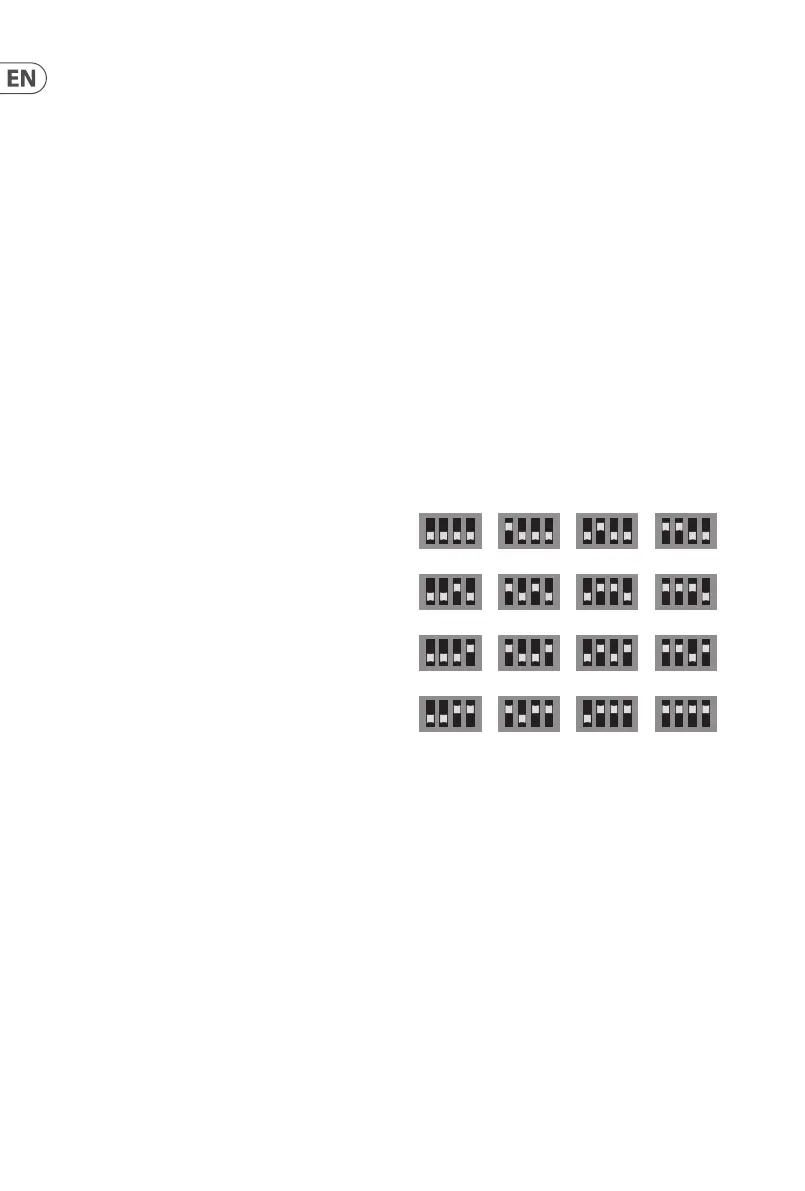
14.4 MIDI channel select
Use these four dip switches to set the MIDI in channel of the
Proton as illustrated:
Please note that this setting can be overridden using the
SynthTribe app.
14.5 MIDI Thru
This 5-pin DIN socket can be used to mirror incoming MIDI
messages received on the front panel MIDI In socket.
14.6 USB
This USB 2.0 Type B socket can be used to control the Proton over
MIDI, for example direct from a DAW, and to alter settings and
update the rmware via the SynthTribe app.
14.7 Power
The Proton comes supplied with a 12 V 1000 mA PSU. This is
the only PSU that should be used, unless the Proton is Eurorack
mounted. The adjacent switch can be used to switch the Proiton
on and o as required.
1 2 3 4
5 6 7 8
9 10 11 12











 To Next Page