21 PROTON User Manual
5.5 Modulation Depth
These controls determine the level of modulation depth to each
of the lters. When link is not in use then VCF 1 is modulated by
LFO 1 or a source patched via the pacthbay; and VCF 2 by LFO 2
or a source patched via the patchbay. When they are linked then
the modulation is as described above, but the controls are still
eective for their respective lters.
There is a second modulation available, which can be set up
using the SynthTribe app, or by using the second panel functions.
Toaccess this press and hold the mode button for the required
lter for two seconds. When it starts to ash use the LFO encoder
to select one of the following modulation sources:
Sine: no source (default)
Triangle: MIDI velocity
Sawtooth: MIDI mod wheel CC #1)
Square: MIDI aftertouch
Pressing the shift button then allows the LFO encoder to set the
modulation depth for the selected source.
5.6 Soft
The soft button softens the resonance of the selected lter.
Ifneither LED is lit then then resonance is not softened, red means
that only VCF 1 is softened, white VCF 2 and both LEDs mean that
both are aected.
Envelope Depth
The envelope depth controls set the amount of ADSR envelope
modulation to each lter from ADSR 1.
5.7 Key
The key button selects whether either, both or neither lter tracks
the keyboard input. If neither LED is let then neither lter is
tracking, red means the VCF 1 tracks, white VCF 2 and both means
that both track.
5.8 Filter Mix
The setting of this control determines how much of the output
of each lter is fed to 1VCAs. At the center point both lters are
fed equally, turning the control CCW biases towards VCF 1; CW to
VCF 2.
5.9 Noise
The noise control sets the level of white noise that is fed into the
lters alongside the VCOs. When it is fully CCW then no noise
is present, fully CW then the noise is of equal volume to the
oscillatormix.
6. Voltage Controlled Ampliers
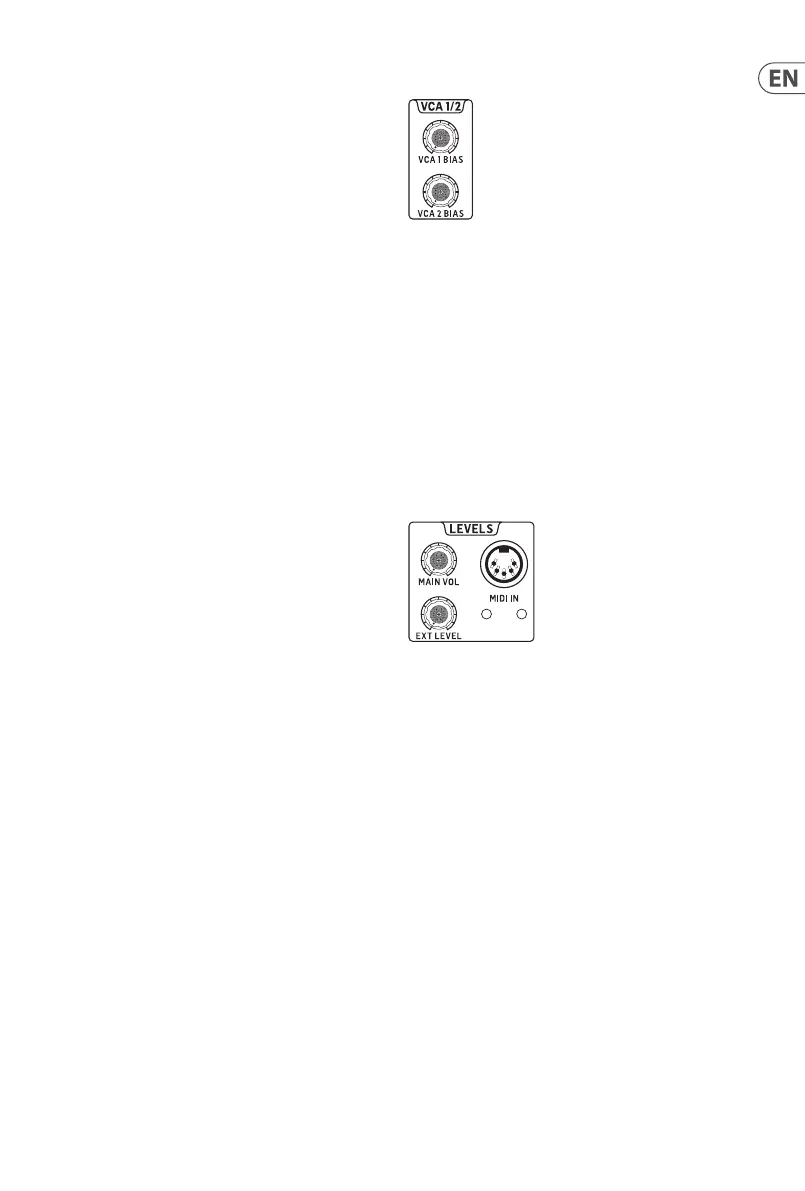
The Proton has two parallel VCAs. Each has an independent bias
control that will allow a level of signal through regardless of what
the control source is doing. When the bias controls are fully CCW
then the VCAs are entirely under the control of their respective
sources, when they are fully CW then the sources are overridden.
Under normal operation VCA 1 receives the output of the lter
mix and VCA 2 receives the output of VCF 2. Both are controlled
by ADSR 2. However either or both can be send a dierent input,
and/or be controlled from a dierent source using the relevant
sockets on the In patchbay. VCA 1 feeds into the Proton’s main
and headphone outputs, but also have their own outputs on the
Out patchbay, which do not break the connection to main and
headphone.
7. Levels
7.1 Main Volume
The levels section contains the volume control for the main line
level output (the volume control for the headphone output is on
the rear panel).
7.2 External Level
The level control for external signals to be processed by the
Proton’s VCFs, whose input socket is also on the rear panel.
7.3 MIDI In
The Proton’s 5-pin DIN MIDI in is also situated on the front
panel. The MIDI input channel can be selected either by the four
dip switches on the rear panel or by using the SynthTribe app.
TheMIDI in socket is accompanied by two LEDs which light when a
MIDI note is received on the selected channel.











 To Next Page