34 PROTON User Manual
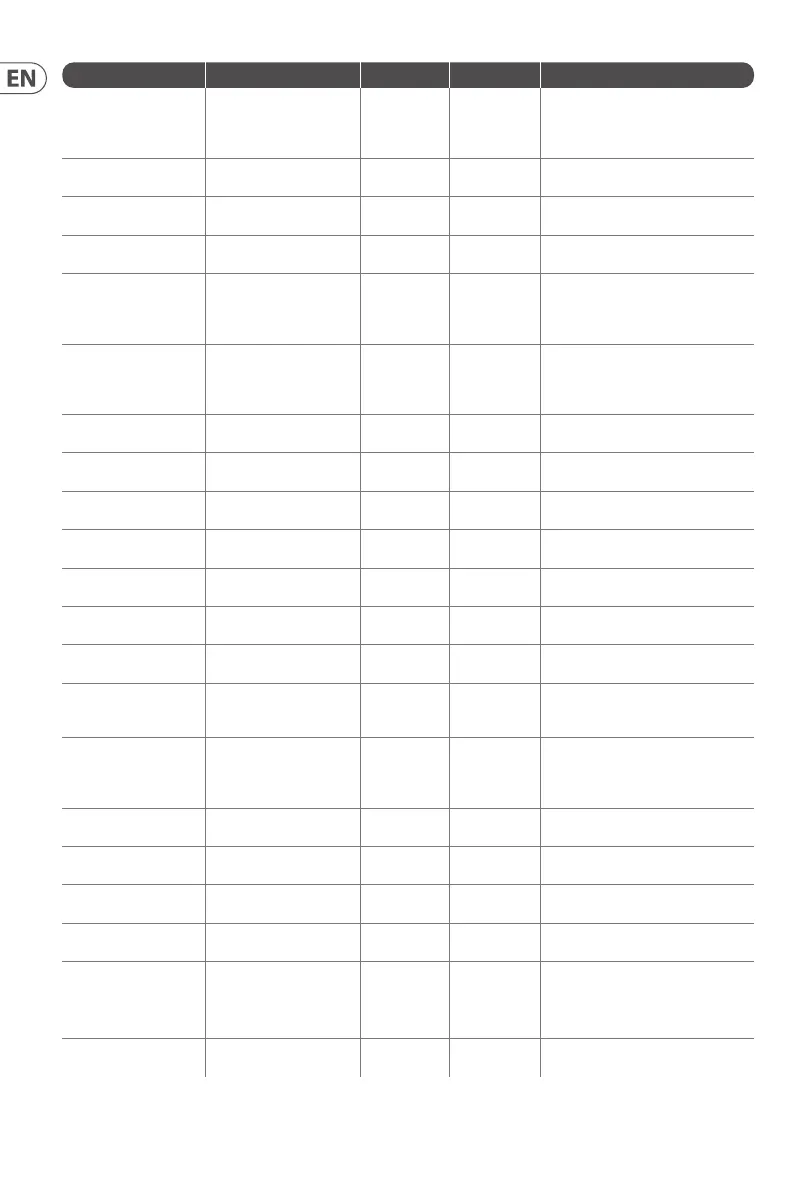
SSPKT Function Value Range Default Value Description
0x44 Wavefolder mode 0-3 3
0 = AM;
1 = half;
2 = 1;
3 = bypass
0x46 Osc sync 0-1 0
0 = not synced;
1 = Osc 2 synced to Osc 1
0x47 Osc paraphony 0-1 0
0 = mono;
1 = paraphonic
0x48 Osc key split 0 or 0C-60 0
0 = no split;
0C-60 = split at this note
0x49 Sub Osc shape 0-3 0
0 = pulse;
1 = sawtooth;
2 = triangle;
3 = sine
0x4A Osc 1 range 0-3 2
0 = 8’;
1 = 16’;
2 = 32’;
3 = free
0x4B Osc 1 mute 0-1 0
0 = unmuted;
1 = muted
0x4C Sub Osc 1 mute 0-1 0
0 = unmuted;
1 = muted
0x50 Osc 1 linear FM 0-1 0
0 = disabled;
1 = enabled
0x51 Osc 1 waveform blend 0-1 1
0 = blended;
1 = switched
0x52 Osc 1 tuning control 0-1 0
0 = enabled;
1 = disabled
0x53 Osc 1 CV modulation 0-1 0
0 = enabled;
1 = disabled
0x54 Osc 1 MIDI 0-1 0
0 = enabled;
1 = disabled
0x55 Osc 1 portamento 0-18 0C
0 = 12 semitone glide;
18 = greater than 12 semitone glide;
0C = no glide
0x56 Osc 2 range 0-3 2
0 = 8’;
1 = 16’;
2 = 32’;
3 = free
0x57 Osc 2 mute 0-1 0
0 = unmuted;
1 = muted
0x58 Sub Osc 2 mute 0-1 0
0 = unmuted;
1 = muted
0x5C Osc 2 linear FM 0-1 0
0 = disabled;
1 = enabled
0x5D Osc 2 waveform blend 0-1 1
0 = blended;
1 = switched
0x5E Osc 2 tuning control 0-1 0
0 = enabled;
1 = disabled
0x5F Osc 2 CV modulation 0-1 0
0 = enabled;
1 = disabled
0x60 Osc 2 MIDI 0-1 0
0 = enabled;
1 = disabled











 To Next Page