15
5. Operation
5.1. Managing the Keypad
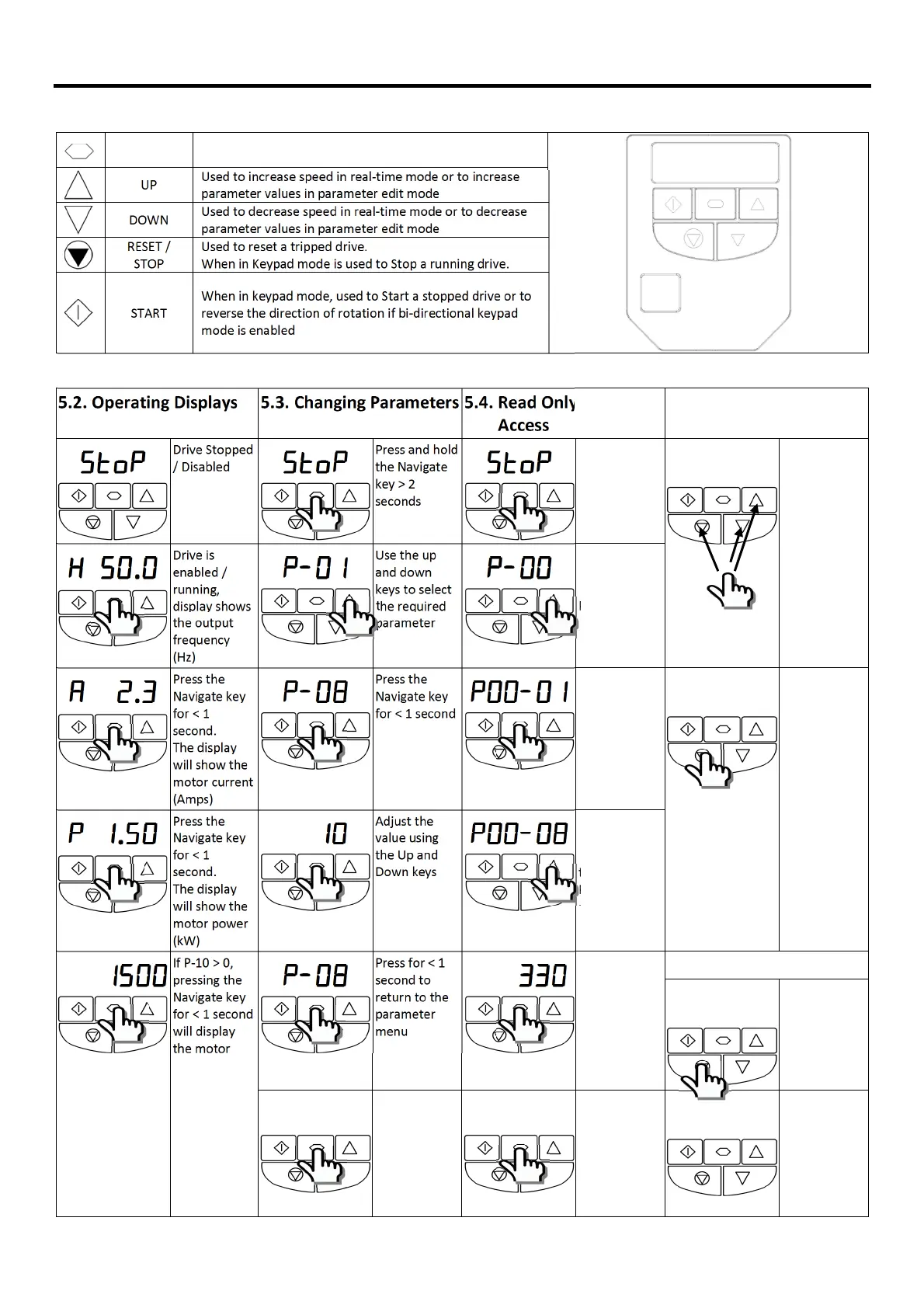
The drive is configured and its operation monitored via the keypad and display.
NAVIGATE
Used to display real-time information, to access and exit
parameter edit mode and to store parameter changes
UP
Used to increase speed in real-time mode or to increase
parameter values in parameter edit mode
DOWN
Used to decrease speed in real-time mode or to decrease
parameter values in parameter edit mode
RESET /
STOP
Used to reset a tripped drive.
When in Keypad mode is used to Stop a running drive.
START
When in keypad mode, used to Start a stopped drive or to
reverse the direction of rotation if bi-directional keypad
mode is enabled
5.2. Operating Displays 5.3. Changing Parameters
5.4.
Access
5.5. Resetting
Parameters
STo
SToSTo
SToP
PP
P
Drive Stopped
/ Disabled
STo
SToSTo
SToP
PP
P
Press and hold
the Navigate
key > 2
seconds
STo
SToSTo
SToP
PP
P
Press and hold
the Navigate
key > 2
seconds
P-def
P-defP-def
P-def
To reset
parameter
values to their
settings, press
and hold Up,
Down and
Stop buttons
for > 2
seconds.
The display
will show
“p-def
p-defp-def
p-def”
H 50
H 50H 50
H 50.0
00
0
Drive is
enabled /
running,
display shows
the output
frequency
(Hz)
P-01
P-01P-01
P-01
Use the up
and down
keys to select
the required
parameter
P-0
P-0P-0
P-00
00
0
Use the up
and down
keys to select
P-00
A 2
A 2A 2
A 2.3
33
3
Press the
Navigate key
for < 1
second.
The display
will show the
motor current
(Amps)
P-08
P-08P-08
P-08
Press the
Navigate key
for < 1 second
P00-01
P00-01P00-01
P00-01
Press the
Navigate key
for < 1 second
Stop
StopStop
Stop
Press the Stop
key.
The display
will show
“stop
stopstop
stop”
P 1
P 1P 1
P 1.50
5050
50
Press the
Navigate key
for < 1
second.
The display
will show the
motor power
(kW)
10
10 10
10
Adjust the
value using
the Up and
Down keys
P
PP
P00-08
00-0800-08
00-08
Use the up
and down
keys to select
the required
Read Only
parameter
1500
15001500
1500
If P-10 > 0,
pressing the
Navigate key
for < 1 second
will display
the motor
speed (RPM)
P-08
P-08P-08
P-08
Press for < 1
second to
return to the
parameter
menu
330
330 330
330
Press the
Navigate key
for < 1 second
to display the
value
5.6. Resetting a Fault
O-I
O-IO-I
O-I
Press the Stop
key.
The display
will show
“stop
stopstop
stop”
P-08
P-08P-08
P-08
Press for > 2
seconds to
return to the
operating
display
STo
SToSTo
SToP
PP
P
Press and hold
the Navigate
key > 2
seconds to
return to the
operating
display
Stop
StopStop
Stop


 To Next Page