27
8. Modbus RTU Communications
8.1. Introduction
The drive can be connected to a Modbus RTU network via the RJ45 connector on the front of the drive.
8.2. Modbus RTU Specification
Protocol Modbus RTU
Error check CRC
Baud rate 9600bps, 19200bps, 38400bps, 57600bps, 115200bps (default)
Data format 1 start bit, 8 data bits, 1 stop bits, no parity.
Physical signal RS 485 (2-wire)
User interface RJ45
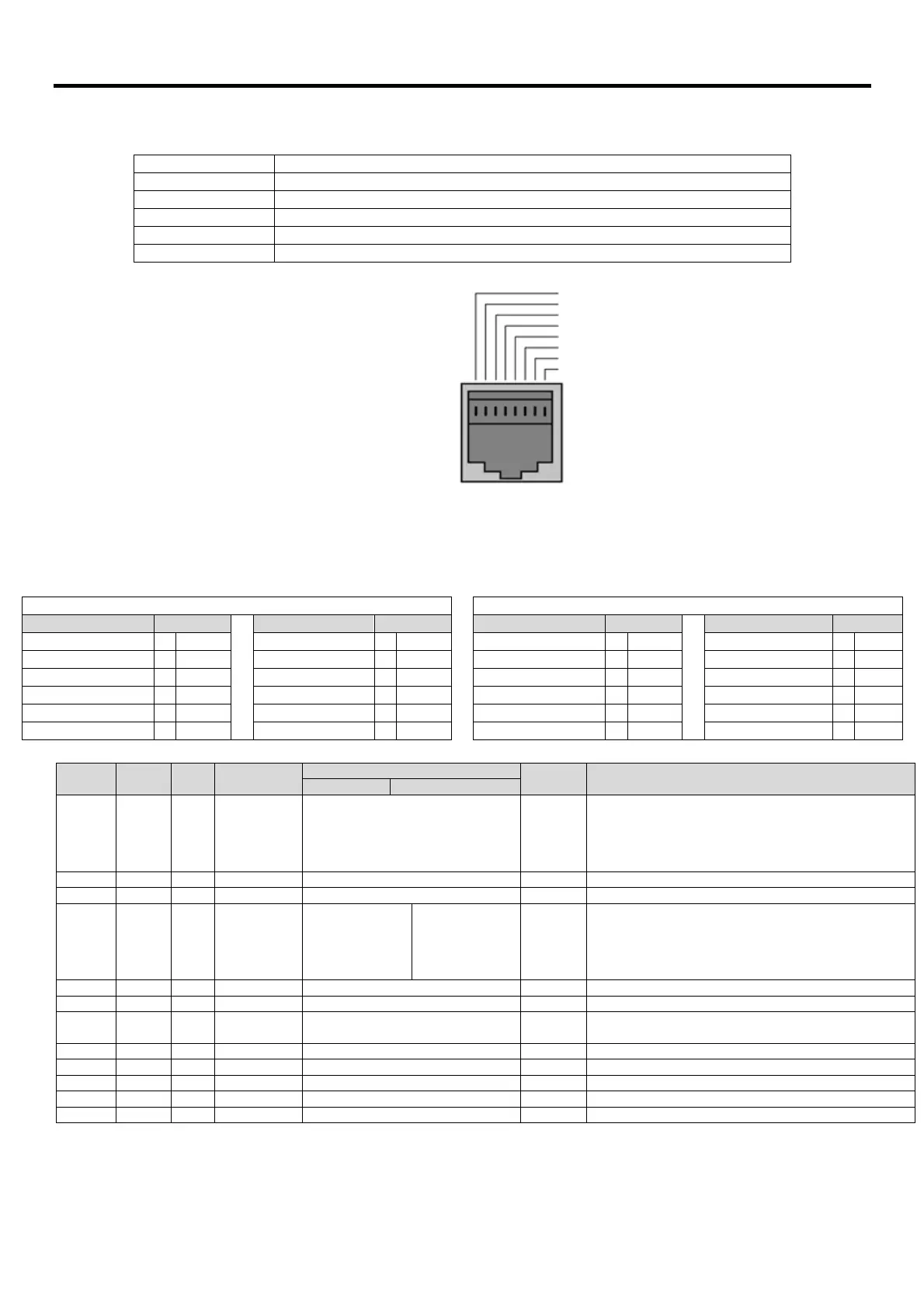
8.3. RJ45 Connector Configuration
For full MODBUS RTU register map
information please refer to Beijer Electronics.
When using MODBUS control the Analog and
Digital Inputs
can be configured as shown in section 7.5
1 CanOpen +
2 CanOpen -
3 0 Volts
4 -RS485 (PC)
5 +RS485 (PC)
6 +24 Volt
7 -RS485 (Modbus RTU)
8 +RS485 (Modbus RTU)
Warning:
This is not an Ethernet
connection. Do not connect
directly to an Ethernet port.
8.4. Modbus Telegram Structure
The drive supports Master / Slave Modbus RTU communications, using the 03 Read Holding Registers and 06 Write Single Holding Register
commands. Many Master devices treat the first Register address as Register 0, therefore it may be necessary to convert the Register Numbers
detail in section 8.5 by subtracting 1 to obtain the correct Register address. The telegram structure is as follows:-
Command 03 – Read Holding Registers Command 06 – Write Single Holding Register
Master Telegram Length Slave Response Length Master Telegram Length Slave Response Length
Slave Address 1
Byte Slave Address 1
Byte Slave Address 1
Byte Slave Address 1
Byte
Function Code (03) 1
Byte Starting Address 1
Byte Function Code (06) 1
Byte Function Code (06) 1
Byte
1
st
Register Address 2
Bytes 1
st
Register Value 2
Bytes Register Address 2
Bytes Register Address 2
Bytes
No. Of Registers 2
Bytes 2
nd
Register Value 2
Bytes Value 2
Bytes Register Value 2
Bytes
CRC Checksum 2
Bytes Etc... CRC Checksum 2
Bytes CRC Checksum 2
Bytes
CRC Checksum 2
Bytes
8.5. Modbus Register Map
Register
Number
Type
Supported
Commands
Range Explanation
Bit 0 : Low = Stop, High = Run Enable
Bit 1 : Low = Decel Ramp 1 (P-04), High = Decel Ramp 2 (P-24)
Bit 2 : Low = No Function, High = Fault Reset
Bit 3 : Low – No Function, High = Coast Stop Request
Modbus Speed reference setpoint
Setpoint frequency x10, e.g. 100 = 10.0Hz
Acceleration and Deceleration Time
Ramp time in seconds x 100, e.g. 250 = 2.5 seconds
yte = Drive Error Code, see section
High Byte = Drive Status as follows :-
0 : Drive Stopped
1: Drive Running
2: Drive Tripped
Output frequency in Hz x10, e.g. 100 = 10.0Hz
Output Motor Current in Amps x10, e.g. 10 = 1.0 Amps
Indicates the status of the 4 digital inputs
Lowest Bit = 1 Input 1
Analog input % of full scale x10, e.g. 1000 = 100%
Analog input % of full scale x10, e.g. 1000 = 100%
Displays the setpoint frequency x10, e.g. 100 = 10.0Hz
Drive heatsink temperature in ºC
All user configurable parameters are accessible as Holding Registers, and can be Read from or Written to using the appropriate Modbus
command. The Register number for each parameter P-04 to P-047 is defined as 128 + Parameter number, e.g. for parameter P-15, the register
number is 128 + 15 = 143. Internal scaling is used on some parameters, for further details, please contact Beijer Electronics.


 To Next Page