30
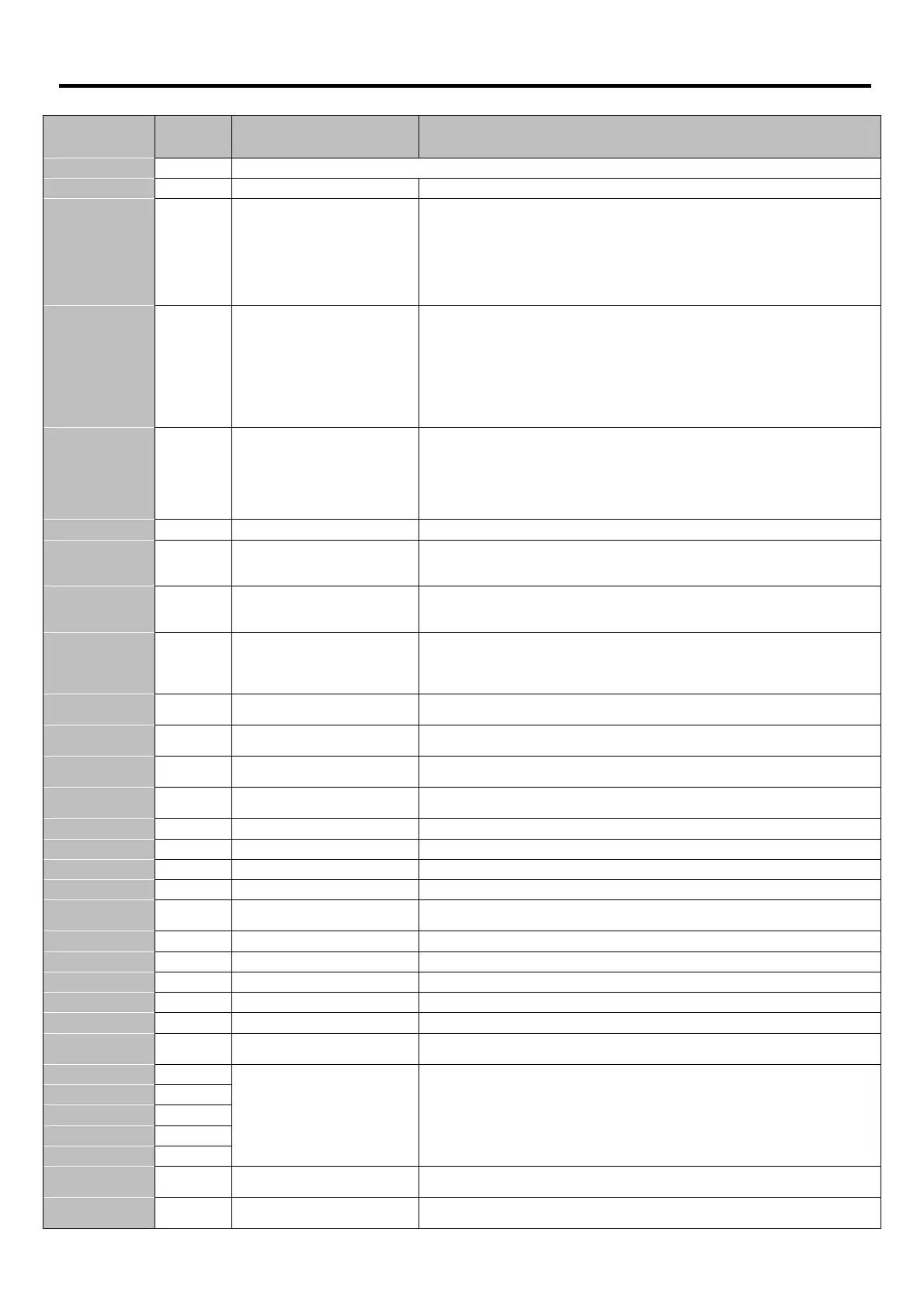
10. Trouble Shooting
10.1. Fault Code Messages
Fault Code
Number
no-
no-no-
no-Flt
FltFlt
Flt
00
Drive is healthy and in a stopped condition. The motor is not energised. No enable signal is present to start the drive
OI-b
OI-bOI-b
OI-b
01
Brake channel over current
Check external brake resistor condition and connection wiring
OL-br
OL-brOL-br
OL-br
02
The internal software protection for the brake resistor has activated to prevent damage
to the brake resistor.
If the standard option braking resistor is being used, P-34 MUST be 1
Increase the deceleration time (P-04). Reduce load inertia
For Other Brake Resistors, P-34 MUST be 2
Ensure the resistance of the brake resistor is equal to or greater than allowed minimum
value. Use an external thermal protection device for the brake resistor.
O-I
O-IO-I
O-I
03
Instantaneous Over current on the
drive output
Check the output wiring connections to the motor and the motor for short circuits
phase to phase and phase to earth.
Check the motor is free to rotate and there are no mechanical blockages. If the motor
has a brake fitted, check the brake is releasing correctly. Check for the correct star-delta
motor wiring. Ensure the motor nameplate current is correctly entered in P-08. Increase
the acceleration time in P-03. Reduce the motor boost voltage setting in P-11
Investigate overload or malfunction.
The acceleration or deceleration times are too short. Increase P-03 or P-04.
I. t-trP
I. t-trPI. t-trP
I. t-trP
04
Motor thermal overload protection
trip. The drive has tripped after
delivering >100% of value in P-08
for a period of time
Ensure the correct motor nameplate current value is entered in P
Star or Delta wiring configuration. Check to see when the decimal points are flashing
(which indicates the output current > P-08 value) and either increase acceleration ramp
(P-03) or decrease motor load. Check the total motor cable length is within the drive
specification. Check the load mechanically to ensure it is free, and that no jams,
blockages or other mechanical faults exist
PS-Trp
PS-TrpPS-Trp
PS-Trp
05
Check for short circuits on the motor and connection cable
O.Uo1t
O.Uo1tO.Uo1t
O.Uo1t
06
Check the supply voltage is within the allowed tolerance for the drive. If the fault occurs
on deceleration or stopping, increase the deceleration time in P-04 or install a suitable
brake resistor and activate the dynamic braking function with P-34
U.Uo1t
U.Uo1tU.Uo1t
U.Uo1t
07
The incoming supply voltage is too low. This trip occurs routinely when power is
removed from the drive. If it occurs during running, check the incoming power supply
voltage and all components in the power feed line to the drive.
O-t
O-tO-t
O-t
08
Heatsink over temperature
The drive is too hot. Check the ambient temperature around the drive is within the
drive specification. Ensure sufficient cooling air is free to circulate around the drive.
Increase the panel ventilation if required. Ensure sufficient cooling air can enter the
drive, and that the bottom entry and top exit vents are not blocked or obstructed.
U-t
U-tU-t
U-t
09
Trip occurs when ambient temperature is less than
10°C. Temperature must be raised
over -10°C in order to start the drive.
P-def
P-defP-def
P-def
10
Factory Default parameters have
been loaded
Press the STOP key, drive is ready to configure for particular
E-triP
E-triPE-triP
E-triP
11
(on digital Input 3)
trip requested on digital input 3. Normally closed contact has opened for some
reason. If motor thermistor is connected check if the motor is too hot.
SC-trP
SC-trPSC-trP
SC-trP
12
tion link between drive and external devices. Make sure each drive in
the network has its unique address.
FLt-dc
FLt-dcFLt-dc
FLt-dc
Check incoming supply phases are all present and balanced
P-LOSS
P-LOSSP-LOSS
P-LOSS
14
Drive intended for use wi
th a 3 phase supply has lost one input phase.
h O-I
h O-Ih O-I
h O-I
15
Check for short circuits on the motor and connection cable
th-Flt
th-Fltth-Flt
th-Flt
16
Faulty thermistor on heatsink
data-F
data-Fdata-F
data-F
17
Parameters not saved, defaults reloaded.
Try again. If problem recurs, refer to the manufacturer or Authorised Distributor.
4-20 F
4-20 F4-20 F
4-20 F
18
Analog input current out of range
Check input current in range defined by P
dAtA-E
dAtA-EdAtA-E
dAtA-E
19
Internal memory fault. (DSP)
Press the stop key. If the fault persists, con
F-Ptc
F-PtcF-Ptc
F-Ptc
21
Motor PTC thermistor trip
Connected motor thermistor over temperature, check wiring connections and motor
FAN-F
FAN-FFAN-F
FAN-F
22
Cooling Fan Fault (IP66 only)
Check / replace the cooling fan
O-hEAt
O-hEAtO-hEAt
O-hEAt
23
Drive internal temperature too high
rive ambient temperature too high, check adequate cooling air is provided
OUT-F
OUT-FOUT-F
OUT-F
Indicates a fault on the output of the drive, such as one phase missing, motor phase
currents not balanced. Check the motor and connections.
AtF-01
AtF-01AtF-01
AtF-01
40
The motor parameters measured through the autotune are not correct.
Check the motor cable and connections for continuity
Check all three phases of the motor are present and balanced
AtF-02
AtF-02AtF-02
AtF-02
41
AtF-03
AtF-03AtF-03
AtF-03
42
AtF-04
AtF-04AtF-04
AtF-04
43
AtF-05
AtF-05AtF-05
AtF-05
44
SC-FO1
SC-FO1SC-FO1
SC-FO1
50
Check the incoming Modbus RTU connection cable
Check that at least one register is
being polled cyclically within the limit set in P-36 Index 3
SC-FO2
SC-FO2SC-FO2
SC-FO2
51
Check the incoming CAN connection cable
Check that cyclic communications take place within the timeout limit set in P-36 Index 3


 To Next Page