VAV – Module NMV-D2M
N-A3.2.8 Status line
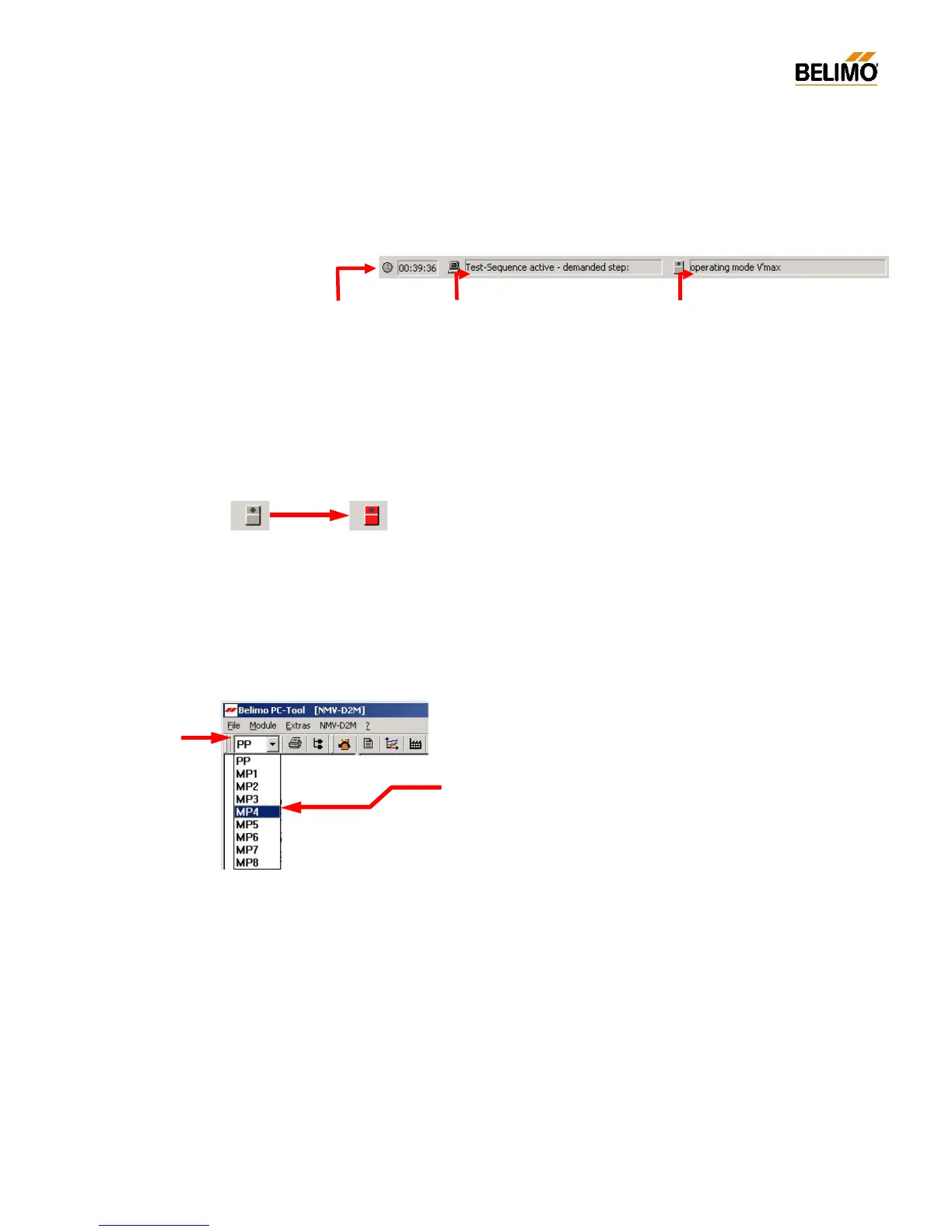
The active program and the status of the NMV-D2M are indicated on this
line.
NMV-D2M Status indicator – red symbol
If the NMV-D2M cannot be overridden by the PC-Tool it will be indicated
by a red actuator symbol. The following states are indicated:
- Adaption active (triggered locally or via the PC-Tool)
- Synchronisation active
- Local override control active, e.g. CAV ‘Close’ step
N-A3.2.9 Select required actuator (bus mode)
Open address window
Select required address, e.g. MP4
The selected active communication link is shown in the actuator identifier.
Program status
- Read data
- Write data
- Operation active
- Trend data recording active
- Test-Sequence – check system pressure
- Test-Sequence active – demanded step
NMV-D2M status
- Adaption / Synchronising active
- Motor s top
- Damper opening / closing
- V’m in / V’mid / V’max active
- operating mode V’nom
- Auto [reference input w]
- Variabl e control V’min... V’max
- Local override control active
- ...



 To Next Page