VAV – Module NMV-D2M
N-A4 Basic functions
The basic functions described below are available in all directories.
N-A4.1 Print controller date
N-A4.1.1 Print <CTRL> <P>
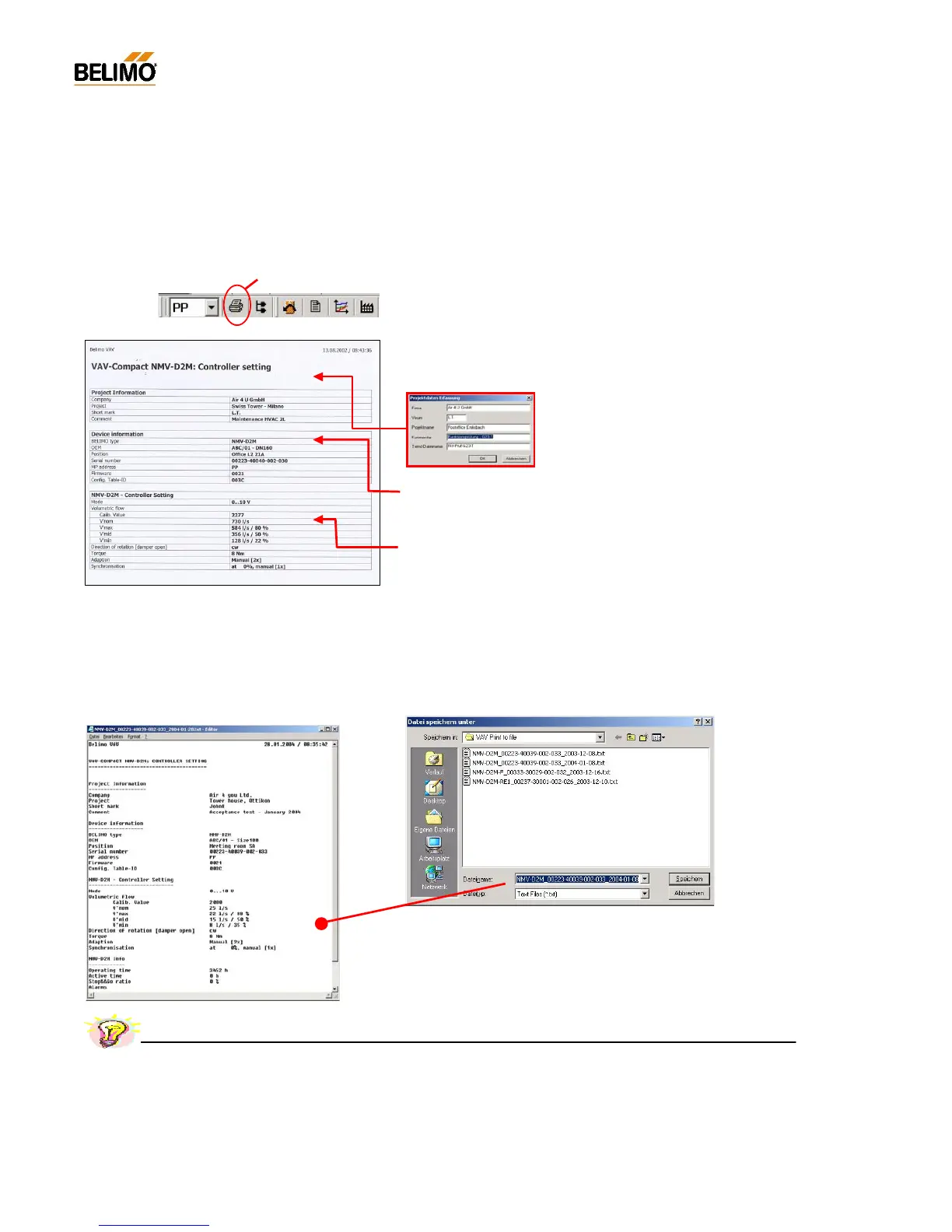
The following data and settings of the active NMV-D2M are printed:
- Project information <F4>
Project-specific information: this is not NMV-D2M data but entries from the ‘Acquire
project data’ input screen mask.
Note: The data of the this screen mask remains
valid until the relevant fields are deleted or over-
written.
- Equipment information
Type / OEM info / Position / Serial number / MP address / Version designation
- NMV-D2M controller settings
Mode / Operatin g flo w ra te setting ( calibr ation value / V’nom / V’ max, V’ mid, V’min)
/ Direction of rotation / Torque / Adaption and synchronisation
N-A4.1.2 Print to file <Shift> <CTRL> <P>
The data from the connected NMV-D2M xxx gets stored in a text file:
The created text file name defaults to :
- layout: NMV-D2M_serialnumber_date.TXT
z.B.: NMV-D2M_00223-40039-002-033_2004-01-08.txt
Name and directory might be changed by demand.
Print <CNTRL> <P>
Practical tip – Project documentation



 To Next Page