VAV – Module NMV-D2M
N-S5 Test
The ‘TEST’ function allows structured testing of the VAV- / CAV-box to be
carried out.
When the function is started it first checks the system supply pressure
and then runs to a defined typical value of volumetric flow with the help of
a preselected Test-Sequence. The Trend window is opened so that the
test results can be checked and stored.
For the purpose of carrying out reviews, the Test-Sequence recorded
from the installation can be read from the hard disk, displayed on the
screen and printed out.
N-S5.1 Test-Sequence
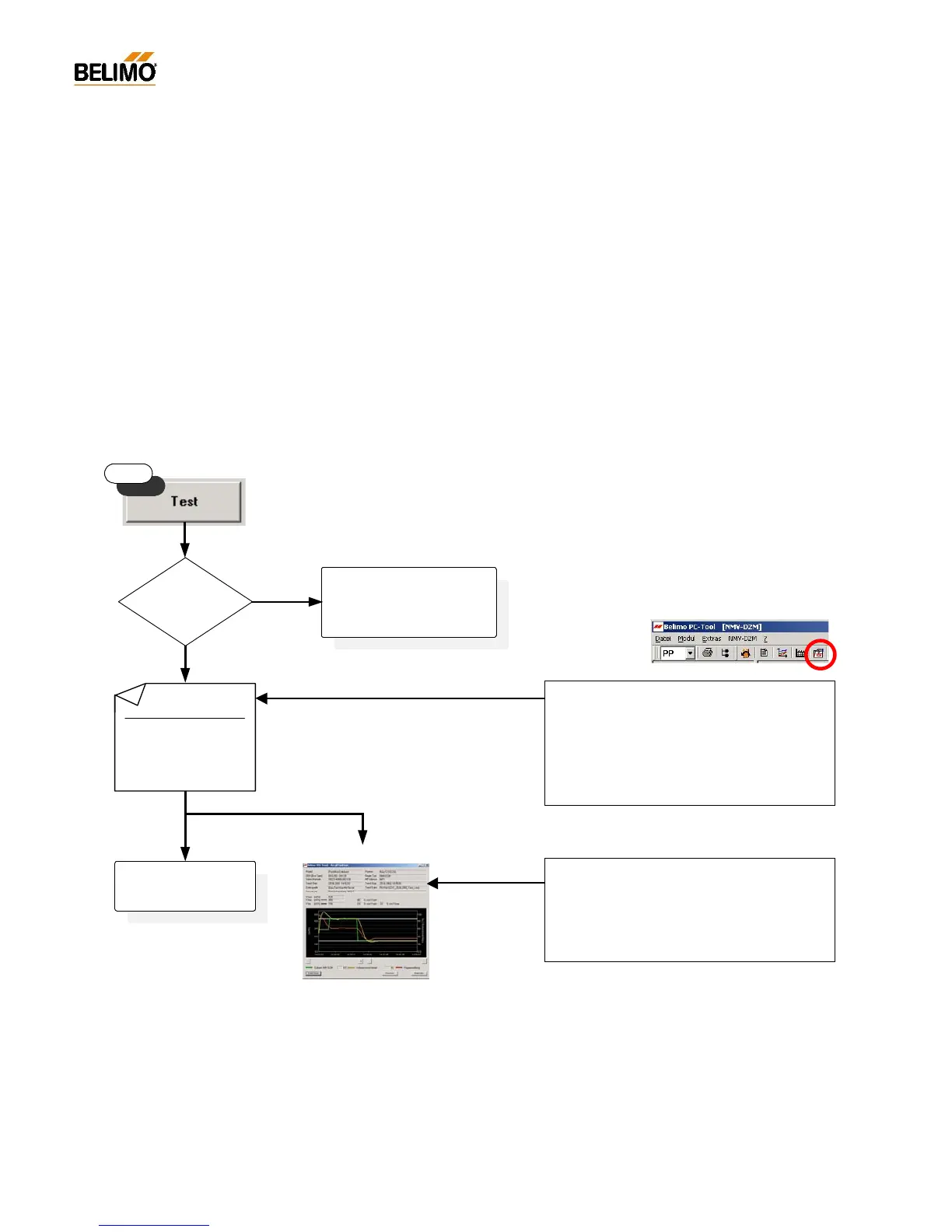
The sequence of the ‘Test’ function is as shown in the diagram below.
N-S5.1.1 Start/Stop
Start: with the ‘TEST’ button
Stop: - with the <ESC> button
- with the ‘STOP’ button
- by interrupting communication
- by local initiation of synchronising or adaption
The ‘TEST’ function cannot be started when ‘OPERATION’ or ‘LIVE
TREND’ is activated.
Test report
As with ‘Live Trend’ the ‘Test’ function gener
necessary.
Further information see: N-S4.3 ‘Trend Recall’
Test-Sequence – file selection:
The Tool is able to provide various Test-
Sequences. They can be selected from the ‘EX-
TRAS ¦ OPTIONS ¦ NMV-D2M’ menu in the ‘Test-
Sequence – file selection’ field.
See: N-S5.7 Selecting the Test-Sequences
N-S5.7.1 Available Test-Sequences
Check following points:
a) fan operation
b) position of fire dampers
c) NMV-D2M function
no
System supply
pressure ok?
Start
yes
Test terminated
Test sequence:
Step 1: V'max 120s
Step 2: V'min 120s
...
Step x: ...
Test-Sequenc e:
z.B.: BasicTest Max-Min 5m.txt
Trend file:
z.B.: Fkt-prüf_G23-T_25.06.2002_Test_k.tnd
Test report VAV Box



 To Next Page