VAV – Module NMV-D2M
N-A8 Extras ¦ Options ¦ NMV-D2M
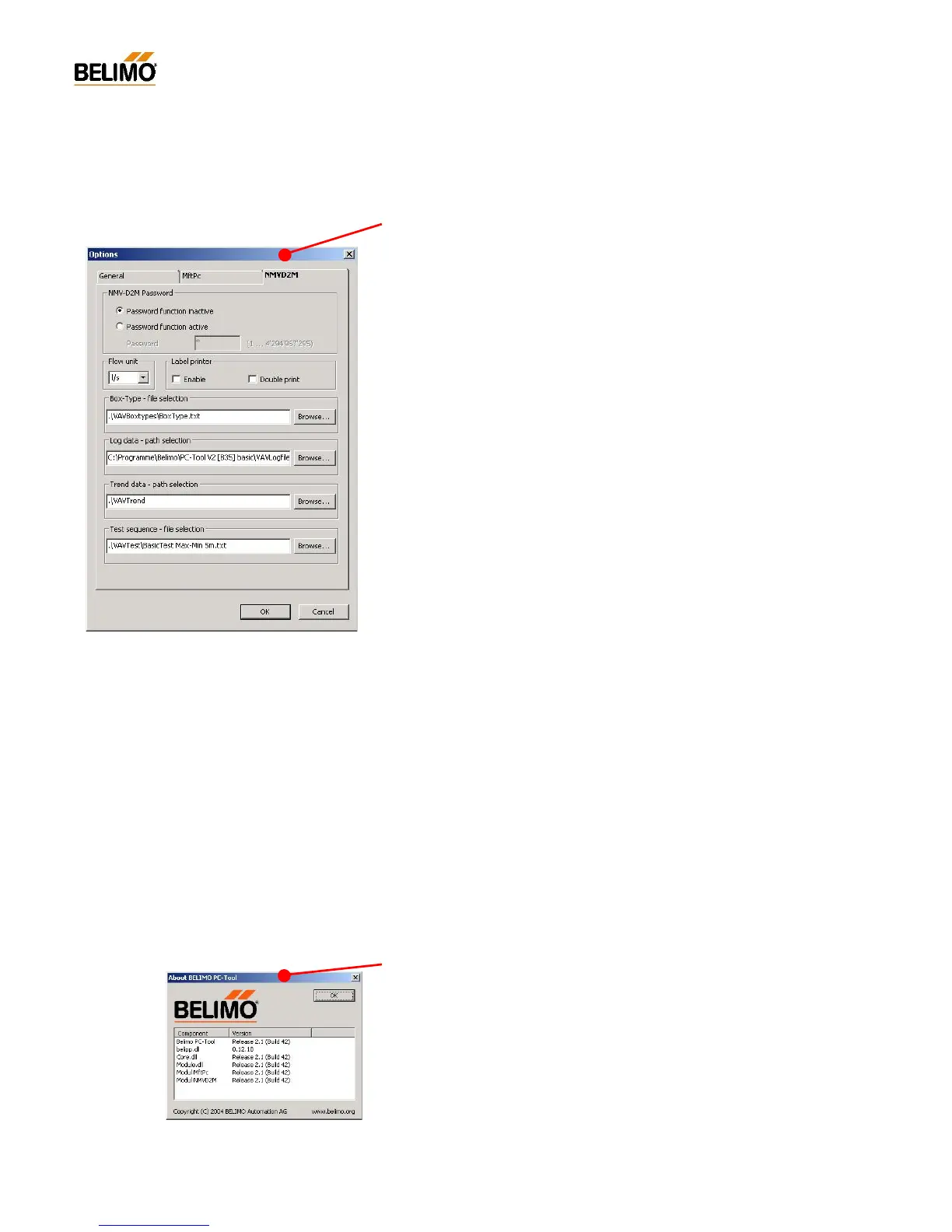
The ‘NMV-D2M’ options dialogue is used for defining specific parameters
for a VAV-Compact NMV-D2M controller.
N-A8.1 NMV-D2M password
NMV-D2M password function – only for manufacturers.
N-A8.1 Flow unit
Volumetric flow data is stored in the NMV-D2M in m
3
/h. The ‘Flow unit’
option allows the PC-Tool NMV-D2M Module display to be in m
3
/h, l/s,
cfm.
N-A8.2 Label printer
Label print option – only for manufacturers.
N-A8.3 Box-Type – File selection
Select Box-Type file – for manufacturer only.
N-A8.4 Log data - path selection
Destination directory for NMV-D2M log data. The NMV-D2M log files are
stored in the selected directory.
N-A8.5 Trend data - path selection
Destination directory for NMV-D2M ‘Trend’ and ‘Test’ data. All NMV-D2M
*.tnd files are stored in the selected directory.
N-A8.6 Test-Sequence – File selection
Defining the Test-Sequences activated in the ‘Service’ register with the
‘Test‘ function.
N-A9 Help
Specific parameters for use with VAV-Compact NMV-D2M controllers are
defined in the ‘NMV-D2M’ options dialogue.
N-A9.1 Help entries (BelimoPcToolHelp_English.pdf)
Call this user documentation in pdf format.
In order to display this file the Adobe Acrobat® Reader program must be
installed first.
The help entries cover all the PC-Tool Modules that are currently avail-
able.
N-A8.1 About Belimo PC-Tool
This option provides information on what PC-Tool components are in-
stalled and their versions.



 To Next Page