EasyManua.ls Logo

Bell System CS106 - User Manual

Default Icon
48 pages
Print Icon
To Next Page IconTo Next Page
Loading...
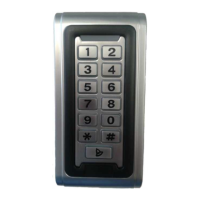
C106
Coded Access Keypad
Including:
CS106 and BL106
Door Entry & Coded Entry
PD-024 Issue 4

Questions and Answers

  • C
    Corey LamAug 12, 2025
    Why does the Bell System CS106 Keypad lock operate from the test button but not when the code is entered?
    • A
      Ashley ManningAug 12, 2025
      If the Bell System Keypad lock operates from the test button but not when the code is entered, first check that the Keypad is correctly programmed. If it is not, restore it to the Factory Settings. Additionally, verify that the Time Clock is in the correct state; if not, reprogram the action code or manually switch the time clock.
  • B
    Blake FrancoAug 16, 2025
    What to do if the Bell System CS106 lock release does not operate when the Exit Button is pressed?
    • G
      Gene FloresAug 16, 2025
      If the lock release on your Bell System Keypad fails to operate when the Exit Button is pressed, test by applying a short-circuit directly to the ‘EXIT’ terminals. Also, check the connections to the Exit button.
  • L
    Lisa CantuAug 20, 2025
    What causes the Bell System Keypad lock release to be permanently active?
    • L
      Lisa ReedAug 20, 2025
      If the Bell System Keypad lock release is permanently active, temporarily remove the connections to the ‘EXIT’ and re-test the unit. Also, check that any exit button connected to the EXIT terminals is ‘push to make’ and not the opposite.
  • E
    evanwilsonAug 25, 2025
    What does it mean when the red and green LEDs flash together on a Bell System Keypad?
    • M
      Mary FullerAug 25, 2025
      If the red and green LEDs flash together when attempting to operate the lock-release on your Bell System Keypad, it indicates that the fail-secure lock release output is short-circuited or of an incorrect rating. To resolve this, temporarily disconnect the lock release and retry to see if the green LED turns on for 3 seconds. You may also need to test the lock release.
  • D
    Dana BlanchardAug 28, 2025
    Why can’t I change settings on my Bell System CS106 when the green LED is on?
    • M
      Mr. Jeremiah HamiltonAug 28, 2025
      If you can’t change any of the settings on your Bell System Keypad and the green LED is on, it could be due to short-circuited ‘EXIT’ terminals. To fix this, temporarily remove the connections to ‘EXIT’ and re-test the unit. Also, check that any exit button connected to the EXIT terminals is ‘push to make’ and not the opposite.
  • T
    Tracy BowersAug 31, 2025
    What to do if the Bell System Keypad lock release fails to operate when the Test button is pressed?
    • W
      warejohnAug 31, 2025
      If the Bell System Keypad lock release fails to operate when the Test button is pressed, check the lock release and its wiring by moving the lock connections to + C, -H, (forcing the lock). Also, measure the voltage on the FAIL SECR terminals; this should be the same as the power supply (13.8V) while the test button is pressed.
  • C
    Chelsey DaughertySep 4, 2025
    How to fix a Bell System Keypad when the lock release operates in reverse?
    • J
      John ConleySep 4, 2025
      If the Bell System Keypad lock release operates in reverse, transpose the connections between the fail-safe and fail-secure outputs.
  • B
    Bradley RiveraSep 8, 2025
    What to do if nothing happens when power is applied to the Bell System CS106 Keypad (LEDs do not flash)?
    • G
      Gregory McdowellSep 8, 2025
      If nothing happens when power is applied to the Bell System Keypad (LEDs do not flash), it could be due to several reasons. First, the power supply might be overloaded, so remove externally connected components until the fault disappears. Second, the polarity might not be correct, so measure the voltage at the C106 (+, -). Finally, check the power supply fuses and replace them with fuses of the correct type and rating if necessary.

Summary

C106 Keypad - General Description and Features

System Overview and Basic Operation

Explains the C106 Keypad's role, LED indicators, and fundamental access code usage.

Key Features and Advanced Functions

Details multiple codes, time-restricted access, exit facility, lock delay, and non-volatile memory.

C106 Keypad - Installation Guide

Wiring, Cables, and Power Supply Safety

Covers keypad wiring, cable specifications, power supply safety, and lock release connections.

Lock Release Types and High Current Loads

Details direct connection for fail-safe/fail-secure locks and considerations for high current releases.

C106 Keypad - Programming Functions

Managing Access Codes and Security Key

Step-by-step procedures for programming new access codes and changing the security key.

Configuring System Settings and Functions

Instructions for programming action codes, lock duration, lock delay, and factory settings.

C106 Keypad - Commissioning and Testing

Testing Lock Release Output Operation

Procedure to verify the lock release mechanism functions correctly after installation.

Validating Controller Functionality

Steps to test the keypad controller's behavior with programmed access codes and settings.

C106 Keypad - Troubleshooting

C106 Keypad - Technical Specifications

CS106;BL106 Series Integration

CS106 and BL106 System Components

Lists and describes the integrated components for CS106 and BL106 complete door entry systems.

Door Entry Phone System Installation Procedures

Covers installation, speech adjustment, and cable planning for the door entry phone system.

Wiring Diagrams

1-Way Combined System Wiring

Provides the wiring diagram for a single-way combined CS106/BL106 door entry and coded access system.

Multi-way Combined System Wiring

Illustrates the wiring for multi-way CS106-N/BL106-N combined door entry and coded access systems.

2 Door System Wiring Diagram

Presents the wiring configuration for a two-door system utilizing the C106 keypad controller.

Bell System CS106 Specifications

General IconGeneral
TypeKeypad
ManufacturerBell System
ModelCS106
CategoryKeypad
Number of Keys12
MaterialPlastic
CompatibilityTelephone systems